
Sanus CAPC01-B1
Sanus CAPC01-B1 Rack Mounted Power Conditioner User Manual
Model: CAPC01-B1
Wstęp
This manual provides essential information for the proper installation, operation, and maintenance of your Sanus CAPC01-B1 Rack Mounted Power Conditioner. Please read these instructions thoroughly before use to ensure optimal performance and safety.
The Sanus CAPC01-B1 is designed to protect your rack equipment and provide clean power. It features adjustable, dual pull-out LED lights for illuminating rack equipment, 11 protected outlets, and EMI/RFI noise filtration.
Ważne informacje dotyczące bezpieczeństwa
- Przeczytaj wszystkie instrukcje: Before operating the unit, read and understand all safety and operating instructions.
- Zachowaj instrukcje: Zachowaj tę instrukcję do wykorzystania w przyszłości.
- Przestrzegaj ostrzeżeń: Należy przestrzegać wszystkich ostrzeżeń znajdujących się na produkcie i w instrukcji obsługi.
- Unplug during storms: Odłącz urządzenie od zasilania podczas burzy z piorunami lub gdy nie jest używane przez dłuższy czas.
- Unikaj płynów: Do not expose the unit to dripping or splashing liquids. Do not place objects filled with liquids on the unit.
- Prawidłowa wentylacja: Zapewnij odpowiednią wentylację. Nie blokuj otworów wentylacyjnych.
- Źródło zasilania: Connect only to a grounded AC power outlet with the specified voltage.
- Serwisowanie: Nie próbuj samodzielnie naprawiać tego produktu. Wszelkie czynności serwisowe należy powierzyć wykwalifikowanemu personelowi serwisowemu.
Produkt ponadview
The Sanus CAPC01-B1 is a rack-mounted power conditioner designed to provide clean, protected power to your audio/video equipment. Key features include:
- Adjustable, dual pull-out LED lights for illuminating rack equipment.
- 11 fast-acting 2,400-joule protected outlets.
- Multi-Mode LED panel indicating voltage, amperage, and power consumption.
- EMI/RFI noise filtration, reducing noise up to 30 dB for superior signal quality.
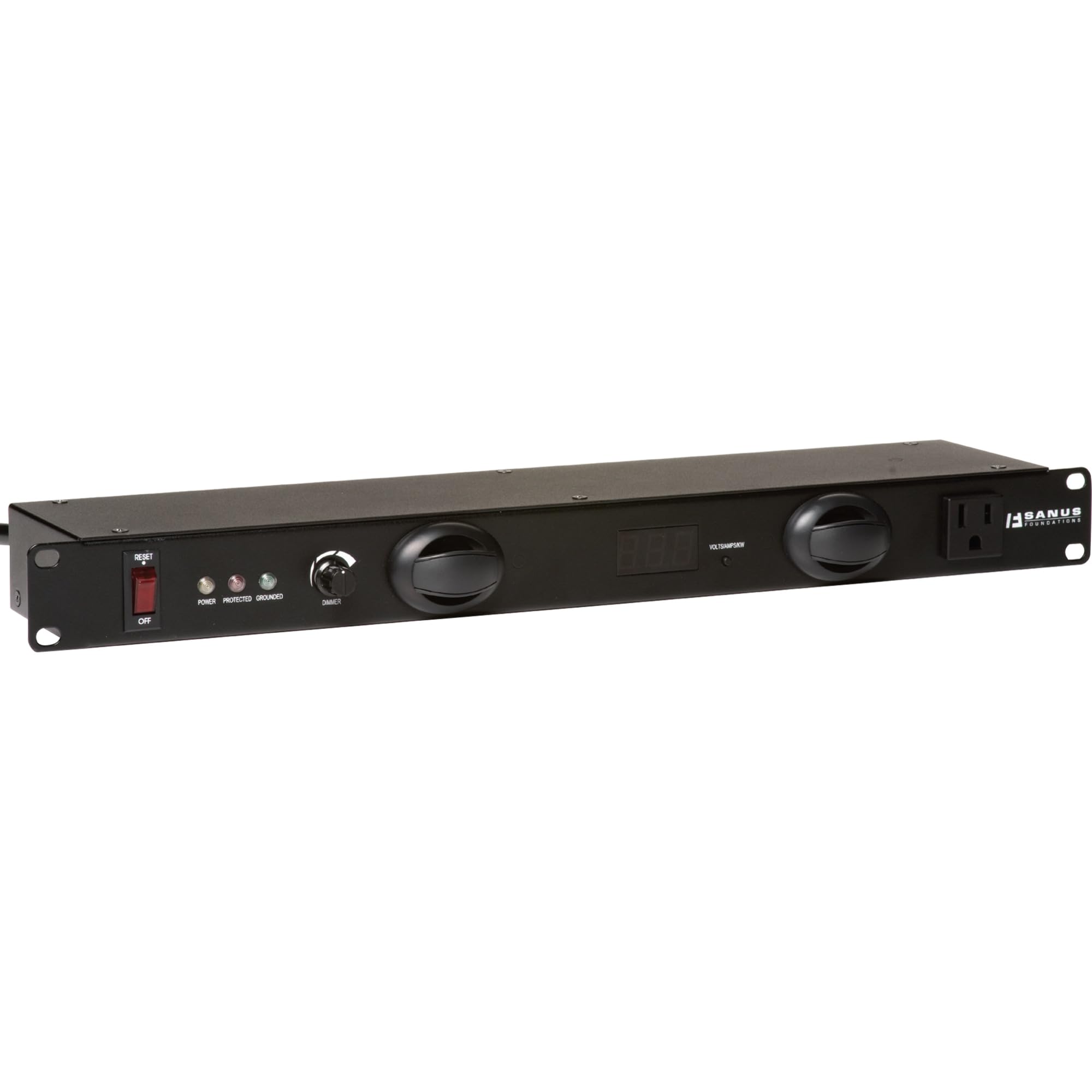
Rycina 1: Przód view of the Sanus CAPC01-B1 Rack Mounted Power Conditioner, showing the LED lights and display.
Konfiguracja i instalacja
Zawartość opakowania
Sprawdź, czy wszystkie komponenty są obecne:
- Sanus CAPC01-B1 Power Conditioner
- Sprzęt do montażu w stojaku
- Instrukcja obsługi (ten dokument)
Instrukcje montażu
- Ensure the rack is stable and properly grounded.
- Align the mounting ears of the CAPC01-B1 with the rack rails.
- Secure the unit to the rack using the provided rack mounting hardware. Ensure all screws are tightened securely.
- Allow adequate space for ventilation around the unit.
Podłączanie sprzętu
- With the power conditioner turned OFF, plug your audio/video equipment into the protected outlets on the rear of the CAPC01-B1.
- Ensure all equipment is properly seated in the outlets.
- Plug the power conditioner's main power cord into a grounded AC wall outlet.
Instrukcja obsługi
Włączanie/wyłączanie
- To power on the unit, press the main power switch located on the front panel. The LED display will illuminate.
- Aby wyłączyć urządzenie, naciśnij ponownie główny wyłącznik zasilania.
Korzystanie ze świateł LED
- The CAPC01-B1 features dual pull-out LED lights. Gently pull out the lights from the front panel.
- Rotate the lights to adjust their direction.
- Use the dimmer knob on the front panel to adjust the brightness of the LED lights.
- Push the lights back into the unit when not in use.
Monitoring with the Multi-Mode LED Panel
The front panel LED display provides real-time information:
- Tomtage: Wyświetla przychodzącą objętość prądu przemiennegotage.
- Ampwymazać: Shows the total current draw of connected equipment.
- Pobór mocy: Indicates the total power being consumed.
Regularly monitor these readings to ensure your equipment is operating within safe parameters.
Konserwacja
Czyszczenie
- Zawsze odłączaj urządzenie od gniazdka elektrycznego przed czyszczeniem.
- Do wycierania powierzchni zewnętrznych należy używać miękkiej, suchej ściereczki.
- Do not use liquid cleaners, aerosol cleaners, or strong chemicals, as they may damage the finish or internal components.
Wentylacja
- Ensure that the ventilation openings on the unit are not blocked by dust or other obstructions.
- Periodically check for dust buildup and gently clean if necessary.
Rozwiązywanie problemów
| Problem | Możliwa przyczyna | Rozwiązanie |
|---|---|---|
| Urządzenie nie włącza się. | No power from wall outlet; main power switch off; internal fuse tripped. | Check wall outlet with another device. Ensure main power switch is ON. If unit has a resettable breaker, press it. If not, contact support. |
| Podłączone urządzenia nie otrzymują zasilania. | Equipment not plugged in correctly; power conditioner not on; surge protection tripped. | Verify equipment is securely plugged into outlets. Ensure power conditioner is ON. Check for a surge protection reset button (if applicable) or power cycle the unit. |
| Oświetlenie LED nie działa. | Lights not pulled out; dimmer knob set to minimum; internal issue. | Gently pull out the LED lights. Adjust the dimmer knob. If still not working, contact support. |
| Display shows unusual readings. | Overload; faulty sensor. | Reduce the load by unplugging some equipment. If readings persist, contact support. |
Specyfikacje
- Model: CAPC01-B1
- Punkty sprzedaży: 11 protected outlets
- Ochrona przeciwprzepięciowa: 2,400 dżuli
- Noise Filtration: EMI/RFI up to 30 dB
- Wymiary: 20.5 x 8 x 2.6 cala (52.07 x 20.32 x 6.6 cm)
- Waga: 6.55 funtów (2.97 kg)
- Producent: Produkty Tjernlund – Audio
- Data pierwszej dostępności: 31 marca 2011 r.
Gwarancja i wsparcie
For warranty information and technical support, please refer to the documentation provided with your purchase or visit the official Sanus webNie próbuj samodzielnie naprawiać urządzenia, ponieważ może to spowodować unieważnienie gwarancji.
Informacje kontaktowe: Please visit the Sanus official webstrona zawierająca najnowsze dane kontaktowe działu pomocy technicznej.
Ask a question about this manual
Ask about setup, troubleshooting, compatibility, parts, safety, or missing instructions. Manuals+ will review the question and use this page’s manual context to help answer it.