
1. Wprowadzenie
This manual provides essential instructions for the safe and efficient installation, operation, and maintenance of your Rocketfish RF-500WPS2 500-Watt ATX CPU Power Supply. This power supply is designed to deliver stable and reliable power to your computer components, supporting most ATX 12V V2.3 motherboards, 2-way SLI, and multi-GPU VGA graphics cards. It features intelligent fan technology for quiet operation and active power factor correction for optimal efficiency.
2. Informacje dotyczące bezpieczeństwa
Please read and understand all safety instructions before installing or operating this product. Failure to follow these instructions may result in electric shock, fire, or damage to the product or other components.
- Zagrożenie elektryczne: Nie otwierać zasilacza. Wysokie napięcietagWewnątrz znajdują się usterki, nawet gdy urządzenie jest odłączone od zasilania. Wewnątrz nie ma żadnych części, które mogłyby zostać naprawione przez użytkownika.
- Prawidłowe uziemienie: Always ensure the power supply is properly grounded. Use only the power cord provided with the unit.
- Wentylacja: Ensure adequate airflow around the power supply. Do not block ventilation openings. Overheating can cause damage or fire.
- Wilgoć: Nie wystawiaj zasilacza na działanie wody i nadmiernej wilgoci.
- Elektryczność statyczna: Always discharge static electricity from your body before handling internal computer components. Use an anti-static wrist strap if available.
- Wyłączone: Always disconnect the power cord from the wall outlet before installing, removing, or servicing the power supply or any other computer components.
3. Konfiguracja i instalacja
Follow these steps to install your Rocketfish RF-500WPS2 power supply into your computer system.
3.1 Zawartość opakowania
Sprawdź, czy w przesyłce znajdują się następujące elementy:
- Rocketfish RF-500WPS2 500-Watt ATX CPU Power Supply
- Modular cables (various types for motherboard, CPU, PCIe, SATA, etc.)
- Przewód zasilający AC
- Śruby montażowe
3.2 Fizyczna instalacja
- Przygotuj swój system: Wyłącz komputer i odłącz przewód zasilający od gniazdka ściennego. Otwórz obudowę komputera.
- Wyjmij stary zasilacz (jeśli dotyczy): Disconnect all cables from your old power supply to the motherboard and other components. Unscrew and remove the old power supply from the case.
- Zainstaluj nowy zasilacz: Carefully slide the Rocketfish RF-500WPS2 into the power supply bay of your computer case. Ensure the fan is oriented correctly for optimal airflow (typically facing downwards or towards the inside of the case, depending on case design). Secure the power supply with the provided mounting screws.
- Podłącz kable modułowe: This power supply features a modular design. Connect only the necessary cables to the power supply unit first, then route them to your components. This helps reduce cable clutter and improve airflow.
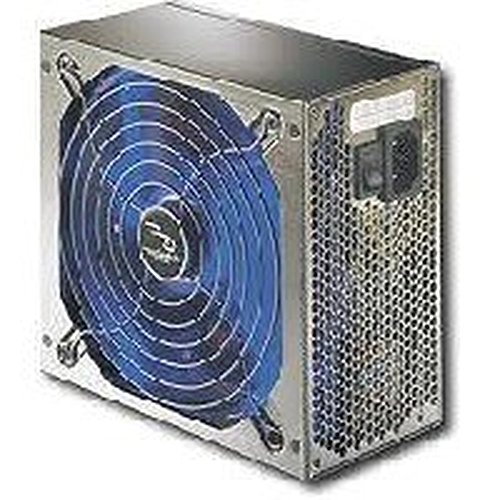
Obraz 1: The Rocketfish RF-500WPS2 500-Watt ATX CPU Power Supply. This image shows the power supply unit, highlighting its compact design and the modular cable ports on one side, allowing for flexible cable management.
3.3 połączeń kablowych
Connect the appropriate cables to your computer components:
- 24-pinowe złącze ATX płyty głównej: Connect this main power connector to your motherboard.
- 4-pin or 8-pin CPU (EPS) Connector: Connect to the CPU power socket on your motherboard. Modern motherboards typically use an 8-pin connector.
- 6-pin or 8-pin PCI Express (PCIe) Connectors: Connect these to your graphics cards. This unit supports 2-way SLI and multi-GPU configurations.
- Złącza zasilania SATA: Connect to SATA hard drives, SSDs, and optical drives.
- 4-pin Peripheral (Molex) Connectors: Connect to older drives or case fans.
- 4-pin Floppy Connector: If required by legacy devices.
Ensure all connections are secure and properly seated. Close your computer case and reconnect the AC power cord to the wall outlet.
4. Działanie
Once installed, the Rocketfish RF-500WPS2 power supply operates automatically to provide power to your system. Turn on your computer as usual.
- Cicha praca: The intelligent fan technology minimizes operational noise, providing a quieter computing environment. The 5.5-inch fan with blue LED light (if present) helps prevent components from overheating.
- Efektywność: Active Power Factor Correction (PFC) ensures optimal operation and energy efficiency.
- Obwody ochronne: Built-in protection circuits and line input fuse protection enhance reliability and safeguard your components.
5. Konserwacja
The Rocketfish RF-500WPS2 power supply is designed for reliable, long-term operation with minimal maintenance. However, periodic checks can help ensure its longevity and performance.
- Usuwanie kurzu: Over time, dust can accumulate inside the power supply and on its fan, potentially reducing cooling efficiency. Periodically, with the computer powered off and unplugged, use compressed air to gently clear dust from the fan and ventilation grilles. Do not open the power supply casing.
- Kontrola kabla: Ensure all modular cables remain securely connected to both the power supply and your components. Loose connections can lead to instability.
- Warunki środowiskowe: Operate the power supply in a well-ventilated area, away from direct heat sources and excessive moisture.
6. Rozwiązywanie Problemów
Jeśli masz problemy z zasilaniem, zapoznaj się z poniższymi typowymi procedurami rozwiązywania problemów:
- Brak zasilania systemu:
- Ensure the AC power cord is securely plugged into both the power supply and a working wall outlet.
- Check that the power switch on the back of the power supply is in the "ON" (I) position.
- Verify all internal power cables (24-pin ATX, CPU, PCIe, SATA) are firmly connected to the motherboard and components.
- Sprawdź, czy gniazdko ścienne ma zasilanie, podłączając do niego inne urządzenie.
- Niestabilność systemu lub losowe wyłączanie się:
- This could indicate insufficient power or a faulty component. Ensure your system's power requirements do not exceed the 500W capacity of the power supply.
- Check for overheating. Ensure the power supply fan is spinning and not obstructed.
- Sprawdź, czy wszystkie połączenia są bezpieczne.
- Nadmierny hałas wentylatora:
- While the intelligent fan is designed for quiet operation, excessive noise might indicate dust buildup. Refer to the Maintenance section for cleaning instructions.
- Upewnij się, że żadne kable nie blokują łopatek wentylatora.
If problems persist after following these steps, contact Rocketfish customer support or a qualified technician.
7. Specyfikacje
| Funkcja | Szczegół |
|---|---|
| Numer modelu | RF-500WPS2 |
| Marka | Rukola |
| Moc wyjściowatage | 500 watów |
| Współczynnik kształtu | ATX |
| Kompatybilne urządzenia | Komputer osobisty |
| Typ złącza | ATX (24-pin), CPU (4/8-pin), PCIe (6/8-pin), SATA, Molex (4-pin), Floppy (4-pin) |
| Metoda chłodzenia | Air (1 x 5.5-inch fan) |
| Cechy specjalne | Modular cables, Intelligent fan technology, Active Power Factor Correction (PFC), Built-in protection circuit, Line input fuse protection |
| Wymiary (dł. x szer. x wys.) | Około 11.2 x 9.9 x 4.3 cala (wymiary opakowania) |
| Waga przedmiotu | 5.75 funta |
8. Gwarancja i wsparcie
8.1 Ograniczona gwarancja
Rocketfish products typically come with a limited warranty. For specific warranty terms and conditions, including duration and coverage, please refer to the warranty card included with your product or visit the official Rocketfish webZachowaj paragon jako dowód zakupu na wypadek reklamacji.
8.2 Obsługa klienta
If you require technical assistance, have questions about your product, or need to initiate a warranty claim, please contact Rocketfish customer support. Contact information can usually be found on the Rocketfish webmiejscu lub w opakowaniu produktu.
Wsparcie online: Visit the official Rocketfish website for FAQs, support resources, and contact details.