
Wstęp
Thank you for choosing the Casio G-Shock GW-M5600A-7ER. This watch combines robust G-Shock durability with advanced radio-controlled timekeeping and solar power technology. This manual provides essential information for proper setup, operation, and maintenance of your watch. Please read it carefully to ensure optimal performance and longevity.
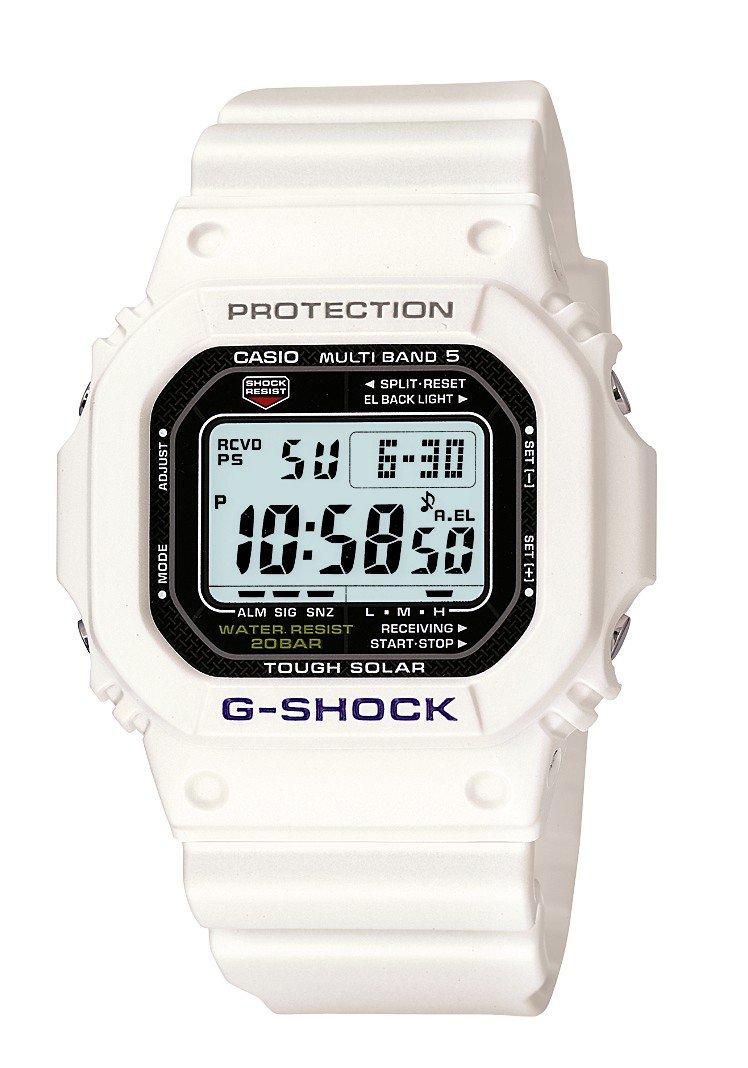
Obraz: Przód view of the Casio G-Shock GW-M5600A-7ER watch, showcasing its digital display and resin strap.
Główne cechy
- Radio-Controlled Timekeeping: Automatically receives time calibration signals for accurate timekeeping.
- Zasilane energią słoneczną: Equipped with a solar panel that converts light into electrical power, eliminating the need for battery replacement.
- Wodoodporność do 200 metrów: Nadaje się do pływania, nurkowania z rurką i nurkowania (z wyjątkiem nurkowania saturacyjnego).
- Odporność na wstrząsy: Zaprojektowane tak, aby wytrzymać uderzenia i wibracje.
- Wyświetlacz cyfrowy: Clear and easy-to-read digital time and function display.
- Funkcja stopera: Pomiar czasu upłyniętego, czasu międzyczasu oraz czasów 1. i 2. miejsca.
- Funkcja alarmu: Wiele codziennych alarmów iurlsygnał czasu y.
- Czas światowy: Wyświetla aktualny czas w największych miastach i wybranych obszarach na całym świecie.
- Szkło mineralne: Protective, scratch-resistant hard mineral lens.
- Trwała konstrukcja z żywicy: High-performance and durable resin case and strap.
Organizować coś
1. Ładowanie początkowe
Your watch is powered by a solar cell. Before initial use, expose the watch face to bright light for several hours to ensure it is sufficiently charged. The watch may arrive with a low charge, indicated by a flashing 'CHG' or 'LOW' indicator on the display. Avoid prolonged storage in dark places.
2. Ustawienie miasta rodzinnego
The Home City setting is crucial for correct time calibration and World Time functionality. Refer to the detailed instructions in the full manual for specific button operations to set your Home City. This setting determines which time calibration signal the watch attempts to receive.
3. Time Calibration Signal Reception
The watch automatically attempts to receive a time calibration signal up to six times a day (or five times a day for the Chinese calibration signal). For optimal reception, place the watch near a window at night, away from metal objects and electronic devices. Manual reception can also be initiated:
- In Timekeeping Mode, hold down the 'A' button (top left) for several seconds until the current time calibration status appears.
- Press the 'D' button (bottom right) to initiate manual reception.
- The watch will display 'RCVD' upon successful reception.
Instrukcja obsługi
Nawigacja w trybie
Press the 'C' button (bottom left) to cycle through the different modes:
- Tryb pomiaru czasu: Wyświetla aktualną godzinę i datę.
- Tryb czasu światowego: Wyświetla aktualny czas w różnych strefach czasowych.
- Tryb alarmu: Ustawiaj i aktywuj codzienne alarmy.
- Tryb stopera: Zmierz czas, który upłynął.
- Tryb licznika odliczania: Set a countdown from a specified time.
Korzystanie ze stopera
- Navigate to Stopwatch Mode using the 'C' button.
- Press the 'D' button (bottom right) to start/stop the stopwatch.
- Press the 'B' button (top right) to record split times or reset the stopwatch when stopped.
Ustawianie alarmów
- Navigate to Alarm Mode using the 'C' button.
- Hold down the 'A' button (top left) until the alarm time starts flashing.
- Use the 'B' and 'D' buttons to adjust the hour and minute settings.
- Press 'A' to confirm and exit the setting screen.
- Press 'D' to toggle the alarm ON/OFF.
Oświetlenie
Press the 'B' button (top right) to illuminate the display for easy viewing in low light conditions. The duration of illumination can be adjusted in the watch settings.
Konserwacja
Ładowanie zegarka
To maintain optimal performance, ensure your watch is regularly exposed to light. The power indicator on the display shows the current charge level. If the charge level is low, expose the watch to direct sunlight or strong artificial light. Avoid covering the watch face when charging.
Czyszczenie
Przetrzyj zegarek miękką, suchą ściereczką, aby usunąć brud i wilgoć. W przypadku uporczywych zabrudzeń użyj miękkiej ściereczki.ampSpłukać wodą z łagodnym, neutralnym detergentem, a następnie wytrzeć do sucha. Unikać stosowania substancji lotnych, takich jak rozcieńczalnik czy benzyna, ponieważ mogą one uszkodzić składniki żywicy.
Środki ostrożności dotyczące wodoodporności
While your watch is water-resistant to 200 meters, it is important to observe the following:
- Nie naciskaj przycisków, gdy zegarek jest mokry lub zanurzony.
- Avoid exposing the watch to hot water or steam (e.g., in showers, saunas) as this can compromise seals.
- After exposure to saltwater, rinse the watch thoroughly with fresh water and wipe dry.
Rozwiązywanie problemów
Time Not Syncing
- Sprawdź ustawienia miasta domowego: Ensure your Home City is correctly set to a region that receives time calibration signals.
- Reception Environment: Move the watch to a location with better signal reception, ideally near a window, away from electronic interference.
- Odbiór ręczny: Attempt a manual time calibration signal reception (refer to Setup section).
- Poziom naładowania: Ensure the watch has sufficient charge. Low power can affect signal reception.
Wyświetlacz jest pusty lub przyciemniony
- Poziom naładowania: The watch may be in power-saving mode or have a very low charge. Expose it to bright light for an extended period.
- Oszczędzanie energii: The watch enters power-saving mode when left in the dark for a certain period. Press any button or expose it to light to reactivate the display.
Przyciski nie odpowiadają
- Reset: In rare cases, a full reset might be necessary. Consult the full Casio manual for your specific module number (usually found on the watch's case back) for detailed reset procedures.
- Woda: Ensure the watch is completely dry if it has been exposed to water.
Specyfikacje
| Numer modelu | GW-M5600A-7ER |
| Producent | G-SHOCK |
| Typ wyświetlacza | Cyfrowy |
| Ruch | Kwarc |
| Źródło zasilania | Zasilany energią słoneczną |
| Głębokość wodoodporności | 200 metrów |
| Rodzaj materiału obudowy | Żywica |
| Rodzaj materiału paska | Żywica |
| Typ materiału okna tarczy | Minerał |
| Średnica koperty | 49 mm |
| Grubość obudowy | 17 mm |
| Przepustowość łącza | 25 mm |
| Rodzaj zapięcia | Klamra z języczkiem |
| Kształt przedmiotu | Kwadrat |
| Kolor paska | Biały |
| Kolor tarczy | Szary |
Gwarancja i wsparcie
Your Casio G-Shock GW-M5600A-7ER watch comes with a 2-letnia gwarancja producentaNiniejsza gwarancja obejmuje wady materiałowe i wykonawcze powstałe w wyniku normalnego użytkowania. Prosimy zachować dowód zakupu na potrzeby roszczeń gwarancyjnych.
For detailed warranty terms, service, or technical support, please refer to the official Casio website or contact your local authorized Casio service center. Contact information can typically be found in the full product manual or on the manufacturer's webstrona.