
1. Wprowadzenie
This manual provides essential information for the safe and efficient use of your Toshiba BDX1100 Blu-ray Disc Player. Please read this manual thoroughly before operating the device and retain it for future reference. The Toshiba BDX1100 offers high-definition video and audio playback, enhancing your home entertainment experience.
2. Informacje dotyczące bezpieczeństwa
Aby zmniejszyć ryzyko pożaru, porażenia prądem elektrycznym i obrażeń, należy zawsze przestrzegać podstawowych zasad bezpieczeństwa podczas korzystania z tego produktu.
- Bezpieczeństwo elektryczne: Do not expose the unit to rain or moisture. Do not open the casing; refer all servicing to qualified personnel. Ensure the power cord is securely plugged into a grounded outlet.
- Wentylacja: Nie zasłaniaj otworów wentylacyjnych. Zachowaj odpowiednią ilość miejsca wokół urządzenia, aby zapewnić prawidłowy przepływ powietrza i zapobiec przegrzaniu.
- Umieszczenie: Place the unit on a stable, level surface. Avoid placing it near heat sources, direct sunlight, or areas with excessive dust or vibration.
- Obsługa dysków: Handle discs by their edges. Keep discs clean and free from scratches to ensure optimal playback.
3. Zawartość opakowania
Sprawdź, czy w opakowaniu znajdują się wszystkie elementy:
- Toshiba BDX1100 Blu-ray Disc Player
- Zdalne sterowanie
- Przewód zasilający
- Instrukcja obsługi (ten dokument)
Note: HDMI cables and other connection cables are typically sold separately.
4. Koniec produktuview
4.1 Panel przedni
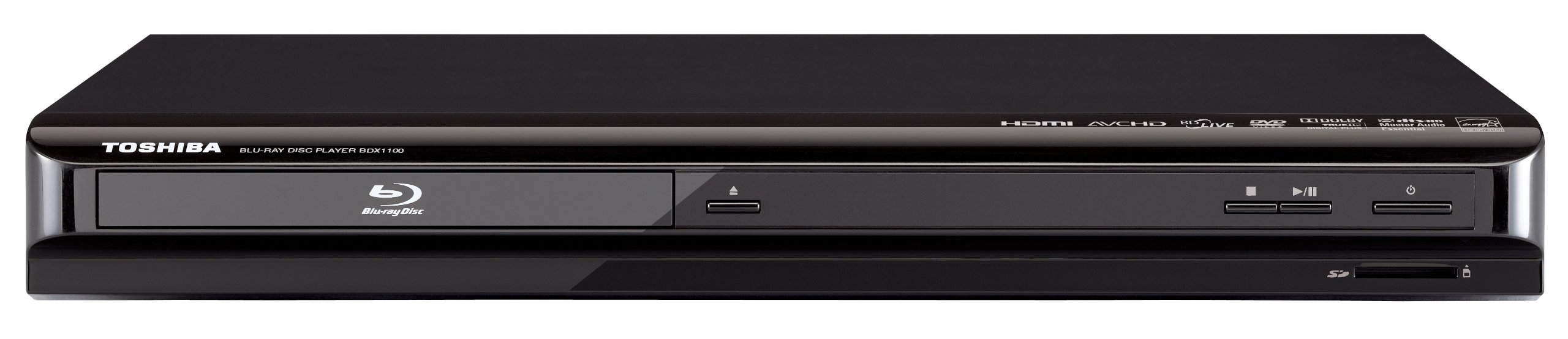
Obraz: Przód view of the Toshiba BDX1100 Blu-ray Disc Player, showing the disc tray, power button, and control buttons.
- Taca na płytę: Insert Blu-ray discs, DVDs, or CDs here.
- Przycisk zasilania: Włącza lub wyłącza odtwarzacz.
- Przycisk wysuwania: Otwiera i zamyka tackę na płyty.
- Gniazdo karty SD: For storing BD-Live content or playing media from an SD card.
- Port USB: Do podłączania urządzeń pamięci masowej USB w celu odtwarzania multimediów.
4.2 Panel tylny

Obraz: Tył view of the Toshiba BDX1100 Blu-ray Disc Player, showing various connection ports.
- Wyjście HDMI: Umożliwia podłączenie do telewizora lub odbiornika AV, umożliwiając oglądanie obrazu i dźwięku w wysokiej rozdzielczości.
- Port Ethernet: Connects to your home network for BD-Live features and firmware updates.
- Cyfrowe wyjście audio (koncentryczne): Connects to an AV receiver for digital audio.
- Analog Audio Output (RCA L/R): Connects to an AV receiver or stereo system for analog audio.
- Wyjście wideo (kompozytowe): Connects to older TVs for standard definition video.
4.3 Pilot zdalnego sterowania

Image: Remote control for the Toshiba BDX1100 Blu-ray Disc Player, displaying various function buttons.
The remote control allows you to operate all functions of the Blu-ray player from a distance. It includes buttons for power, disc tray open/close, playback controls (play, pause, stop, fast forward, rewind), navigation, menu access, and volume control.
5. Konfiguracja
5.1 Podłączanie do telewizora
- Połączenie HDMI (zalecane): Connect one end of an HDMI cable (not included) to the HDMI OUT port on the Blu-ray player and the other end to an HDMI input on your TV.
- Composite Video Connection (Alternative): If your TV does not have an HDMI input, connect a composite video cable (yellow) to the VIDEO OUT port on the player and the corresponding video input on your TV. Connect the red and white audio cables to the AUDIO OUT (L/R) ports on the player and the audio inputs on your TV.
5.2 Connecting to Audio System (Optional)
- Digital Coaxial Audio: For high-quality digital audio, connect a digital coaxial cable to the DIGITAL AUDIO OUT (COAXIAL) port on the player and the corresponding input on your AV receiver.
5.3 Network Connection (for BD-Live)
To access BD-Live features, connect an Ethernet cable from the LAN port on the Blu-ray player to your home router or network switch.
5.4 Połączenie zasilania
Plug the power cord into the AC IN socket on the rear of the player, then plug the other end into a wall outlet.
5.5 Konfiguracja początkowa
After connecting all cables and powering on the unit, follow the on-screen instructions to complete the initial setup, which may include language selection, display resolution, and network settings.
6. Instrukcja obsługi
6.1 Podstawowe odtwarzanie płyt
- Turn on your TV and the Blu-ray player. Select the correct input source on your TV.
- Press the Eject button on the player or remote control to open the disc tray.
- Umieść płytę Blu-ray, DVD lub CD na tacy na płyty etykietą skierowaną do góry.
- Press the Eject button again to close the disc tray. The disc will load automatically.
- Use the remote control's Play, Pause, Stop, Fast Forward, and Rewind buttons to control playback.
6.2 BD-Live Features
If connected to the internet, BD-Live allows access to online bonus content related to your Blu-ray discs. An SD card inserted into the SD Card Slot may be required to store downloaded content.
6.3 AVCHD Playback
The player supports AVCHD format playback, allowing you to view high-definition home movies recorded on compatible media.
6.4 Media Playback via USB/SD Card
Insert a USB storage device into the USB port or an SD card into the SD Card Slot. Use the player's menu to navigate and select media files (photos, music, videos) for playback.
7. Konserwacja
- Czyszczenie urządzenia: Przetrzyj zewnętrzną część odtwarzacza miękką, suchą ściereczką. Nie używaj środków czyszczących w płynie ani aerozolu.
- Dyski czyszczące: Wipe discs gently from the center outwards with a soft, lint-free cloth. Do not use abrasive cleaners.
- Składowanie: When not in use for extended periods, unplug the player and store it in a cool, dry place.
8. Rozwiązywanie Problemów
Jeśli napotkasz problemy, zapoznaj się z poniższymi typowymi problemami i rozwiązaniami:
| Problem | Możliwa przyczyna | Rozwiązanie |
|---|---|---|
| Brak zasilania | Przewód zasilający nie jest podłączony; gniazdko elektryczne jest uszkodzone. | Upewnij się, że przewód zasilający jest prawidłowo podłączony. Spróbuj użyć innego gniazdka. |
| Brak zdjęcia | Incorrect TV input; HDMI/video cable loose or faulty. | Select the correct TV input. Check HDMI/video cable connections. |
| Brak dźwięku | Audio cables loose; TV/receiver volume low or muted. | Check audio cable connections. Adjust TV/receiver volume. |
| Dysk nie odtwarza się | Płyta jest brudna, porysowana lub nieprawidłowo włożona; format płyty jest niezgodny. | Clean the disc. Insert disc with label side up. Ensure disc format is supported. |
| Pilot nie działa | Batteries depleted; obstruction between remote and player. | Wymień baterie. Usuń wszelkie przeszkody. |
9. Specyfikacje
- Model: BDX1100
- Marka: TOSHIBA
- Wyjście wideo: 1080p Full HD (24 fps native)
- Łączność: HDMI 1.3, Ethernet, USB, SD Card Slot
- Obsługa audio: Dolby TrueHD, DTS-HD Master Audio | Essential
- Odtwarzanie multimediów: Blu-ray Disc, BD-R, DVD, DVD+R, DVD+RW, DVD-R, DVD-RW, VCD, MP3, AVCHD
- Wymiary: Około 9.13 x 14.17 x 1.77 cala
- Waga: Około 1.77 funtów
10. Gwarancja i wsparcie
Aby uzyskać informacje dotyczące gwarancji i pomocy technicznej, zapoznaj się z kartą gwarancyjną dołączoną do produktu lub odwiedź oficjalną stronę pomocy technicznej firmy Toshiba webNie próbuj samodzielnie naprawiać urządzenia, ponieważ może to spowodować unieważnienie gwarancji.