
Wstęp
The GIGABYTE GM-M7600 is a wireless precision optical mouse designed for comfortable and reliable use. This manual provides instructions for setting up, operating, maintaining, and troubleshooting your device.
Zawartość opakowania
Sprawdź zawartość paczki, aby upewnić się, że znajdują się w niej wszystkie elementy:
- GIGABYTE GM-M7600 Wireless Optical Mouse
- Portable Nano USB Receiver
- 2 baterie AAA
Organizować coś
1. Instalowanie baterii
The GM-M7600 mouse requires two AAA batteries for operation. The batteries are included in the package.
- Znajdź pokrywę komory baterii na spodzie myszy.
- Aby otworzyć komorę, delikatnie przesuń lub unieś pokrywę.
- Włóż dwie baterie AAA, upewniając się, że bieguny dodatni (+) i ujemny (-) są prawidłowo ustawione względem oznaczeń wewnątrz komory.
- Dokładnie zamknij pokrywę komory baterii.
2. Podłączanie odbiornika USB
The mouse connects to your computer via a portable Nano USB receiver.
- Locate the Nano USB receiver. It may be stored inside the mouse's battery compartment or packaged separately.
- Plug the Nano USB receiver into an available USB port on your computer (Laptop or Personal Computer).
- Your operating system (e.g., Windows XP, Linux) should automatically detect and install the necessary drivers. This process may take a few moments.
- Po zainstalowaniu sterowników mysz będzie gotowa do użycia.
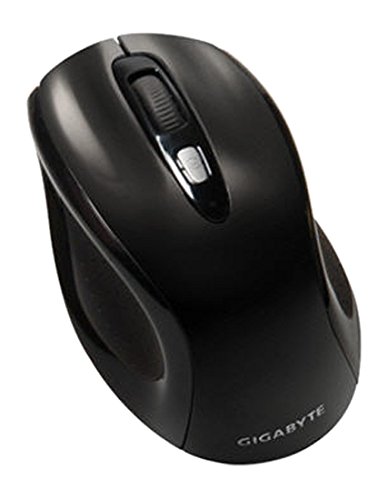
Rysunek 1: GIGABYTE GM-M7600 Wireless Optical Mouse. This image displays the ergonomic design of the mouse, highlighting its form factor and the location of its buttons. The Nano USB receiver is typically stored within the mouse or connected to a computer's USB port.
Instrukcja obsługi
1. Włączanie/wyłączanie zasilania
The mouse typically has a power switch on its underside. Slide the switch to the 'ON' position to activate the mouse. Slide it to 'OFF' when not in use to conserve battery life.
2. Regulacja DPI (czułości)
The GM-M7600 features an adjustable DPI switch, allowing you to change the mouse sensitivity between 800 DPI and 1600 DPI. This switch is usually located near the scroll wheel. Press the DPI button to toggle between the two sensitivity settings.
3. Podstawowe funkcje myszy
- Lewy przycisk myszy: Główny przycisk do wybierania elementów, otwierania filei interakcji z oprogramowaniem.
- Kliknij prawym przyciskiem myszy: Dodatkowy przycisk umożliwiający dostęp do menu kontekstowego i dodatkowych opcji.
- Kółko przewijania: Służy do przewijania dokumentów i web stron. Może również pełnić funkcję środkowego przycisku kliknięcia.
Konserwacja
1. Czyszczenie
Aby zachować optymalną wydajność i wygląd:
- Disconnect the mouse from your computer and turn off the power switch.
- Użyj miękkiej, niestrzępiącej się ściereczki, lekko wyczyśćampPrzetrzyj powierzchnię myszy wodą lub łagodnym środkiem czyszczącym.
- Unikaj stosowania silnych środków chemicznych, ściernych środków czyszczących lub spryskiwania myszy bezpośrednio płynami.
- Clean the optical sensor area on the underside of the mouse with a dry cotton swab to remove any dust or debris.
2. Wymiana baterii
When the mouse performance degrades or it stops responding, it may be time to replace the batteries.
- Wyłącz mysz za pomocą wyłącznika zasilania.
- Open the battery compartment as described in the 'Installing Batteries' section.
- Wyjmij stare baterie AAA.
- Włóż dwie nowe baterie AAA, zwracając uwagę na prawidłową biegunowość (+/-).
- Zamknij komorę baterii i włącz ponownie mysz.
Rozwiązywanie problemów
If you encounter issues with your GIGABYTE GM-M7600 mouse, try the following solutions:
- Mysz nie odpowiada:
- Upewnij się, że mysz jest włączona.
- Sprawdź, czy baterie są prawidłowo zainstalowane i wystarczająco naładowane. W razie potrzeby wymień je.
- Ensure the Nano USB receiver is securely plugged into a working USB port on your computer. Try a different USB port.
- Uruchom ponownie komputer.
- Nieregularny ruch kursora:
- Wyczyść czujnik optyczny znajdujący się na spodzie myszy.
- Upewnij się, że używasz myszy na odpowiedniej powierzchni. Unikaj powierzchni silnie odblaskowych lub przezroczystych.
- Check for any wireless interference. Move the mouse closer to the receiver or away from other wireless devices.
- DPI switch not working:
- Sprawdź, czy mysz jest włączona i podłączona.
- Naciśnij mocno przycisk DPI.
Specyfikacje
| Nazwa modelu | GM-M7600 |
| Marka | GIGABAJT |
| Technologia łączności | 2.4GHz Radio Frequency Wireless |
| Wykrywanie ruchu | Optyczny |
| Regulowane DPI | 800/1600 DPI |
| Liczba przycisków | 3 (lewy, prawy, kółko przewijania/środkowy przycisk) |
| Źródło zasilania | 2 x baterie AAA (w zestawie) |
| Typ odbiornika | Portable Nano USB Receiver |
| Kompatybilne urządzenia | Laptop, komputer osobisty |
| Wsparcie systemu operacyjnego | Linux, Windows XP |
| Materiał obudowy | Plastic with Rubberized Finish |
| Kolor | Czarny |
Gwarancja i wsparcie
For warranty information and technical support, please refer to the warranty card included with your product or visit the official GIGABYTE webstrona. Zachowaj dowód zakupu na potrzeby roszczeń gwarancyjnych.