
1. Wprowadzenie
The BUFFALO Giga Switching Hub LSW3-GT-24NSR is a 24-port Gigabit Ethernet switch designed for high-speed network environments. It is ideal for small to medium-sized offices and workplaces requiring robust and reliable network connectivity. This device supports full Gigabit speeds across all ports, ensuring efficient data transfer.
Key features include a fanless design for silent operation and enhanced reliability, as well as a loop detection function to prevent network disruptions caused by accidental network loops.
2. Informacje dotyczące bezpieczeństwa
Aby zapobiec obrażeniom lub uszkodzeniom urządzenia, przed użyciem należy zapoznać się z poniższymi środkami ostrożności.
- Zasilanie: Use only the provided power adapter. Ensure the power outlet meets the specified voltagi wymagania.
- Wentylacja: Nie zasłaniaj otworów wentylacyjnych. Zapewnij odpowiedni przepływ powietrza wokół urządzenia, aby zapobiec przegrzaniu.
- Środowisko: Avoid exposing the device to water, high humidity, extreme temperatures, or direct sunlight.
- Obsługiwanie: Do not drop or subject the device to strong impacts. Do not attempt to open or repair the device yourself. Refer all servicing to qualified personnel.
- Kable: Ensure all network cables are properly connected and secured.
3. Zawartość opakowania
Sprawdź, czy w opakowaniu znajdują się wszystkie elementy:
- BUFFALO Giga Switching Hub LSW3-GT-24NSR Unit
- Kabel zasilający
- Rack Mount Brackets (if included with your model)
- Nóżki gumowe (do ustawienia na biurku)
4. Konfiguracja
4.1 Fizyczna instalacja
The LSW3-GT-24NSR can be installed on a desktop or mounted in a 19-inch equipment rack.
Umieszczenie na pulpicie:
- Attach the included rubber feet to the bottom of the unit to prevent slipping and provide stability.
- Place the unit on a flat, stable surface with adequate ventilation.
Montaż w szafie:
- Attach the rack mount brackets to the sides of the unit using the provided screws.
- Secure the unit into a standard 19-inch equipment rack using appropriate rack screws (not included).
4.2 Podłączanie kabli sieciowych
Connect your network devices (computers, servers, other switches) to any of the 24 RJ-45 ports on the front panel using standard Ethernet cables (Category 5e or higher recommended for Gigabit speeds).

Rysunek 1: Panel przedni z góryview with 24 Ethernet Ports and Status LEDs.
4.3 Podłączanie zasilania
- Connect the power cable to the AC IN port on the rear of the device.
- Podłącz drugi koniec kabla zasilającego do odpowiedniego gniazdka elektrycznego.
- The device will power on automatically. The POWER LED on the front panel should illuminate.

Rysunek 2: Panel tylny z góryview with AC IN Power Port.
5. Instrukcja obsługi
5.1 Wskaźniki LED
The front panel features several LED indicators to monitor the status of the switch and its ports.
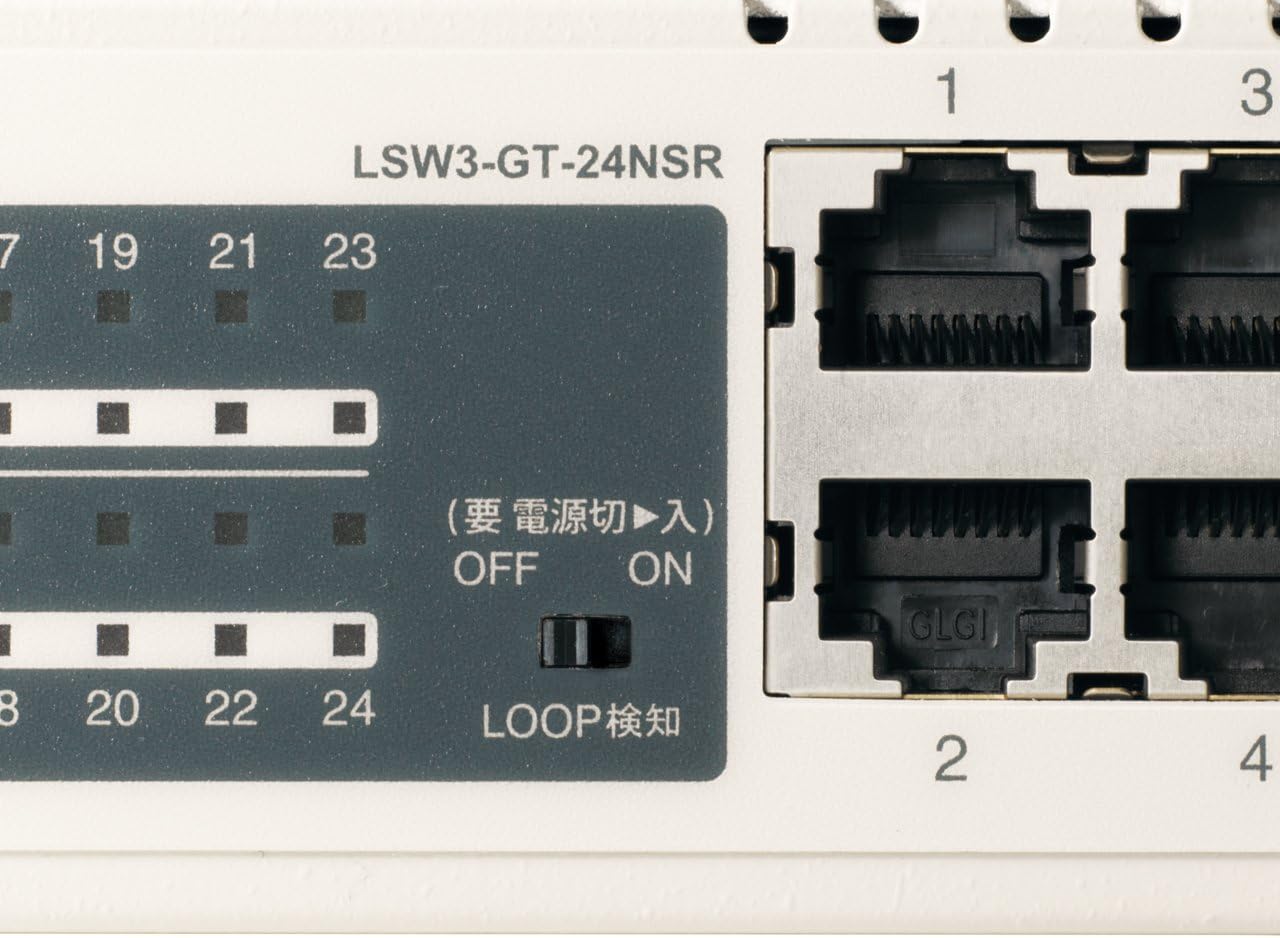
Rysunek 3: Szczegółowy view of LED Indicators and Loop Detection Switch.
| Nazwa diody LED | Status | Opis |
|---|---|---|
| MOC | On | Urządzenie jest włączone. |
| POŁĄCZ/DZIAŁ (na port) | On | A network device is connected and a link is established. |
| Błyskowy | Dane są przesyłane lub odbierane przez port. | |
| 1000/100/10 mln (na port) | Zielony | Port is operating at 1000 Mbps (Gigabit Ethernet). |
| Pomarańczowy | Port is operating at 100 Mbps (Fast Ethernet). | |
| Wyłączony | Port is operating at 10 Mbps (Ethernet). | |
| LOOP DETECT | On | A network loop has been detected. |
5.2 Loop Detection Function
The LSW3-GT-24NSR features a hardware switch for enabling or disabling the loop detection function. This function helps prevent network instability caused by accidental network loops.
Figure 4: Loop Detection Switch (ON/OFF).
- NA: Loop detection is active. If a loop is detected, the corresponding port will be automatically shut down to prevent network broadcast storms, and the LOOP DETECT LED will illuminate.
- OFF: Loop detection is disabled.
It is recommended to keep the loop detection function ON for network stability.
6. Konserwacja
6.1 Czyszczenie urządzenia
Aby zachować optymalną wydajność, należy okresowo czyścić zewnętrzną część przełącznika.
- Przed czyszczeniem należy odłączyć kabel zasilający.
- Użyj miękkiej, suchej szmatki do wytarcia powierzchni.
- Do not use liquid cleaners, aerosols, or solvents, as these may damage the casing lub komponentów wewnętrznych.
6.2 Względy środowiskowe
Ensure the device is operated within its specified environmental conditions:
- Temperatura: 0°C do 40°C (32°F do 104°F)
- Wilgotność: 10% do 85% (bez kondensacji)
7. Rozwiązywanie Problemów
If you encounter issues with your BUFFALO Giga Switching Hub, refer to the following common problems and solutions.
7.1 Brak zasilania
- Objaw: Dioda ZASILANIA jest wyłączona.
- Rozwiązanie: Check if the power cable is securely connected to both the device and the power outlet. Ensure the power outlet is functional.
7.2 No Link or Slow Speed on a Port
- Objaw: The LINK/ACT LED for a connected port is off, or the 1000/100/10M LED indicates a lower speed than expected (e.g., 100M instead of 1000M).
- Rozwiązanie:
- Sprawdź, czy kabel Ethernet jest solidnie podłączony na obu końcach.
- Try a different Ethernet cable. Ensure it is a Category 5e or higher cable for Gigabit speeds.
- Podłącz urządzenie do innego portu przełącznika.
- Check the network adapter settings on the connected device (computer, server) to ensure it is configured for auto-negotiation or the correct speed.
7.3 Network Instability / LOOP DETECT LED is On
- Objaw: The LOOP DETECT LED is illuminated, and network performance is degraded or unstable.
- Rozwiązanie:
- A network loop has been detected. This typically occurs when two ports on the same switch (or different switches) are connected to each other, creating an infinite data path.
- Carefully inspect your network cabling to identify and remove any redundant connections that form a loop.
- If the loop detection switch is ON, the affected port will be automatically shut down. Once the loop is resolved, the port should resume normal operation.
8. Specyfikacje
| Funkcja | Opis |
|---|---|
| Marka | BAWÓŁ |
| Numer modelu | LSW3-GT-24NSR |
| Liczba portów | 24 portów 10/100/1000BASE-T RJ-45 |
| Przełączanie pojemności | 48 Gbps (bez blokowania) |
| Szybkość przekazywania | 35.7 Mpps |
| Rozmiar tabeli adresów MAC | 8 tys. Wpisów |
| Obsługa ramek Jumbo | Do 9 KB |
| Cechy | Auto-MDI/MDIX, Auto-Negotiation, Loop Detection Function, Fanless Design |
| Zasilacz | Wewnętrzny zasilacz prądu przemiennego |
| Wymiary (szer. x gł. x wys.) | (Specific dimensions not provided in source, typical for 1U rackmount) |
| Waga | (Specific weight not provided in source) |
| Temperatura pracy | 0°C do 40°C |
| Wilgotność robocza | 10% do 85% (bez kondensacji) |
9. Gwarancja i wsparcie
This BUFFALO product is covered by a manufacturer's warranty. Please refer to the warranty card included with your product or visit the official BUFFALO webSzczegółowe warunki gwarancji można znaleźć na naszej stronie.
For technical support, product registration, or further assistance, please visit the official BUFFALO support weblub skontaktuj się z działem obsługi klienta. Dane kontaktowe zazwyczaj można znaleźć na stronie producenta. webmiejscu lub w opakowaniu produktu.