
1. Wprowadzenie
Thank you for choosing the Takstar E 340 Karaoke Microphone. This manual provides essential information for the proper setup, operation, and maintenance of your microphone. Please read this manual thoroughly before using the product to ensure optimal performance and longevity.
2. Koniec produktuview
The Takstar E 340 is a high-quality unidirectional handheld dynamic microphone designed for clear vocal reproduction, ideal for karaoke and general speech applications. It features a robust construction and a design focused on user comfort and sound clarity.
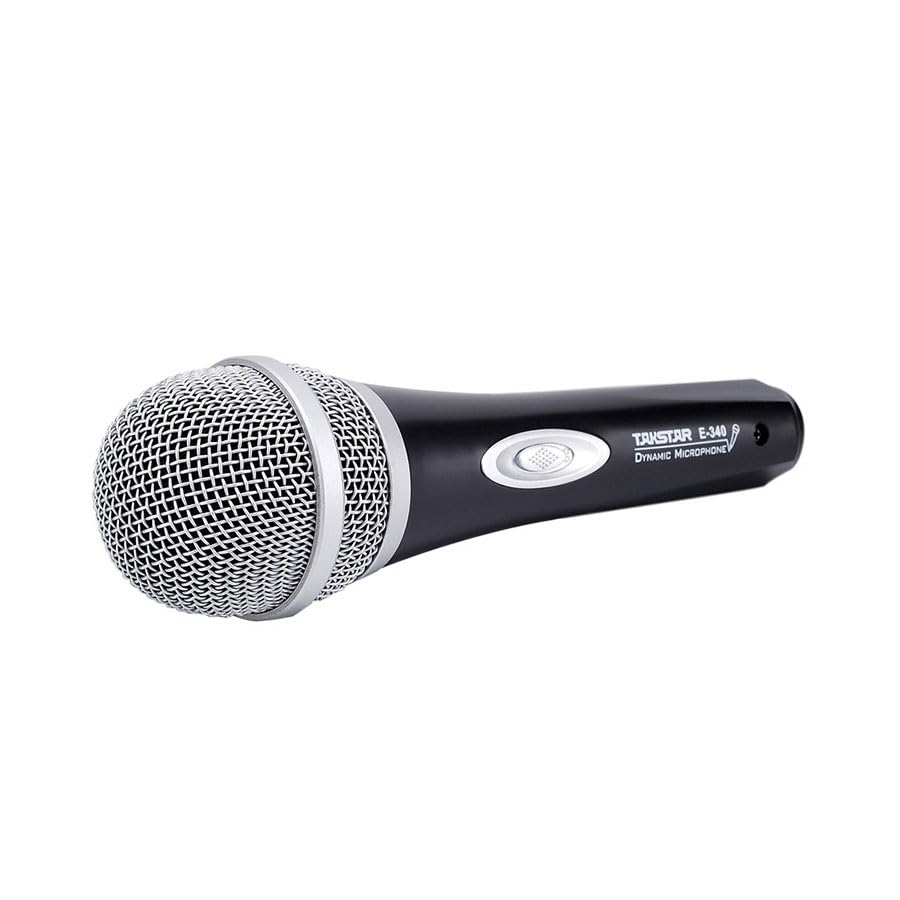
Figure 2.1: Takstar E 340 Handheld Dynamic Microphone. This image shows the full view of the microphone, highlighting its black body and silver grille.
Główne cechy:
- Jednokierunkowy wzór biegunowy: Koncentruje się na dźwięku dochodzącym z przodu, redukując hałas tła.
- Kapsuła dynamiczna: Provides clear and powerful sound reproduction.
- Trwała konstrukcja: Plastic housing with a paint finish for comfortable handling and durability.
- Łączność XLR: Utilizes a dual-core XLR cable for clear signal transmission and noise interference shielding.
- Lekka konstrukcja: Ensures ease of use and portability.

Rysunek 2.2: Szczegółowy view of the Takstar E 340 microphone highlighting its internal dynamic capsule and the robust construction. This image illustrates the quality components and design features.
Identyfikacja komponentu:
- Kratka mikrofonu: Protects the microphone capsule and helps shape the sound.
- Korpus mikrofonu: Houses the internal components and provides a comfortable grip.
- Przełącznik włączania/wyłączania: Steruje mocą mikrofonu.
- XLR Output Connector: For connecting the microphone to an audio interface or karaoke machine.
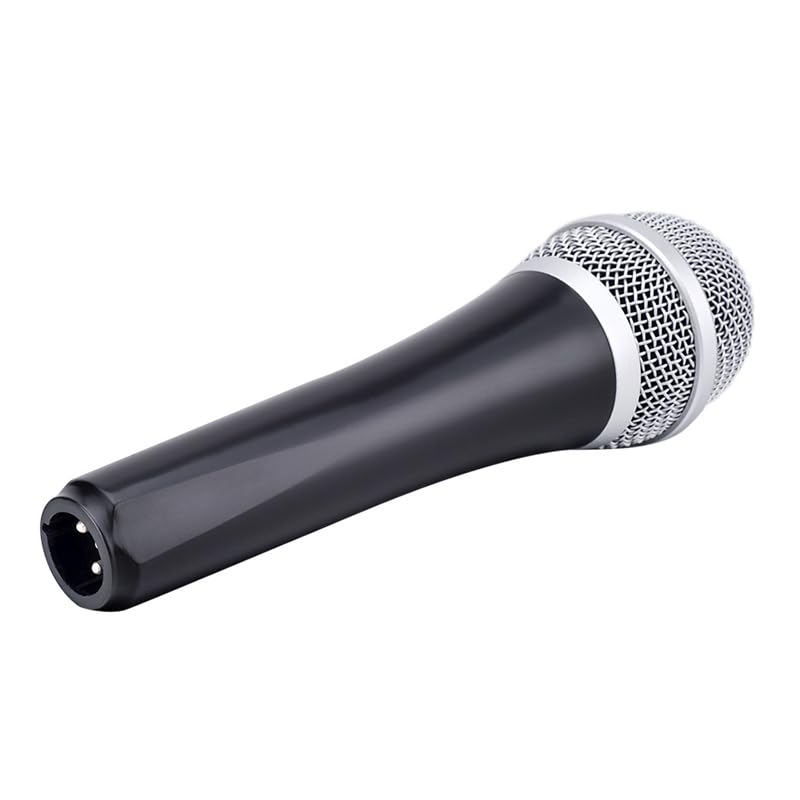
Figure 2.3: The XLR output connector located at the base of the Takstar E 340 microphone. This is where the microphone cable connects.
3. Instrukcje konfiguracji
- Rozpakuj mikrofon: Carefully remove the Takstar E 340 microphone and any included accessories from its packaging.
- Podłącz kabel: Insert the XLR end of your microphone cable into the XLR output connector at the base of the microphone. Ensure it clicks securely into place.
- Połącz z urządzeniem audio: Connect the other end of the microphone cable (e.g., 1/4-inch jack or USB Type-C, depending on your cable) to the microphone input of your karaoke machine, mixer, or audio interface.
- Włączanie: Ensure your audio device is powered on and its volume is set to a low level before activating the microphone.
4. Instrukcja obsługi
- Turn On the Microphone: Locate the On/Off switch on the microphone body and slide it to the 'ON' position.
- Pozycjonowanie: Hold the microphone approximately 2-6 inches (5-15 cm) from your mouth for optimal sound pickup. Experiment with distance to find the best sound for your voice and environment.
- Regulacja głośności: Gradually increase the volume on your connected audio device until the desired sound level is achieved. Avoid setting the volume too high to prevent feedback or distortion.
- Odbiór jednokierunkowy: The E 340 is a unidirectional microphone, meaning it primarily picks up sound from the front. Point the top of the microphone directly towards the sound source (your mouth) for the clearest audio.
- Wyłączanie: When finished, slide the On/Off switch to the 'OFF' position and then turn off your audio device.
5. Pielęgnacja i konserwacja
- Czyszczenie: Use a soft, dry cloth to clean the microphone body. For the grille, a soft brush can be used to gently remove dust or debris. Do not use liquid cleaners or solvents.
- Składowanie: Store the microphone in a dry, cool place away from direct sunlight and extreme temperatures. If possible, use a protective case to prevent physical damage.
- Obsługiwanie: Unikaj upuszczania mikrofonu i narażania go na silne uderzenia, gdyż może to spowodować uszkodzenie jego wewnętrznych podzespołów.
- Pielęgnacja kabli: Always grasp the connector, not the cable, when plugging or unplugging. Avoid bending or kinking the cable excessively.
6. Rozwiązywanie Problemów
| Problem | Możliwa przyczyna | Rozwiązanie |
|---|---|---|
| Brak dźwięku | Przełącznik mikrofonu jest wyłączony Kabel nie jest prawidłowo podłączony Głośność wejściowa urządzenia audio jest zbyt niska Faulty cable or audio device input | Przesuń przełącznik na pozycję „ON” Upewnij się, że kabel jest solidnie podłączony na obu końcach Increase input volume on audio device Test with a different cable or audio input |
| Niski lub zniekształcony dźwięk | Mikrofon zbyt daleko od źródła dźwięku Input volume too high (distortion) Uszkodzona kapsuła mikrofonu | Hold microphone closer to mouth Reduce input volume on audio device W przypadku podejrzenia uszkodzenia skontaktuj się z obsługą klienta |
| Sprzężenie zwrotne (dźwięk wycia) | Mikrofon zbyt blisko głośników Tom zbyt wysoki Microphone pointed at speakers | Increase distance between microphone and speakers Reduce overall volume Ensure microphone is not pointed directly at speakers |
7. Specyfikacje techniczne
| Funkcja | Specyfikacja |
|---|---|
| Model | E340 |
| Wzór biegunowy | Jednokierunkowy |
| Współczynnik kształtu mikrofonu | Ręczny |
| Impedancja | 600 omy |
| Stosunek sygnału do szumu (SNR) | 72dB |
| Odpowiedź częstotliwościowa | 16 kHz |
| Czułość audio | 54 decybeli |
| Technologia łączności | UHF (via cable) |
| Typ złącza | USB Type-C (implied for cable connection, typically XLR on mic) |
| Kompatybilne urządzenia | Maszyna karaoke |
| Źródło zasilania | Elektryczny przewodowy |
| Waga przedmiotu | 580 gramów |
| Wymiary opakowania | Wymiary 24.8 x 12.6 x 8 cm |
| Funkcja specjalna | Adjustable Headband (Note: This feature is typically associated with headsets, but listed in product specifications.) |
8. Gwarancja i wsparcie
For warranty information and customer support, please refer to the documentation provided at the time of purchase or visit the official Takstar webZachowaj dowód zakupu na wypadek roszczeń gwarancyjnych.


