
Wstęp
This manual provides detailed instructions for the safe and effective use of your Sony Alpha NEX-3 interchangeable lens digital camera. The NEX-3 combines the performance of a DSLR with a compact, lightweight design, featuring a 14.2-megapixel APS-C sensor and an 18-55mm zoom lens. Please read this manual thoroughly before operating the camera and retain it for future reference.
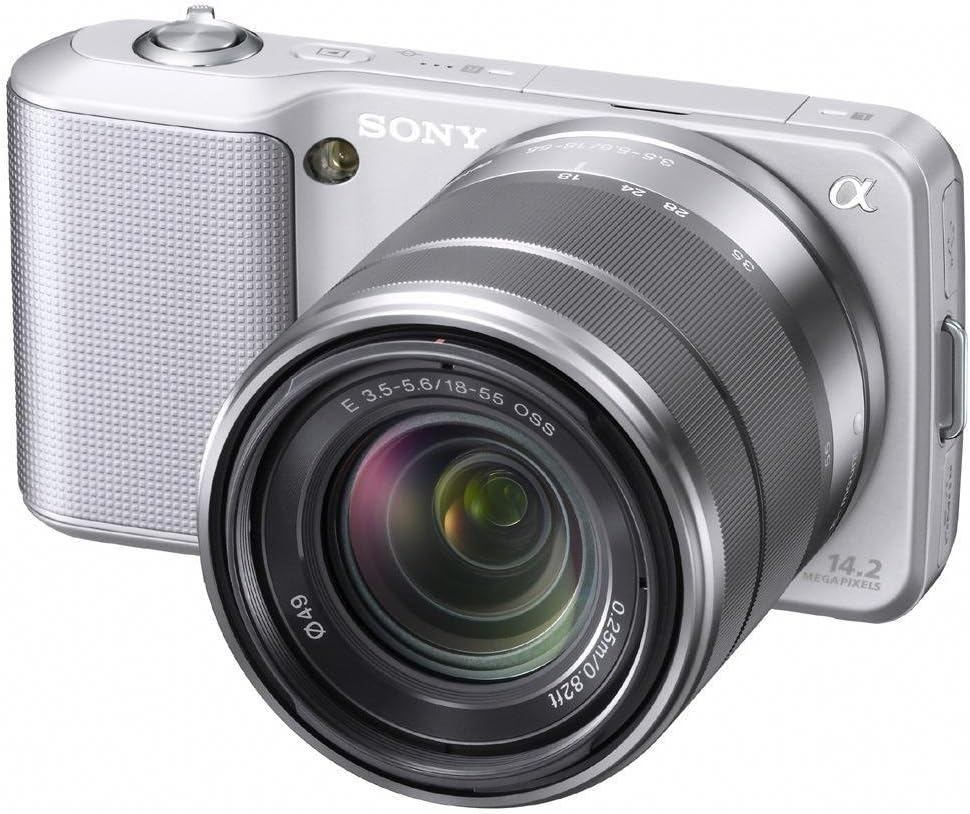
Rysunek 1: Sony Alpha NEX-3 Digital Camera with the included 18-55mm zoom lens. The camera body is silver with a textured grip, and the lens is also silver and black.
Organizować coś
Before using your camera, perform the following setup steps:
- Naładuj baterię: Insert the supplied NP-FW50 Lithium-Ion battery into the charger and connect the charger to a power outlet. The charging indicator will illuminate and turn off when charging is complete.
- Włóż baterię: Open the battery cover on the bottom of the camera and insert the charged battery, ensuring correct orientation. Close the cover securely.
- Włóż kartę pamięci: Open the memory card slot cover. Insert a compatible SD/SDHC/SDXC or Memory Stick Pro Duo/Pro-HG Duo card with the contacts facing the correct direction until it clicks into place. Close the cover.
- Załóż soczewkę: Align the white index mark on the lens with the white index mark on the camera body. Mount the lens by rotating it clockwise until it locks into position.
- Ustawienia początkowe: Włącz kamerę za pomocą włącznika zasilania. Postępuj zgodnie z instrukcjami wyświetlanymi na ekranie, aby ustawić język, datę, godzinę i strefę czasową.
Obsługa aparatu
The Sony Alpha NEX-3 offers various modes and features for capturing images and videos.
Podstawy fotografii
- iAuto Mode: For automatic scene recognition and optimal settings, rotate the control wheel to select the 'iAuto' mode. The camera will automatically adjust exposure, white balance, and other parameters.
- Robienie zdjęć: Frame your subject using the 3-inch tilting LCD. Press the shutter button halfway down to focus, then press it fully to capture the image.
Zaawansowane tryby fotografowania
For more creative control, the NEX-3 provides Program Auto (P), Shutter Priority (S), Aperture Priority (A), and Manual (M) modes. Access these via the menu system using the control wheel and soft keys.
- Panorama: This mode allows you to capture wide panoramic images by sweeping the camera horizontally or vertically. The camera automatically stitches multiple images together.
- Tryb zmierzchowy w trybie ręcznym: Captures six images at high speed and combines them to reduce noise in low-light conditions without a tripod.
- Tryb zapobiegający rozmyciu ruchu: Similar to Hand-held Twilight, this mode combines six shots to reduce blur caused by camera shake or subject movement in low light.
Nagrywanie wideo
The NEX-3 can record high-definition video in MP4 format (720p/30p or 480p/30p).
- Rozpocznij/zatrzymaj nagrywanie: Press the dedicated MOVIE button to begin or end video recording.
- Focus and Exposure: The camera automatically adjusts focus and exposure during video recording with E-mount lenses. Exposure compensation can be adjusted using the control wheel.
Konserwacja
Właściwa konserwacja gwarantuje długowieczność i optymalną wydajność aparatu.
- Czyszczenie korpusu aparatu: Do czyszczenia korpusu aparatu użyj miękkiej, suchej ściereczki. W przypadku uporczywych zabrudzeń delikatnie przetrzyj.ampPrzetrzyj szmatkę wodą. Unikaj stosowania rozpuszczalników organicznych.
- Czyszczenie obiektywu: Use a lens blower to remove dust. For smudges, use a lens cleaning solution and a soft lens cloth, wiping gently in a circular motion from the center outwards.
- Czyszczenie czujnika: If dust spots appear on images, the image sensor may need cleaning. This is a delicate procedure; it is recommended to have this performed by a qualified service technician.
- Pielęgnacja baterii: Przechowuj baterie w chłodnym, suchym miejscu. Nie wystawiaj ich na działanie ekstremalnych temperatur. Jeśli aparat nie będzie używany przez dłuższy czas, wyjmij baterię.
- Składowanie: Store the camera in a dry, well-ventilated area, away from direct sunlight and extreme temperatures. Use a desiccant if storing in humid environments.
Rozwiązywanie problemów
W tej sekcji omówiono typowe problemy, na które możesz natrafić.
| Problem | Możliwa przyczyna / rozwiązanie |
|---|---|
| Kamera się nie włącza. | Battery may be depleted. Ensure the battery is charged and inserted correctly. |
| Obrazy są niewyraźne. |
|
| Images appear noisy, especially in low light. | High ISO settings can introduce noise. Use Hand-held Twilight mode or ensure adequate lighting. |
| Błąd karty pamięci. | Upewnij się, że karta pamięci jest prawidłowo włożona i nie jest uszkodzona. Spróbuj sformatować kartę (spowoduje to usunięcie wszystkich danych). |
| Lampa błyskowa się nie uruchamia. | Check flash settings. Ensure the external flash unit (if used) is properly attached and powered. |
Jeśli problem nadal występuje, skontaktuj się z pomocą techniczną Sony webodwiedź witrynę lub skontaktuj się z obsługą klienta.
Specyfikacje
| Funkcja | Szczegół |
|---|---|
| Nazwa modelu | ALPHA NEX-3 |
| Rozdzielczość czujnika fotograficznego | 14.2 MP |
| Rozmiar fotokomórki | APS-C (23.4 x 15.6 mm) |
| Typ czujnika | CMOS |
| Typ soczewki | Zoom (18-55mm) |
| Kompatybilne mocowania | Sony E (NEX), Sony FE |
| Stabilizacja obrazu | Cyfrowy |
| Rozdzielczość wideo | 720p |
| Typ wyświetlacza | 3-calowy odchylany wyświetlacz LCD |
| Ciągłe fotografowanie | Do 7 FPS |
| ISO Sensitivity (Expanded) | 200-12800 |
| Prędkość migawki | od 30 sekund do 1/4000 sekundy |
| Typ baterii | Lithium-Ion NP-FW50 |
| Łączność | HDMI, USB, EyeFi (Wireless Technology) |
| Wymiary (w przybliżeniu) | Wysokość przedmiotu: 2.44 cala |
| Waga (w przybliżeniu) | 0.65 funtów |
Gwarancja i wsparcie
Your Sony Alpha NEX-3 camera comes with a 1-roczna ograniczona gwarancja od daty zakupu. Niniejsza gwarancja obejmuje wady produkcyjne powstałe w wyniku normalnego użytkowania. Prosimy zachować dowód zakupu na wypadek roszczeń gwarancyjnych.
For technical support, service, or detailed warranty information, please visit the official Sony support webodwiedź witrynę firmy Sony lub skontaktuj się z działem obsługi klienta firmy Sony.