
1. Wprowadzenie
This manual provides instructions for the installation, operation, and maintenance of the NETGEAR WN2000RPT Universal WiFi Range Extender. This device is designed to expand the coverage of an existing wireless network, eliminating dead zones and improving signal strength in areas with weak Wi-Fi connectivity.
2. Zawartość opakowania
Sprawdź, czy w przesyłce znajdują się następujące elementy:
- NETGEAR WN2000RPT Universal WiFi Range Extender
- Zasilacz
- Kabel Ethernetowy
Jeśli brakuje jakichkolwiek elementów lub są one uszkodzone, skontaktuj się z pomocą techniczną firmy NETGEAR.
3. Koniec produktuview
The NETGEAR WN2000RPT is a compact device designed to blend into various environments. It features indicator lights on the front panel and multiple ports on the rear for connectivity.
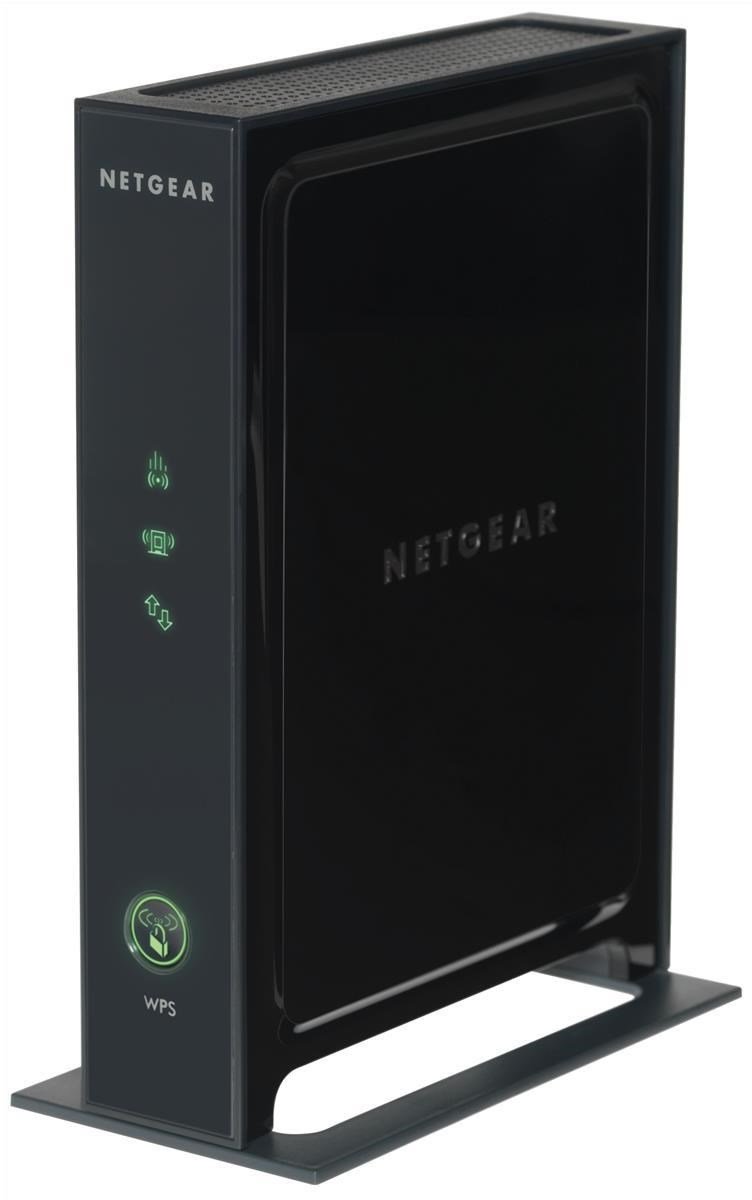
Rysunek 3.1: Przód view of the NETGEAR WN2000RPT Universal WiFi Range Extender. The front panel displays status indicator lights and a WPS button.
3.1 Wskaźniki na panelu przednim
- Dioda LED zasilania: Wskazuje stan zasilania urządzenia.
- Dioda LED łącza routera: Shows the connection status to your main wireless router.
- Client Link LED: Indicates the connection status to client devices.
- Przycisk WPS: Used for easy setup with WPS-compatible routers.
3.2 Porty na tylnym panelu

Rysunek 3.2: Tył view of the NETGEAR WN2000RPT, illustrating the four Ethernet LAN ports, power switch, and DC-in jack.
- Ethernet LAN (RJ-45) Ports (x4): For connecting wired devices such as desktop PCs, notebooks, or gaming consoles.
- Przycisk włączania/wyłączania zasilania: Controls the power supply to the device.
- Gniazdo DC-in: Łączy się z zasilaczem.
4. Konfiguracja
Follow these steps to set up your NETGEAR WN2000RPT Universal WiFi Range Extender:
- Umieszczenie: Place the extender in a location between your wireless router and the area where you want to improve Wi-Fi coverage. Ensure it is within the range of your existing router's Wi-Fi signal.
- Włączanie: Connect the power adapter to the DC-in jack on the extender and plug it into an electrical outlet. Press the Power On/Off button. Wait for the Power LED to turn solid green.
- Połącz z wzmacniaczem: On a computer or mobile device, connect to the extender's default Wi-Fi network. This network typically has a name like "NETGEAR_EXT" or similar. The network name and password can usually be found on a label on the extender.
- Kreator konfiguracji dostępu: Otwórz web browser and navigate to the extender's setup page. This is often http://www.mywifiext.net or the extender's IP address (e.g., 192.168.1.250). Follow the on-screen instructions to select your existing Wi-Fi network and enter its password.
- Połącz się z routerem: The extender will connect to your main router. The Router Link LED should turn green, indicating a good connection.
- Przenieś (opcjonalnie): If the Router Link LED is not green, try moving the extender closer to your router. Once connected, you can optionally rename the extended network or use the same name as your main network.
5. Obsługa przedłużacza
Once set up, the NETGEAR WN2000RPT operates automatically to extend your Wi-Fi signal. Devices within the extended range will connect to the extender's network.
- Połączenie bezprzewodowe: Your wireless devices (laptops, smartphones, tablets) can connect to the extended Wi-Fi network for improved signal strength and coverage.
- Łączność przewodowa: Use the Ethernet LAN ports to connect wired devices to your network. This is useful for devices that require a stable wired connection or do not have Wi-Fi capabilities.
- Tryb punktu dostępu: The device supports Access Point Mode, allowing it to function as a new Wi-Fi access point when connected to a router via an Ethernet cable.
6. Konserwacja
Regular maintenance ensures optimal performance of your range extender:
- Aktualizacje oprogramowania układowego: Okresowo sprawdzaj wsparcie NETGEAR webStrona z aktualizacjami oprogramowania sprzętowego. Aktualizacja oprogramowania sprzętowego może poprawić wydajność, dodać nowe funkcje i naprawić błędy.
- Czyszczenie: Utrzymuj urządzenie w czystości i zapobiegaj jego zakurzeniu. Do czyszczenia obudowy używaj miękkiej, suchej ściereczki. Nie używaj płynnych środków czyszczących.
- Wentylacja: Aby zapobiec przegrzaniu, należy upewnić się, że przedłużacz jest umieszczony w dobrze wentylowanym pomieszczeniu.
- Resetowanie: If the device experiences persistent issues, a factory reset may be necessary. Refer to the troubleshooting section for instructions.
7. Rozwiązywanie Problemów
If you encounter issues with your NETGEAR WN2000RPT, refer to the following common problems and solutions:
- Brak zasilania:
Objaw: Dioda LED zasilania jest wyłączona.
Rozwiązanie: Ensure the power adapter is securely connected to the extender and a working electrical outlet. Press the Power On/Off button. - Cannot Access Setup Wizard:
Objaw: Web browser does not load the setup page (e.g., http://www.mywifiext.net).
Rozwiązanie: Ensure your device is connected to the extender's Wi-Fi network (e.g., "NETGEAR_EXT"). Try clearing your browser's cache or using a different browser. Restart the extender and your computer/device. - Weak or No Extended Signal:
Objaw: Devices connected to the extender still have poor signal or no internet access.
Rozwiązanie: Relocate the extender closer to your main wireless router. Ensure the Router Link LED is green, indicating a strong connection to the router. Avoid placing the extender near large metal objects, concrete walls, or other sources of interference. - Połączenie przerywane:
Objaw: Devices frequently disconnect from the extended network.
Rozwiązanie: Check for interference from other electronic devices. Ensure the extender's firmware is up to date. Try changing the Wi-Fi channel on your main router if possible. - Przywrócenie ustawień fabrycznych:
Objaw: Persistent issues or forgotten login credentials.
Rozwiązanie: With the extender powered on, use a paperclip to press and hold the Reset button (usually a small pinhole) for about 7-10 seconds until the LEDs flash. The extender will restart with factory default settings, requiring re-setup.
8. Specyfikacje
| Marka | NETGEAR |
| Model | WN2000RPT |
| Standard komunikacji bezprzewodowej | 802.11n |
| Szybkość przesyłu danych | Do 300 Mb/s |
| Pasmo częstotliwości | 2.4 GHz |
| Technologia łączności | Bezprzewodowy |
| Porty Ethernet LAN (RJ-45). | 4 |
| Cechy specjalne | Access Point Mode, QoS |
| Kolor | Czarny |
| Moc wejściowa | Gniazdo zasilania prądem stałym |
9. Gwarancja i wsparcie
Aby uzyskać informacje dotyczące gwarancji i pomocy technicznej, zapoznaj się z oficjalną stroną internetową firmy NETGEAR website or the documentation included with your product. You can typically find support resources, FAQs, and contact information at www.netgear.com/support.