
Wstęp
This manual provides comprehensive instructions for the setup and operation of your RCA RCU704 4-Function Universal Remote Control. This remote is designed to control up to four different audio/video components, simplifying your home entertainment experience.
Informacje dotyczące bezpieczeństwa
- Nie należy mieszać starych i nowych baterii.
- Nie należy mieszać baterii alkalicznych, standardowych (węglowo-cynkowych) ani akumulatorów (niklowo-kadmowych).
- Jeżeli pilot nie będzie używany przez dłuższy czas, wyjmij baterie, aby zapobiec wyciekowi.
- Przechowuj baterie w miejscu niedostępnym dla dzieci.
Zawartość opakowania
- RCA RCU704 Universal Remote Control
- Instrukcja obsługi (ten dokument)
Produkt ponadview
The RCA RCU704 remote control features a straightforward layout for easy operation of your home entertainment devices.
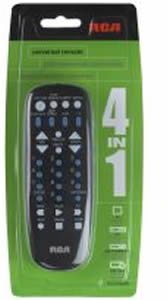
Obraz: Przód view of the RCA RCU704 universal remote control, showcasinze względu na układ przycisków i ergonomiczną konstrukcję.
Key buttons and their functions include:
- MOC: Włącza lub wyłącza wybrany komponent.
- TV, VCR, DVD, AUX: Component selection buttons to switch control to the desired device.
- GŁOŚNOŚĆ +/-: Dostosowuje poziom głośności.
- CO +/-: Zmienia kanały w górę lub w dół.
- NIEMY: Wycisza dźwięk.
- INPUT/VIDEO: Selects the video input source on your TV or other display device.
- KLAWIATURA NUMERYCZNA (0-9): Do bezpośredniego wejścia na kanał lub nawigacji po menu.
Organizować coś
1. Instalacja baterii
- Remove the battery compartment cover located on the back of the remote control.
- Insert two fresh AAA batteries, ensuring that the (+) and (-) terminals align correctly with the markings inside the compartment.
- Dokładnie załóż pokrywę komory baterii.
2. Programowanie pilota
There are two primary methods to program your universal remote to control your devices:
Metoda A: Bezpośrednie wprowadzenie kodu
- Turn on the component (e.g., TV, DVD player) you wish to control.
- Naciśnij i przytrzymaj WYSZUKIWANIE KODU button until the indicator light on the remote turns on.
- Kontynuując trzymanie WYSZUKIWANIE KODU, press and release the component button (e.g., TV, płyta DVD) corresponding to the device you want to program. The indicator light will blink once and then remain steadily on.
- Enter the 4-digit code for your brand from the provided code list (refer to the separate code booklet that came with your remote).
- If the code is valid, the indicator light will turn off. If the code is invalid, the light will flash rapidly.
- Przetestuj pilota naciskając MOC button. If the component turns off, try other functions like GŁOŚNOŚĆ +/-. If it works, programming is complete.
- If the component does not respond or functions incorrectly, repeat the process with the next code listed for your brand.
Metoda B: wyszukiwanie kodu automatycznego
- Włącz komponent, którym chcesz sterować.
- Naciśnij i przytrzymaj WYSZUKIWANIE KODU button until the indicator light on the remote turns on.
- Kontynuując trzymanie WYSZUKIWANIE KODU, press and release the component button (e.g., TV, płyta DVD) you want to program. The indicator light will blink once and then remain steadily on.
- Skieruj pilota na element i naciskaj wielokrotnie MOC przycisk (lub CH+ for TVs) until the component turns off.
- Once the component turns off, immediately press the WCHODZIĆ Naciśnij przycisk, aby zapisać kod. Kontrolka zgaśnie.
- Test the remote. If it does not work correctly, repeat the auto code search process.
Obsługa pilota
To operate a component after it has been programmed:
- Press the corresponding component button (TV, Magnetowid, płyta DVD, Lub AUX) to select the device you want to control. The indicator light will flash once to confirm selection.
- Point the remote at the component and press the desired function button (e.g., MOC, GŁOŚNOŚĆ +/-, CH +/-).
Konserwacja
- Clean the remote with a soft, dry cloth. Do not use liquid cleaners or abrasive materials.
- Avoid exposing the remote to extreme temperatures, high humidity, or direct sunlight.
- Do not drop the remote or subject it to strong impacts, as this may damage internal components.
Rozwiązywanie problemów
| Problem | Rozwiązanie |
|---|---|
| Pilot nie obsługuje Twojego komponentu. | Ensure batteries are fresh and installed correctly. Reprogram the remote using a different code for your brand or try the auto code search method. Ensure the remote is pointed directly at the component and there are no obstructions. |
| Lampka kontrolna nie włącza się. | Check battery installation. Replace batteries if necessary. Ensure the battery compartment cover is closed properly. |
| Some buttons work, but others don't. | The programmed code may only partially match your component. Try programming with a different code for your brand or use the auto code search to find a more compatible code. |
| Pilot traci możliwość programowania. | This is typically due to low batteries. Replace batteries with fresh ones and reprogram the remote. |
Specyfikacje
- Model: RCU704 (RCARC704)
- Funkcje: 4 (TV, VCR, DVD, AUX)
- Łączność: Podczerwieni (IR)
- Moc: Baterie 2 x AAA (brak w zestawie)
- Maksymalny zasięg: 10 metrów (około 33 stóp)
- Liczba przycisków: 4 component selection buttons + various function buttons
- Waga: Około 2.4 uncji (bez baterii)
Gwarancja i wsparcie
For detailed warranty information or technical support, please refer to the documentation included with your original purchase or visit the official RCA webZaleca się zachowanie paragonu jako dowodu zakupu na wypadek reklamacji.
Uwaga: Szczegółowe warunki gwarancji i dane kontaktowe działu pomocy technicznej mogą się różnić w zależności od regionu i sprzedawcy.