
Gardena 1860 Classic 3-Cycle Water Timer T 1030 Plus
Instrukcja obsługi sterownika nawadniania Gardena 1860 Classic 3-Cycle Water Timer T 1030 Plus
Model: 1860-U | Brand: Gardena
1. Koniec produktuview
The Gardena 1860 Classic 3-Cycle Water Timer T 1030 Plus is designed to automate your garden watering, providing a simple and convenient solution for efficient irrigation. This classic model features large, easy-to-use rotary knobs for straightforward programming.
Główne cechy obejmują:
- Do 3 cykli podlewania na dobę.
- Adjustable watering times from 1 to 120 minutes.
- Connection port for a GARDENA Rain or Soil Moisture Sensor for optimized watering.
- Integrated battery level display for easy monitoring.

Rycina 1: Przód view of the Gardena 1860 Classic 3-Cycle Water Timer T 1030 Plus, showing the two main rotary knobs for run time and frequency, and the 'Start +1h' button.
2. Konfiguracja i instalacja
2.1 Rozpakowanie
Ostrożnie wyjmij wszystkie elementy z opakowania. Upewnij się, że wszystkie części wymienione w zestawie są obecne.
2.2 Instalacja baterii
The water timer requires batteries for operation. Locate the battery compartment, typically on the back or side of the unit. Insert the required batteries, observing the correct polarity (+/-). The battery level display will activate upon successful installation.
2.3 Connecting to Water Tap
Screw the water timer securely onto a standard outdoor water tap. Ensure the connection is tight to prevent leaks. Connect your garden hose to the outlet of the water timer.

Figure 2: The Gardena water timer attached to an outdoor tap, with a garden hose connected to its outlet. A hand is shown adjusting the timer's settings.

Figure 3: The Gardena water timer installed on a vertical pipe connected to a water tap, demonstrating a typical outdoor setup.
3. Instrukcja obsługi
3.1 Setting Watering Duration (Run Time)
Use the upper rotary knob, labeled "Run Time" or similar, to select the desired watering duration. Options typically range from 1 minute to 120 minutes. Turn the knob to align the indicator with your chosen time.
3.2 Setting Watering Frequency
Use the lower rotary knob, labeled "Frequency" or similar, to set how often the watering cycle should repeat. This model supports up to 3 watering cycles per day. Available settings may include intervals like every 8 hours, 12 hours, 24 hours, or specific days.
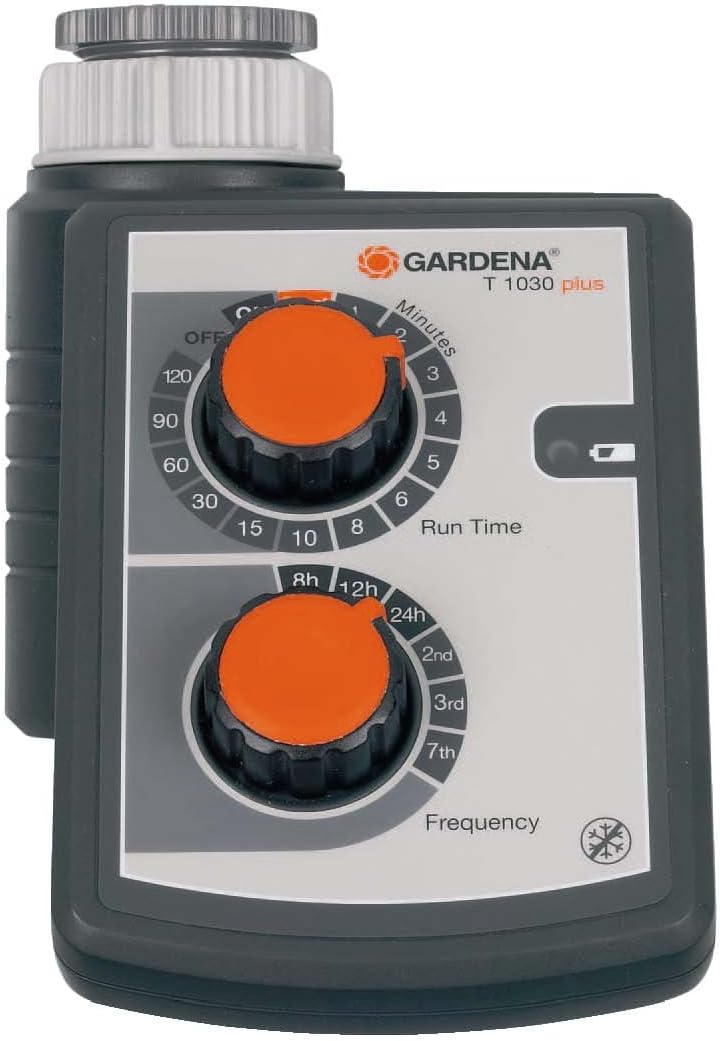
Rysunek 4: Zbliżenie view of the Gardena water timer's control panel, highlighting the "Run Time" and "Frequency" rotary knobs for programming watering schedules.

Figure 5: Hands adjusting the rotary knobs on the Gardena water timer, demonstrating the ease of programming.
3.3 Manual Watering (Start +1h)
To initiate an immediate watering cycle for one hour, press the "Start +1h" button. The timer will run for approximately one hour and then revert to its programmed schedule.
3.4 Connecting a Rain or Soil Moisture Sensor
For optimal water conservation, the timer can be connected to a GARDENA Rain or Soil Moisture Sensor (sold separately). This sensor will automatically interrupt or prevent watering if the soil is sufficiently moist or if it is raining, ensuring your plants receive the right amount of water without waste.
Video 1: An official Gardena video demonstrating the benefits of using Gardena water controls, including the connection to a sensor for water saving. This video highlights various models and their features, emphasizing efficient watering and ease of use.

Figure 6: The Gardena water timer installed on a tap during rainfall, illustrating its weather-resistant design and compatibility with external sensors for smart watering.
4. Konserwacja
4.1 Czyszczenie
Clean the exterior of the water timer with a damp Ściereczka. Nie używaj środków czyszczących ani rozpuszczalników o działaniu ściernym. Upewnij się, że woda nie dostanie się do komory baterii ani podzespołów elektronicznych.
4.2 Wymiana baterii
When the battery level indicator shows low power, replace the batteries promptly to ensure continuous operation. Always use new batteries of the specified type.
4.3 Przechowywanie w zimie
Before the first frost, disconnect the water timer from the tap and drain any remaining water. Store the unit in a dry, frost-free location. Remove batteries if storing for an extended period.
5. Rozwiązywanie Problemów
| Problem | Możliwa przyczyna | Rozwiązanie |
|---|---|---|
| Timer nie podlewa. | Low or dead batteries. | Tap is off. | Incorrect programming. | Sensor preventing watering. | Replace batteries. | Turn on the tap. | Re-check and adjust run time and frequency settings. | Check sensor status; disconnect if not needed. |
| Wyciek wody z przyłączy. | Loose connection. | Worn washer/seal. | Tighten connections. | Replace rubber washer/seal. |
| Timer nie reaguje na naciśnięcie przycisków. | Batteries are completely drained. | Internal malfunction. | Replace batteries. If problem persists, contact Gardena support. |
6. Specyfikacje
- Numer modelu: 1860-U
- Watering Cycles: Do 3 dziennie
- Czas podlewania: 1 do 120 minut
- Źródło zasilania: Batteries (type not specified in input, typically AA or AAA)
- Waga: 1.7 funta (ok. 0.77 kg)
- Wymiary (opakowanie): 9.3 x 6.5 x 4.1 cala (ok. 23.6 x 16.5 x 10.4 cm)
- Zgodność: Connects to GARDENA Rain or Soil Moisture Sensor
7. Gwarancja i wsparcie
Gardena offers a minimum 12-month parts and labor warranty on all products. In the unlikely event that your Gardena product develops a fault within this period, it will be repaired or replaced free of charge. For products older than 12 months, a national repair service is available to provide a free estimate for parts and labor.
For further assistance or to inquire about service, please visit the official Gardena website or contact their customer support. You can find more information and products at the Sklep Gardena na Amazonie.