
Degen DE1125
DEGEN DE1125 User Manual
Model: DE1125 | Brand: Degen
1. Koniec produktuview
The DEGEN DE1125 is a compact and versatile portable device that integrates multiple functionalities into a single unit. It serves as a world-band radio, an MP3 player, a digital recorder, and an ebook reader. Designed for portability, it features a slim profile and lightweight construction, making it ideal for travel and on-the-go use.
Główne cechy obejmują:
- Pocket-size world-band radio with built-in speaker and Digital Signal Processing (DSP) technology.
- 4 GB flash memory MP3 player for music playback.
- Digital recorder for radio programs and voice recording, offering up to 150 hours of recording time (at 32 kbps).
- 255 preset memories for radio stations.
- Built-in battery charger.
- LED back-lit display for clear visibility.
- Digital clock, sleep timer, key lock, and numeric volume indicator.
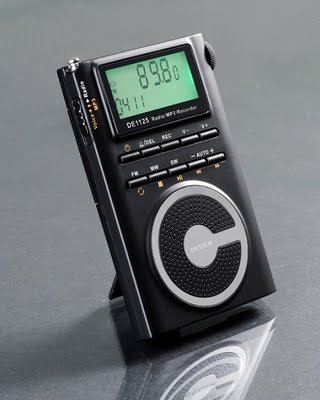
Figure 1.1: The DEGEN DE1125 portable radio and multimedia player, shown standing upright with its integrated kickstand.
2. Przewodnik konfiguracji
2.1 Rozpakowanie i wstępna kontrola
Ostrożnie wyjmij wszystkie elementy z opakowania. Sprawdź, czy wszystkie wymienione poniżej elementy są obecne i nieuszkodzone:
- DEGEN DE1125 Unit
- Słuchawki
- AC Wall Plug (Charger)
- Kabel USB
- Torba transportowa
- Akumulator do ponownego ładowania
- Instrukcja obsługi (ten dokument)
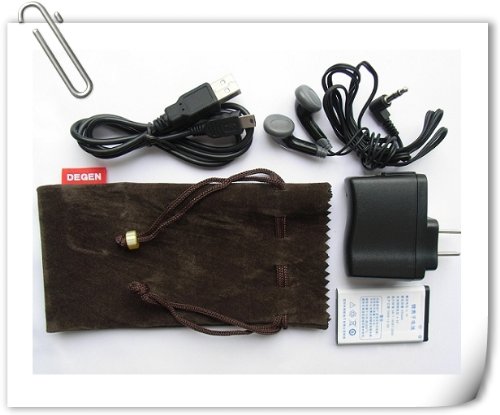
Figure 2.1: All included accessories for the DEGEN DE1125, including earphones, USB cable, AC adapter, carrying pouch, and rechargeable battery.
2.2 Instalacja i ładowanie akumulatora
The DE1125 is powered by a rechargeable lithium battery. Before first use, ensure the battery is properly installed and fully charged.
- Znajdź komorę baterii z tyłu urządzenia.
- Insert the rechargeable battery, ensuring correct polarity as indicated inside the compartment.
- Dokładnie zamknij pokrywę komory baterii.
- Connect the small end of the USB cable to the mini-USB port on the side of the DE1125.
- Connect the standard USB end of the cable to the AC wall plug, then plug the AC wall plug into a standard electrical outlet. Alternatively, connect the standard USB end directly to a computer's USB port for charging.
- The display will indicate charging status. Allow the battery to fully charge before initial use.
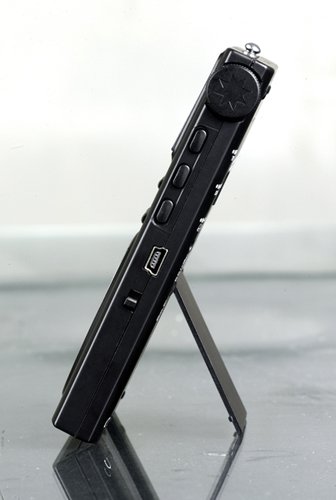
Rysunek 2.2: Strona view of the DEGEN DE1125, highlighting the mini-USB port for charging and data transfer.
3. Instrukcja obsługi
3.1 Sterowanie ogólne
Familiarize yourself with the buttons and display on the DE1125:
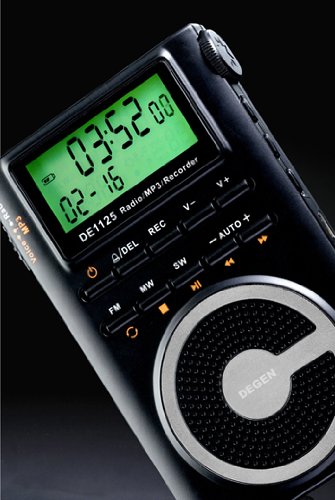
Rysunek 3.1: Zbliżenie view of the DEGEN DE1125's display and control panel, showing buttons for power, mode selection, tuning, and volume.
- Przycisk zasilania (): Naciśnij i przytrzymaj, aby włączyć lub wyłączyć urządzenie.
- Volume Buttons (V+, V-): Dostosuj poziom wyjściowy dźwięku.
- Przycisk menu: Access the main menu or settings within a mode.
- Przyciski nawigacyjne (, ): Navigate through menus or adjust frequencies/tracks.
- Mode Buttons (FM, MW, SW, MP3, REC): Wybierz żądany tryb pracy.
- Przycisk Odtwórz/Pauza (): Start or pause playback in MP3 mode, or confirm selections.
3.2 Radio Operation (FM, AM, SW)
The DE1125 supports FM (64.0 - 108.0 MHz), MW (520-1710 KHz), and SW (2.3-23.0 MHz) bands.
- Włącz urządzenie.
- Press the corresponding mode button (FM, MW, or SW) to select the desired radio band.
- Opcje dostrajania:
- Automatyczne skanowanie: Press and hold the 'AUTO' button to automatically scan and store available stations.
- Strojenie ręczne: Użyj przycisków nawigacyjnych (, ) to fine-tune the frequency step-by-step.
- Strojenie cyfrowe: Enter the desired frequency directly using the numeric keypad (if available, or through menu options).
- ATS (Auto Tuning Storage): Automatically scans and stores strong signals into memory presets.
- Zaprogramowane stacje: The device can store up to 255 preset stations. Use the 'M+' and 'M-' buttons to navigate through stored presets.
3.3 Funkcja odtwarzacza MP3
The DE1125 features 4GB of internal flash memory for MP3 playback.

Figure 3.2: The DEGEN DE1125 display indicating the 'Music' mode, ready for MP3 playback.
- Press the 'MP3' button to enter MP3 player mode.
- Aby przesłać muzykę files from your computer, connect the DE1125 to your computer using the provided USB cable. The device will appear as a removable disk drive. Drag and drop your MP3 filedo pamięci urządzenia.
- Użyj przycisków nawigacyjnych (, ) to select tracks.
- Naciśnij przycisk Play / Pause () aby rozpocząć lub wstrzymać odtwarzanie.
3.4 Digital Recorder Function
The DE1125 can record radio programs or function as a voice recorder.

Figure 3.3: The DEGEN DE1125 display showing the 'Record' mode, indicating readiness for audio capture.

Figure 3.4: The DEGEN DE1125 display showing the 'Voice' mode, used for voice recording functions.
- Press the 'REC' button to enter recording mode.
- Select either 'Radio Record' or 'Voice Record' from the menu.
- Press the 'REC' button again to start recording. The display will show recording time.
- Press the 'REC' button again to stop recording. Recorded files are saved to the internal memory.
- To play back recordings, navigate to the 'Recordings' folder in MP3 mode.
3.5 Ebook Reader Function
The DE1125 supports basic ebook reading functionality.

Figure 3.5: The DEGEN DE1125 display showing the 'Ebook' mode, indicating readiness to display text files.
- Connect the DE1125 to your computer via USB.
- Przenieś zgodny tekst files (e.g., .TXT) to the device's internal memory.
- Odłącz urządzenie od komputera.
- Navigate to the 'Ebook' mode using the menu or mode selection.
- Select the desired ebook file otworzyć i przeczytać.
4. Pielęgnacja i konserwacja
Proper care ensures the longevity and optimal performance of your DEGEN DE1125.
- Czyszczenie: Do czyszczenia zewnętrznej części urządzenia należy używać miękkiej, suchej ściereczki. Nie należy używać płynnych środków czyszczących, aerozoli ani materiałów ściernych.
- Składowanie: Store the device in a cool, dry place away from direct sunlight, extreme temperatures, and high humidity. Use the provided carrying pouch for protection during transport.
- Pielęgnacja baterii: Aby zachować sprawność baterii, należy unikać częstego całkowitego rozładowywania. W przypadku dłuższego przechowywania, należy naładować baterię do około 50% i doładować ją ponownie co kilka miesięcy.
- Narażenie na działanie wody: To urządzenie nie jest wodoodporne. Unikaj kontaktu z wodą i innymi płynami.
- Uderzenie: Chroń urządzenie przed upadkami i uderzeniami, które mogą uszkodzić podzespoły wewnętrzne lub ekran.
5. Rozwiązywanie Problemów
If you encounter issues with your DEGEN DE1125, refer to the following common problems and solutions:
| Problem | Możliwa przyczyna | Rozwiązanie |
|---|---|---|
| Urządzenie się nie włącza. | Bateria jest rozładowana lub nie została prawidłowo zainstalowana. | Naładuj akumulator. Upewnij się, że akumulator jest włożony z zachowaniem prawidłowej polaryzacji. |
| No radio reception or poor signal. | Weak signal area, antenna not extended, interference. | Extend the telescopic antenna fully. Move to an area with better reception. Avoid sources of electronic interference. |
| MP3 filenie gra. | Nieobsługiwane file format, uszkodzony file, NIE files na urządzeniu. | Zapewnić files are in MP3 format. Re-transfer files. Zweryfikuj files exist in the device's memory. |
| Cannot record audio. | Insufficient storage space, incorrect mode. | Usuń stare files to free up space. Ensure you are in the correct recording mode (Radio Record or Voice Record). |
| Ekran jest pusty lub zamrożony. | System error, low battery. | Press and hold the power button for 10 seconds to force a restart. Charge the battery. |
6. Specyfikacje techniczne
| Funkcja | Specyfikacja |
|---|---|
| Marka | Degen |
| Model | DE1125 |
| Wymiary produktu | Wymiary 11 x 1.5 x 6.7 cm |
| Waga przedmiotu | 113 gramów |
| Pojemność pamięci masowej | 4 GB |
| Interfejs sprzętowy | USB |
| Technologia tunera | AM, FM, SW |
| Zakres częstotliwości FM | 64.0 - 108.0 MHz |
| Zakres częstotliwości MW | 520 - 1710 kHz |
| Zakres częstotliwości SW | 2.3 - 23.0 MHz |
| Kompatybilne urządzenia | Nausznik |
| Typ wyświetlacza | PROWADZONY |
| Rozmiar ekranu | 0.5 Inches (visible diagonal 1" / 2 cm) |
| Źródło zasilania | Zasilany bateryjnie |
| Typ baterii | Lithium Rechargeable |
| Typ złącza | USB |
| Zgodny typ nośnika | MP3 |
| Tworzywo | Inny |
7. Gwarancja i wsparcie
7.1 Informacje o gwarancji
This product is covered by a manufacturer's warranty. Please refer to the warranty policy provided at the time of purchase or contact your retailer for specific details regarding warranty duration and terms. Keep your proof of purchase for warranty claims.
7.2 Obsługa klienta
For technical assistance, troubleshooting beyond this manual, or inquiries about your DEGEN DE1125, please contact the retailer or the manufacturer's customer support. Refer to the contact information provided with your purchase documentation.
Powiązane dokumenty - DE1125
 |
Odtwarzacz MP3 Q3: Często zadawane pytania i instrukcja obsługi Kompleksowe FAQ i instrukcja obsługi odtwarzacza MP3 Q3. Znajdź odpowiedzi na często zadawane pytania dotyczące łączności Bluetooth, odtwarzania muzyki, file zarządzanie, bateria i wiele więcej. |
 |
Shenzhen Chiyi Portable MP3 Player 8NB1003377 - Features, Specifications, and Overview Discover the Shenzhen Chiyi Portable MP3 Player (Model 8NB1003377). This compact device offers versatile entertainment with a 1.8-inch display, Bluetooth, expandable storage, radio, and multiple media playback options. |
 |
AideeMaster Portable MP3 Player with Bluetooth 4.0 - HiFi Music, Voice Recorder, eBook Explore the AideeMaster portable MP3 player, featuring Bluetooth 4.0, HiFi sound, voice recording, eBook reader, and support for multiple formats. Compact, lightweight, and versatile for music, radio, and more. |
 |
Instrukcja obsługi RUIZU X52 Instrukcja obsługi odtwarzacza MP3 RUIZU X52, obejmująca sterowanie przyciskami, nawigację po interfejsie, odtwarzanie muzyki, odtwarzanie wideo, łączność Bluetooth, radio FM, krokomierz, nagrania, czytnik e-booków, zdjęcia viewer, narzędzia, ustawienia i specyfikacje. |
 |
Instrukcja obsługi odtwarzacza muzycznego ColorCool M10 Instrukcja obsługi odtwarzacza muzycznego ColorCool M10 zawiera szczegółowe informacje na temat podstawowych operacji, skrócony przewodnik, odtwarzanie muzyki, łączność Bluetooth, odtwarzanie wideo, funkcje radia FM, czytnik e-booków, możliwości nagrywania, narzędzia, ustawienia, zarządzanie folderami i rozwiązywanie problemów. |
 |
Denver MPS-320B MP3 Player User Manual User manual for the Denver MPS-320B MP3 player, detailing its features, button layout, Bluetooth connectivity, music playback, alarm settings, voice recording, photo viewing, ebook reading, tools, folder navigation, and system settings. |
Ask a question about this manual
Ask about setup, troubleshooting, compatibility, parts, safety, or missing instructions. Manuals+ will review the question and use this page’s manual context to help answer it.