
Mitela 50005847
Instrukcja obsługi telefonu IP Mitel 5312
Model: 50005847
1. Wprowadzenie i koniecview
The Mitel 5312 IP Phone is a versatile and user-friendly communication device designed for modern office environments. It features a full-duplex handsfree speakerphone, a multi-line backlit display, and programmable feature keys, providing intuitive access to advanced call handling and converged applications supported by Mitel's IP communication platforms.
This manual provides comprehensive instructions for setting up, operating, maintaining, and troubleshooting your Mitel 5312 IP Phone, ensuring optimal performance and user experience.
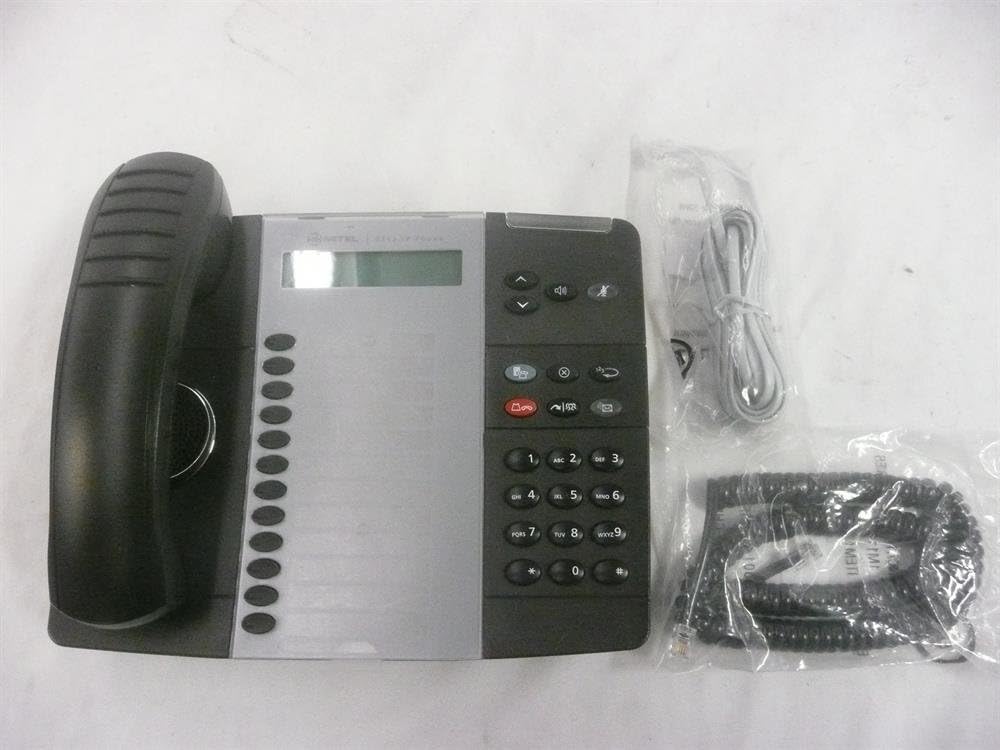
Figure 1: Mitel 5312 IP Phone with included accessories.
2. Główne cechy
- Wyświetlacz: Two-line by 20-character white, backlit, graphics display with contrast control and auto-dimming.
- Programowalne klawisze: Twelve multi-function keys with dual-color LED indicators for speed dialing, line appearances, and feature access.
- Klawisze funkcyjne: Dedicated keys for Hold, Menu, Message, Speaker, Mute, Transfer/Conference, Redial, and Cancel.
- Zestaw głośnomówiący: Full duplex handsfree speakerphone operation.
- Personalizacja: Browser-based desktop user tool programming for easy access to telephone system features.
3. Przewodnik konfiguracji
3.1 Zawartość opakowania
Przed rozpoczęciem upewnij się, że wszystkie komponenty są obecne:
- Jednostka telefoniczna IP Mitel 5312
- Słuchawka i przewód spiralny
- Kabel Ethernetowy
- Zasilacz (jeśli nie używasz zasilania przez Ethernet - PoE)
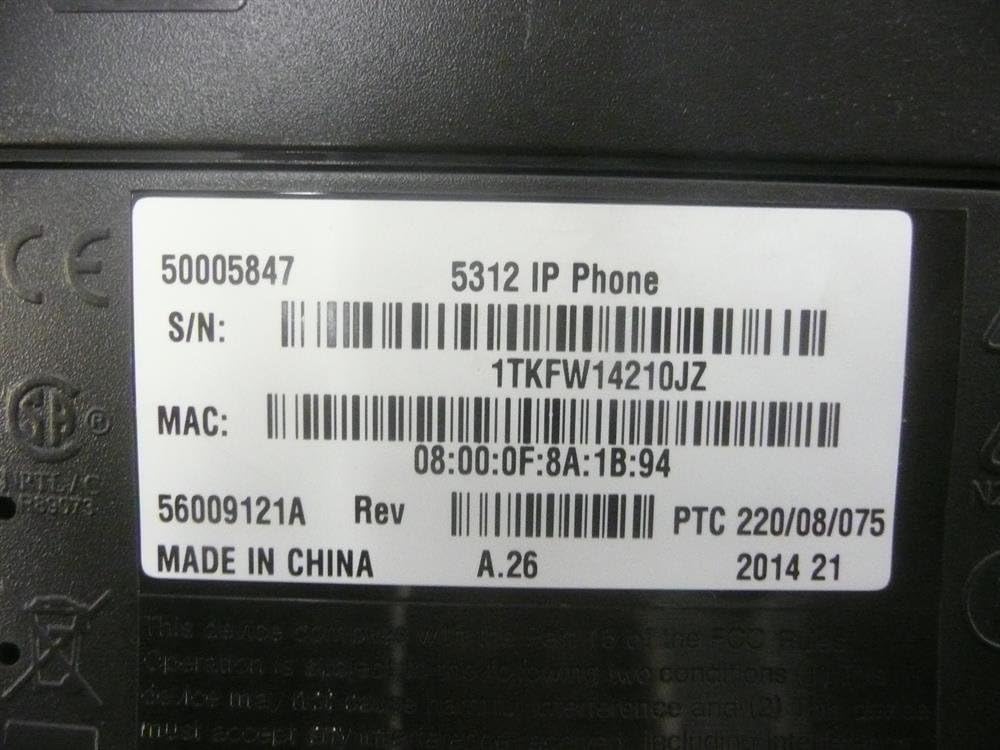
Figure 2: Mitel 5312 IP Phone and its primary accessories.
3.2 Podłączanie telefonu
- Podłącz słuchawkę: Podłącz jeden koniec spiralnego przewodu do słuchawki, a drugi koniec do portu słuchawki w podstawie telefonu.
- Połącz z siecią:
- If using Power over Ethernet (PoE), connect one end of the Ethernet cable to the LAN port on the phone and the other end to a PoE-enabled network switch or router.
- If not using PoE, connect one end of the Ethernet cable to the LAN port on the phone and the other end to your network switch/router. Then, connect the power adapter to the phone's power port and plug it into a power outlet.
- Opcjonalne połączenie z komputerem: Jeżeli chcesz połączyć się z komputerem za pomocą telefonu, podłącz kabel Ethernet z komputera do portu PC w telefonie.
- Pierwsze uruchomienie: The phone will power on and begin its boot-up sequence. This may take a few moments as it obtains network configuration and registers with your IP communications platform.
4. Instrukcja obsługi
4.1 Podstawowe funkcje wywołań
- Nawiązywanie połączenia: Lift the handset, press a line key, or press the Speaker button. Dial the number.
- Odbieranie połączenia: Lift the handset, press the flashing line key, or press the Speaker button.
- Zakończenie połączenia: Replace the handset, or press the Speaker button if using speakerphone.
- Trzymać: Podczas połączenia naciśnij Trzymać key. To retrieve, press the flashing line key.
- Niemy: Naciśnij Niemy Naciśnij przycisk, aby wyciszyć mikrofon podczas połączenia. Naciśnij ponownie, aby włączyć mikrofon.
- Zestaw głośnomówiący: Naciśnij Głośnik key to activate or deactivate the speakerphone.
4.2 Funkcje zaawansowane
- Transfer: Podczas połączenia naciśnij Transfer/Conference key. Dial the transfer destination, then press Transfer/Conference again to complete (blind transfer) or wait for an answer and announce the call (supervised transfer).
- Konferencja: Podczas połączenia naciśnij Transfer/Conference key. Dial the number of the third party. Once connected, press Transfer/Conference ponownie dołączyć do wszystkich partii.
- Ponowne wybieranie: Naciśnij Ponowne wybieranie klawisz, aby zadzwonić pod ostatnio wybierany numer.
- Message Access: Naciśnij Wiadomość klawisz umożliwiający dostęp do poczty głosowej.
- Programowalne klawisze: The twelve programmable keys can be configured for speed dialing, line appearances, or quick access to system features. Consult your system administrator for specific programming details.
5. Konserwacja
Proper care and maintenance will extend the life of your Mitel 5312 IP Phone.
- Czyszczenie: Użyj miękkiego, lekko damp cloth to clean the phone's surface. Avoid abrasive cleaners, solvents, or strong chemicals. Do not spray liquids directly onto the phone.
- Środowisko: Keep the phone in a dry environment, away from direct sunlight, excessive heat, or extreme cold. Ensure proper ventilation.
- Obsługiwanie: Handle the phone and its components with care. Avoid dropping the handset or pulling excessively on cords.
6. Rozwiązywanie Problemów
W tej sekcji opisano typowe problemy, jakie mogą wystąpić w telefonie IP Mitel 5312.
| Problem | Możliwa przyczyna | Rozwiązanie |
|---|---|---|
| No dial tone / Phone not registering | Network cable disconnected, no power (if not PoE), incorrect network configuration, server issue. | Check Ethernet cable connection. Ensure power adapter is plugged in (if applicable). Verify network settings with your IT administrator. Restart the phone by unplugging and replugging the power/Ethernet cable. |
| Wyświetlacz jest pusty lub nieczytelny | No power, display settings, hardware fault. | Check power connection. Adjust display contrast (if available). If the issue persists, contact support. |
| Nie słyszę dzwoniącego / Dzwoniący mnie nie słyszy | Volume too low, Mute activated, faulty handset/speakerphone, network quality. | Adjust volume. Check if Mute is active. Try speakerphone or handset to isolate the issue. Check network connection quality. |
If you continue to experience issues, please contact your IT support or Mitel customer service. Be prepared to provide the model number and serial number of your device.
7. Specyfikacje
Detailed technical specifications for the Mitel 5312 IP Phone (Model: 50005847).
| Funkcja | Szczegół |
|---|---|
| Numer modelu | 50005847 |
| Marka | Mitel |
| Waga przedmiotu | 3 funta |
| Kolor | Czarny, Srebrny |
| Typ telefonu | Sznurowy |
| Tworzywo | Plastikowy |
| Źródło zasilania | Elektryczny przewodowy |
| Typ dialera | Pojedyncza klawiatura |
| Typ systemu odbierającego | Cyfrowy |
| Kompatybilne urządzenia | Mitel's IP communications platforms, VoIP services, PSTN networks |
| Możliwość prowadzenia rozmów konferencyjnych | Podstawowy |
| Pierwsza dostępna data | 4 sierpnia 2009 r. |

Figure 3: Product label with identification details.
Extracted details from label:
Numer seryjny: 1TKFW14210JZ, FSABV9236
Adres MAC: 08:00:0F:8A:1B:94, 08-00-0F-3B-E5-DA
Rewizja: A.26, A.2
8. Wsparcie i gwarancja
For technical assistance, troubleshooting beyond this manual, or warranty inquiries, please contact Mitel customer support or your authorized Mitel reseller.
When contacting support, please have your product model number (50005847) and serial number ready. The serial number can be found on the label at the bottom of your phone unit (refer to Figure 3).
Information regarding protection plans and return policies may be available from your point of purchase.