
1. Wprowadzenie
This manual provides detailed instructions for the proper setup, operation, and maintenance of your Veho VMS-004 Discovery Deluxe USB Microscope. Please read this manual thoroughly before using the device to ensure optimal performance and longevity.
The Veho VMS-004 is a versatile USB microscope designed for detailed observation and digital capture of magnified images and videos. It features up to 400x magnification, a 2.0 Megapixel CMOS lens, and adjustable LED illumination, making it suitable for various applications including educational, hobbyist, and professional use.
2. Informacje dotyczące bezpieczeństwa
- Nie rozbierać: Attempting to disassemble or modify the microscope may cause damage and void the warranty.
- Unikaj bezpośredniego światła słonecznego: Do not expose the microscope to direct sunlight or high temperatures.
- Zachowaj ostrożność: The lens and internal components are delicate. Avoid dropping or subjecting the device to strong impacts.
- Utrzymuj w suchości: To urządzenie nie jest wodoodporne. Unikaj narażenia na działanie wody i wysokiej wilgotności.
- Źródło zasilania: Use only the specified USB power source.
- Dzieci: Keep out of reach of small children. Adult supervision is recommended during use.
3. Zawartość opakowania
Sprawdź, czy w przesyłce znajdują się wszystkie elementy:
- Veho VMS-004 Discovery Deluxe USB Microscope
- Flexi Alloy Stand
- Software CD (for drivers and application)
- Instrukcja obsługi (ten dokument)
4. Koniec produktuview
Familiarize yourself with the main components of the Veho VMS-004 microscope.

Figure 4.1: The Veho VMS-004 Discovery Deluxe USB Microscope mounted on its flexi alloy stand.
- Korpus mikroskopu: Contains the lens, CMOS sensor, and illumination LEDs.
- Koło ostrości: Located on the microscope body, used to adjust the focus for clear images.
- Przycisk migawki: A button on the microscope body for capturing still images.
- LED Illumination Control: A small wheel or dial to adjust the brightness of the built-in LEDs.
- Kabel USB: For connecting the microscope to your computer.
- Flexi Alloy Stand: Provides a stable base and adjustable positioning for the microscope.

Rysunek 4.2: Zbliżenie view of the focus wheel and magnification markings on the microscope body.

Rycina 4.3: Przód view of the microscope lens, showing the integrated LED illumination ring.
5. Konfiguracja
5.1 Montaż stojaka
The flexi alloy stand provides stability and allows for precise positioning of the microscope.
- Attach the microscope holder to the flexible arm of the stand.
- Secure the microscope into the holder. Ensure it is firmly seated but not overly tightened to avoid damage.
- Umieść stojak na stabilnej, płaskiej powierzchni.
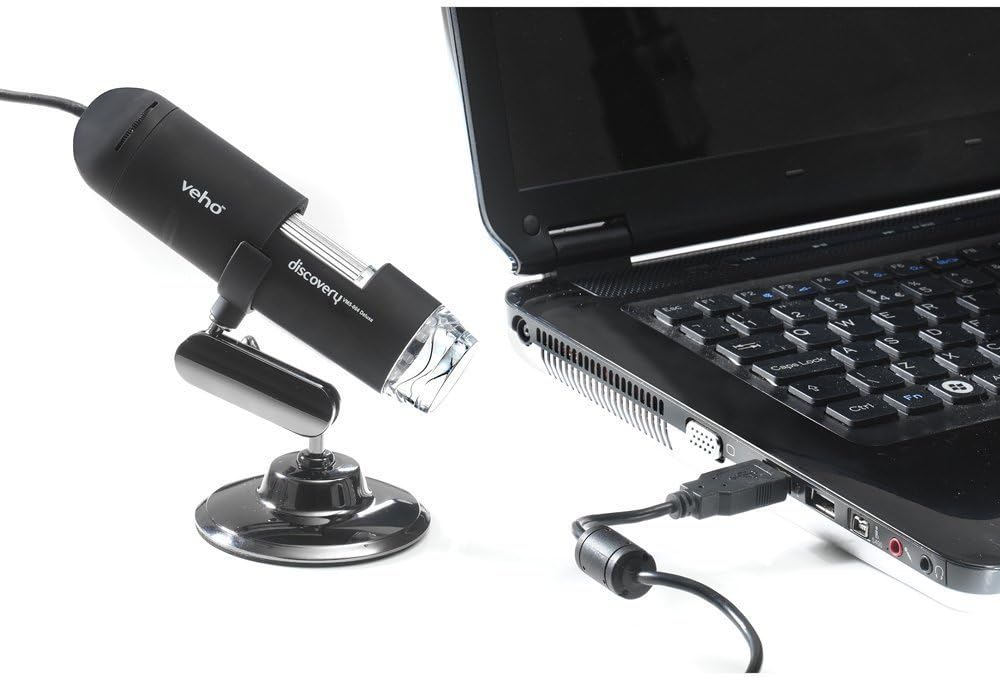
Figure 5.1: The microscope securely mounted on its flexi alloy stand.
5.2 Instalacja oprogramowania
The Veho VMS-004 requires driver and software installation for full functionality on your computer (PC or Mac compatible).
- Insert the provided software CD into your computer's CD/DVD drive. If your computer does not have a CD drive, please visit the official Veho support website to download the necessary drivers and software.
- Follow the on-screen instructions to install the drivers and the accompanying application.
- Jeśli po instalacji pojawi się monit, uruchom ponownie komputer.
5.3 Connecting the Microscope
Once the software is installed, connect the microscope to your computer.
- Plug the USB cable of the microscope into an available USB port on your computer.
- The computer should automatically detect the device.
- Launch the installed microscope application. You should see a live feed from the microscope's camera.

Figure 5.2: The USB microscope connected to a laptop, ready for use.
6. Instrukcja obsługi
6.1 Umieszczanie obiektu
Position the object you wish to observe directly beneath the microscope lens. Adjust the flexible stand to bring the lens close to the object.

Figure 6.1: The microscope positioned over a coin for observation.
6.2 Regulacja powiększenia i ostrości
The microscope offers up to 400x digital magnification. To achieve a clear image:
- Adjust the distance between the microscope lens and the object using the flexible stand.
- Rotate the focus wheel on the microscope body until the image on your computer screen is sharp and clear.
- Notatka: The effective magnification changes with the distance from the object and the focus setting.
6.3 LED Illumination Control
The microscope features built-in LEDs to illuminate your subject. To adjust the brightness:
- Locate the LED illumination control (a small wheel or dial) on the microscope cable or body.
- Rotate the control to increase or decrease the LED brightness as needed for optimal viewing.
6.4 Robienie zdjęć i nagrywanie filmów
The included software allows you to capture still images and record videos.
- Obraz nieruchomy: Press the snapshot button on the microscope body or click the capture button within the software interface.
- Nagrywanie wideo: Use the record function within the software application to start and stop video capture.
- Złapany files are typically saved to a default folder on your computer, which can usually be configured within the software settings.
6.5 Measurement Software
The accompanying software includes measurement capabilities. Refer to the software's help documentation for detailed instructions on how to calibrate and use the measurement tools. For accurate measurements, it is recommended to use a known reference scale in your image.
7. Konserwacja
- Czyszczenie obiektywu: Używaj miękkiej, niepozostawiającej włókien ściereczki przeznaczonej specjalnie do soczewek optycznych. Nie używaj środków czyszczących ani rozpuszczalników o właściwościach ściernych.
- Czyszczenie ciała: Wytrzyj korpus mikroskopu i postaw go na sucho lub lekkoamp, miękka ściereczka.
- Składowanie: Gdy mikroskop nie jest używany, należy go przechowywać w czystym, suchym i wolnym od kurzu miejscu.
- Aktualizacje oprogramowania: Periodically check the Veho official website for software and driver updates to ensure compatibility and optimal performance.
8. Rozwiązywanie Problemów
| Problem | Możliwa przyczyna | Rozwiązanie |
|---|---|---|
| Brak obrazu na ekranie / Urządzenie nie zostało wykryte |
|
|
| Obraz jest rozmazany lub nieostry |
|
|
| Obraz jest zbyt ciemny lub zbyt jasny |
|
|
| Magnification does not appear to be 400x |
|
|
9. Specyfikacje
| Numer modelu | VMS-004D |
| Powiększenie | Up to x400 (digital) |
| Obiektyw | 2.0 megapikseli CMOS |
| Oświetlenie | On/Off LEDs (adjustable brightness) |
| Mieszkania | Tacton Rubber Touch |
| Podstawka | Flexi Alloy Stand |
| Łączność | USB |
| Zgodność | Kompatybilny z komputerami PC i Mac |
| Wymiary produktu | Wymiary 13.46 x 10.92 x 22.35 cm |
| Waga przedmiotu | 159 gramów |
| Tomtage | 5 V (zasilanie przez USB) |
| Typ źródła światła | Fluorowiec |
| Kąt rzeczywisty View | 30 stopni |
10. Gwarancja i pomoc techniczna
For warranty information, technical support, or service inquiries, please refer to the warranty card included with your product or visit the official Veho webZachowaj dowód zakupu na wypadek roszczeń gwarancyjnych.
Veho Official Webstrona: www.veho-world.com