
1. Wprowadzenie
This manual provides instructions for the installation, operation, maintenance, and troubleshooting of the Juniper EX3200-24T Layer 3 Switch. The EX3200-24T is a fixed-configuration switch designed for access-layer deployments in various network environments, offering comprehensive Layer 2 and Layer 3 switching capabilities.
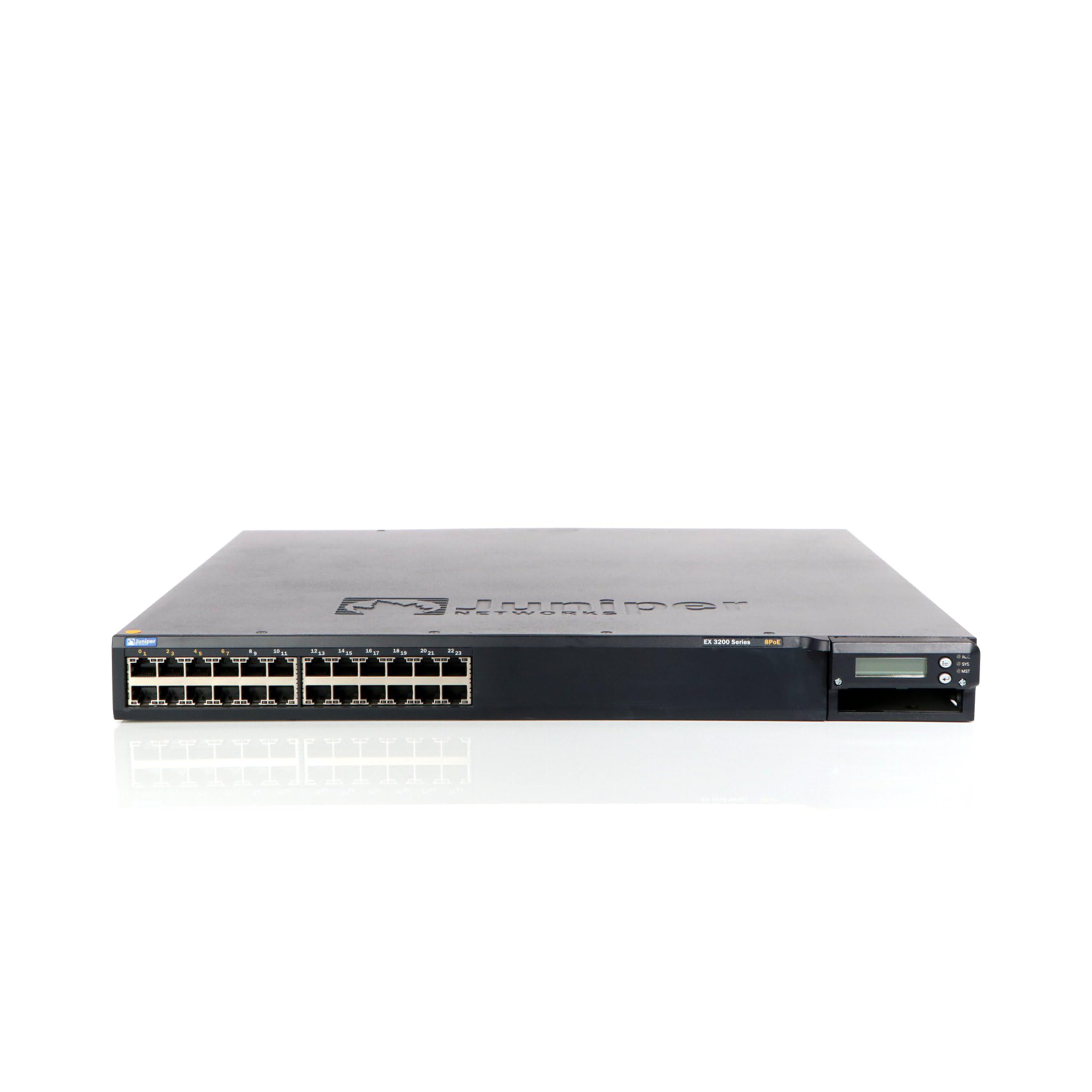
Rycina 1: Przód view of the Juniper EX3200-24T Layer 3 Switch. This image displays the 24 Ethernet ports, along with various status indicator lights and the Juniper Networks branding.
2. Konfiguracja
Follow these steps to properly set up your Juniper EX3200-24T switch.
2.1 Rozpakowanie i kontrola
- Ostrożnie wyjmij przełącznik z opakowania.
- Sprawdź przełącznik pod kątem oznak uszkodzeń fizycznych. W przypadku stwierdzenia uszkodzenia skontaktuj się natychmiast ze sprzedawcą.
- Sprawdź, czy wszystkie elementy wymienione w liście przewozowym są obecne.
2.2 Montaż w szafie rack (opcjonalnie)
The EX3200-24T can be mounted in a standard 19-inch equipment rack. Use the provided rack-mount kit and follow the instructions included with the kit for secure installation.
2.3 Podłączanie zasilania
- Ensure the power switch on the rear panel of the switch is in the OFF position.
- Connect the provided AC power cord to the power inlet on the rear of the switch.
- Podłącz drugi koniec przewodu zasilającego do uziemionego gniazdka elektrycznego.
2.4 Podłączanie kabli sieciowych
Connect Ethernet cables from your network devices (computers, servers, other switches) to the 10/100/1000Base-T ports on the front panel of the EX3200-24T switch. Ensure cables are securely seated.
3. Instrukcja obsługi
This section outlines the basic operation of the Juniper EX3200-24T switch.
3.1 Włączanie przełącznika
After connecting the power cord, flip the power switch on the rear panel to the ON position. The system status LEDs on the front panel will illuminate during the boot process.
3.2 Understanding Status LEDs
The front panel features various LEDs to indicate the operational status of the switch and its ports:
- Dioda SYS: Indicates system status (e.g., green for normal operation, amber for warning, red for critical error).
- Dioda ALM: Wskazuje stan alarmowy.
- PPM LED: Indicates power supply module status.
- Diody LED portów: Each port has LEDs indicating link status and activity (e.g., green for link, blinking green for activity).
3.3 Konfiguracja początkowa (dostęp do konsoli)
W celu wstępnej konfiguracji podłącz kabel konsolowy (RJ-45 do DB-9) ze stacji roboczej zarządzającej do portu konsoli w przełączniku. Użyj programu emulującego terminal (np. PuTTY, Tera Term) z następującymi ustawieniami:
- Szybkość transmisji: 9600
- Bity danych: 8
- Parzystość: Brak
- Bity stopu: 1
- Kontrola przepływu: Brak
Refer to the Juniper Networks documentation for detailed configuration procedures.
4. Konserwacja
Regular maintenance ensures optimal performance and longevity of your EX3200-24T switch.
4.1 Czyszczenie
- Periodically clean the exterior of the switch with a soft, dry, lint-free cloth.
- Ensure ventilation openings are free from dust and obstructions to prevent overheating. Do not use liquid or aerosol cleaners directly on the switch.
4.2 aktualizacji oprogramowania sprzętowego
Juniper Networks periodically releases firmware updates to improve performance, add features, and address security vulnerabilities. It is recommended to keep the switch firmware updated. Refer to the official Juniper Networks support webwitryna zawierająca najnowsze oprogramowanie sprzętowe i procedury aktualizacji.
4.3 Względy środowiskowe
Operate the switch within its specified environmental limits (temperature, humidity) to prevent damage and ensure reliable operation. Avoid exposing the switch to direct sunlight, excessive heat, or moisture.
5. Rozwiązywanie Problemów
This section provides solutions to common issues you might encounter with your EX3200-24T switch.
5.1 Brak zasilania
- Objaw: No LEDs are illuminated, and the switch does not power on.
- Działanie:
- Sprawdź, czy przewód zasilający jest prawidłowo podłączony do przełącznika i gniazdka elektrycznego.
- Upewnij się, że przełącznik zasilania na tylnym panelu jest w pozycji ON.
- Check the electrical outlet with another device to confirm it is functional.
- Jeśli używasz listwy zasilającej lub UPS-a, upewnij się, że są one włączone i działają prawidłowo.
5.2 Brak połączenia sieciowego
- Objaw: Devices connected to the switch cannot access the network.
- Działanie:
- Check the port LEDs on the switch for the connected device. A solid green LED indicates a link. If no link, try a different port or cable.
- Verify the network cable is securely connected at both ends (switch and device).
- Ensure the connected device's network adapter is enabled and configured correctly.
- If multiple devices are affected, check the uplink connection from the EX3200-24T to your core network.
- Consult the switch's configuration for VLANs, IP addressing, and other network settings.
5.3 System Alarm LED (ALM) is Amber/Red
- Objaw: The ALM LED is illuminated amber or red.
- Działanie:
- Log in to the switch via the console or network management interface.
- Check system logs and alarm messages for details on the specific issue.
- Common causes include power supply issues, fan failures, or high temperature.
- Address the root cause as indicated by the logs.
6. Specyfikacje
Key technical specifications for the Juniper EX3200-24T Layer 3 Switch:
| Funkcja | Specyfikacja |
|---|---|
| Marka | Sieci Juniper |
| Numer modelu | EX3200-24T |
| Liczba portów | 24 (16 x 10/100/1000Base-T, 8 x 10/100/1000Base-T) |
| Gniazdo rozszerzeń | 1 x Expansion Slot |
| Szybkość przesyłu danych | 1 gigabitów na sekundę |
| Obsługa warstw | Warstwa 3 |
| Waga przedmiotu | 14.9 funtów |
| Kolor | Czarny |
| Kompatybilne urządzenia | Pulpit |
| UPC | 832938037793 |
7. Gwarancja i wsparcie
7.1 Gwarancja na produkt
The Juniper EX3200-24T Layer 3 Switch is covered by a standard manufacturer's warranty. For detailed information regarding warranty terms, duration, and coverage, please refer to the warranty card included with your product or visit the official Juniper Networks webstrona.
7.2 Wsparcie techniczne
For technical assistance, troubleshooting beyond this manual, or to report issues, please contact Juniper Networks technical support. Support resources, including documentation, FAQs, and contact information, are available on the official Juniper Networks support portal: