
Wstęp
Thank you for choosing the NOVA Lightweight Wheelchair Model 7180L. This manual provides essential information for the safe assembly, operation, maintenance, and care of your wheelchair. Please read this manual thoroughly before using the product to ensure proper function and user safety. This wheelchair is designed for individuals requiring mobility assistance, offering features such as flip-up desk arms, adjustable footrests, and safety anti-tippers.

Image: The NOVA Lightweight Wheelchair Model 7180L, showcasing its overall design with black upholstery and chrome frame.
Informacje dotyczące bezpieczeństwa
Your safety is paramount. Adhere to all warnings and instructions provided in this manual.
- Nośność: Do not exceed the maximum weight capacity of 300 lbs (136 kg). Exceeding this limit can compromise the wheelchair's stability and safety.
- Zabezpieczenia przed wywrotką: Always ensure the anti-tippers are properly engaged when using the wheelchair, especially on inclines or when leaning back. These devices are designed to prevent backward tipping.
- Hamulce: Always engage the wheel locks (brakes) when transferring in or out of the wheelchair, or when the wheelchair is stationary. Ensure brakes are properly adjusted and functional.
- Transfery: Exercise extreme caution during transfers. Ensure the wheelchair is on a level surface and the brakes are locked. Seek assistance if necessary.
- Podnóżki: Ensure footrests are securely attached and adjusted to the correct height for the user to prevent feet from dragging or becoming entangled.
- Składanie/rozkładanie: Keep hands and fingers clear of moving parts when folding or unfolding the wheelchair to avoid pinching.
- Konserwacja: Regularly inspect all components for wear, damage, or loose parts. Do not use the wheelchair if any part is damaged or missing.

Obraz: Zbliżenie view of the anti-tippers, which can be flipped up and out of the way when not in use, enhancing safety by preventing backward tipping.
Komponenty ponadview
Familiarize yourself with the main components of your NOVA Lightweight Wheelchair:
- Rama: Durable, lightweight hammer-tone grey/black finish.
- Tapicerka: Strong, breathable, and easy-to-clean nylon canvas with foam polyurethane padding for seat and back.
- Podłokietniki: Padded, flip-up desk-style arms for easy transfers and access to tables.
- Podnóżki: Adjustable, swing-away, and removable footrests with heel loops.
- Koła: Large rear wheels for self-propulsion, smaller front casters for maneuverability.
- Wheel Locks (Brakes): Levers located near the rear wheels to secure the wheelchair.
- Zabezpieczenia przed wywrotką: Rear-mounted safety devices to prevent backward tipping.
- Uchwyty do pchania: Located at the back for an attendant to push the wheelchair.

Obraz: Bok view of the wheelchair, showing the large rear wheels, front casters, and the overall frame structure.
Konfiguracja i montaż
The NOVA Lightweight Wheelchair is designed for minimal assembly. It arrives largely pre-assembled and ready for use after attaching the footrests and making necessary adjustments.
- Rozkładanie wózka inwalidzkiego:
- Złożony wózek inwalidzki należy umieścić na płaskiej i stabilnej powierzchni.
- Grasp the push handles and gently pull them apart until the frame begins to open.
- Push down on the seat rails until the seat is fully flat and locked into position. Ensure all locking mechanisms are engaged.
- Montaż podnóżków:
- Align the footrest attachment pins with the receivers on the front of the wheelchair frame.
- Push the footrest down until it clicks securely into place.
- Swing the footrest inward towards the wheelchair.
- Powtórz tę samą czynność dla drugiego podnóżka.
- Adjusting Footrest Height:
- Loosen the adjustment knob or lever on the footrest extension tube.
- Adjust the footplate to a height where the user's feet are comfortably supported, with knees at approximately a 90-degree angle and thighs parallel to the ground.
- Tighten the adjustment knob or lever securely.
- Brake Adjustment (if necessary):
- If the wheel locks do not engage securely or are too difficult to operate, they may require adjustment.
- Consult a qualified technician or refer to detailed instructions for brake adjustment, which typically involves loosening and repositioning the brake mechanism relative to the wheel.

Image: The wheelchair in its folded state, illustrating its compact dimensions for storage and transport.
Instrukcja obsługi
Using the Wheel Locks (Brakes)
- Do angażować się the wheel locks, push the brake levers forward until they firmly press against the tires.
- Do odłączyć the wheel locks, pull the brake levers backward.
- Always ensure both wheel locks are fully engaged before transferring in or out of the wheelchair.
Using Flip-Up Desk Arms
- Do flip up an armrest, locate the release lever near the armrest pivot point. Push the lever to release the arm, then lift the armrest upwards.
- Do lock down an armrest, push the armrest back down until it clicks into place. Ensure it is securely locked before use.
- These arms facilitate easier transfers and allow the user to get closer to desks or tables.
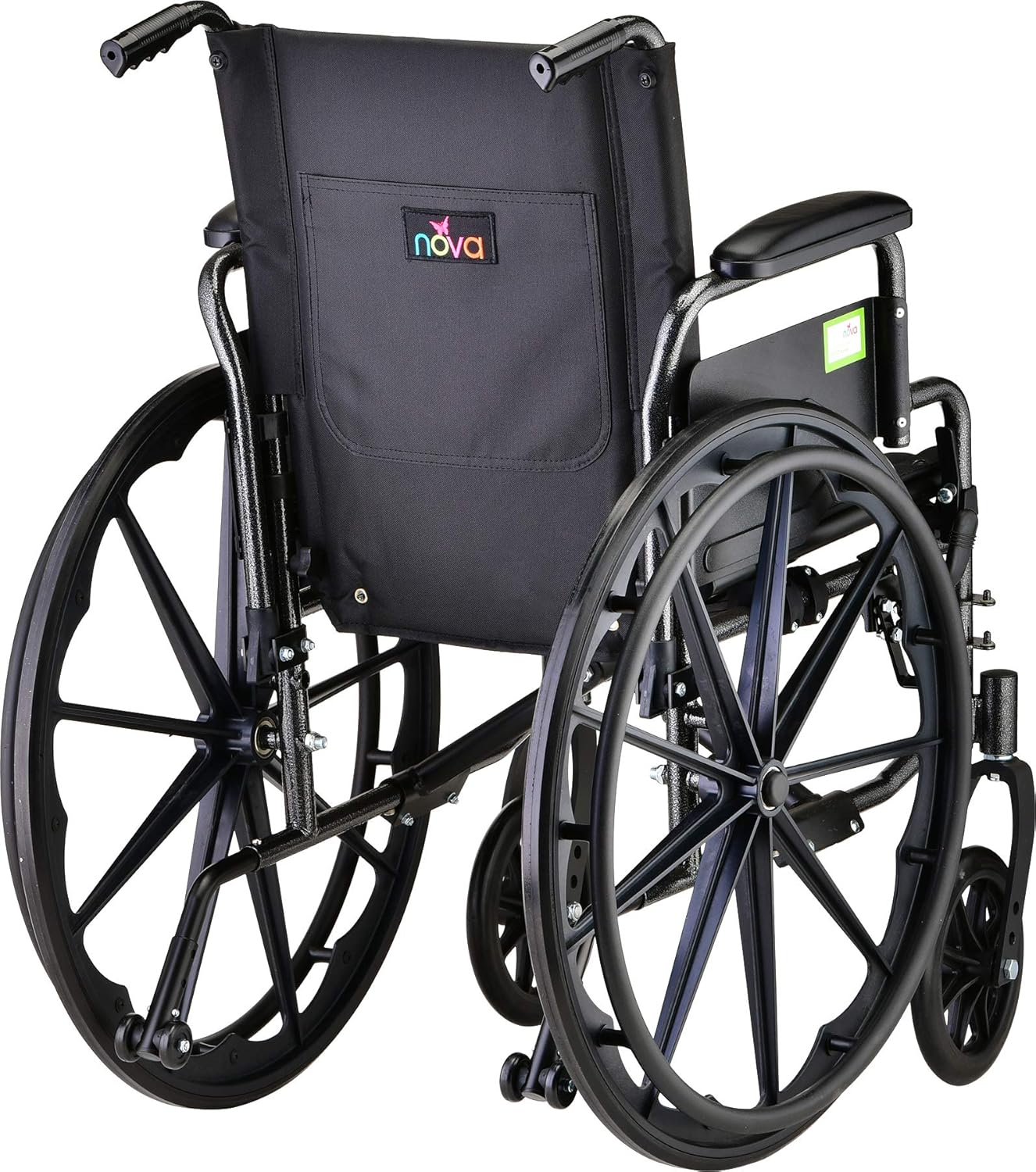
Image: Close-up of the armrest, highlighting its padded design and the mechanism for flipping it up for transfers or desk access.
Using Footrests
- Do swing away footrests, pull the release lever on the side of the footrest hanger and swing the footrest outwards. This provides clear access for transfers.
- Do usunąć footrests, swing them outwards, then lift them straight up off the attachment pins.
- Always ensure the user's feet are placed securely on the footplates and within the heel loops during movement.
Self-Propelling and Assisted Pushing
- Self-Propelling: Grasp the handrims on the large rear wheels and push forward to move. Use both hands for steering and braking.
- Wspomagane pchanie: An attendant can push the wheelchair using the push handles at the back. Ensure the user is safely seated and aware of movement.
- Always be mindful of obstacles, uneven surfaces, and inclines. Engage anti-tippers as needed.
Dostosowania
Seat Height Adjustment (Hemi Option)
The wheelchair features dual axle positions on the rear wheels, allowing the seat height to be lowered by 2 inches for a "Hemi" (shorter) seat option. This adjustment should be performed by a qualified technician.
Back Upholstery and Handle Height
The back handles and upholstery can be raised by 2 inches to accommodate a seat cushion, providing additional comfort or pressure relief. This adjustment typically involves repositioning bolts or pins on the backrest frame.
Konserwacja
Regularna konserwacja gwarantuje długowieczność i bezpieczną eksploatację wózka inwalidzkiego.
- Czyszczenie:
- Przetrzyj ramkę reklamąamp ściereczką i łagodnym detergentem. Dokładnie osuszyć.
- The nylon upholstery is easy to clean; use a damp cloth with mild soap and water. Avoid harsh chemicals.
- Kontrola:
- Periodically check all nuts, bolts, and fasteners for tightness. Tighten as needed.
- Inspect tires for wear and proper inflation (if applicable).
- Check wheel locks for proper function and adjustment.
- Examine upholstery for tears or excessive wear.
- Ensure anti-tippers are free from obstruction and function correctly.
- Smarowanie: Moving parts such as axle bearings and caster stems may benefit from occasional lubrication with a silicone-based spray.
Rozwiązywanie problemów
| Problem | Możliwa przyczyna | Rozwiązanie |
|---|---|---|
| Wheel locks do not hold securely. | Brakes are out of adjustment or worn. | Adjust the brake mechanism to ensure proper contact with the tire. If worn, contact customer support for replacement parts. |
| Wheelchair drifts to one side. | Uneven tire pressure (if applicable), bent wheel, or misaligned casters. | Check tire pressure. Inspect wheels and casters for damage or misalignment. Contact customer support if the issue persists. |
| Footrests are difficult to attach/remove. | Pins or receivers are dirty or bent. | Clean attachment points. Ensure pins are straight. Apply a small amount of lubricant if needed. |
| Upholstery tearing. | Excessive wear, sharp objects, or exceeding weight capacity. | Avoid sharp objects. Ensure weight capacity is not exceeded. Contact customer support for replacement upholstery if necessary. |
Specyfikacje
Key specifications for the NOVA Lightweight Wheelchair Model 7180L:
- Numer modelu: 7180L
- Dostępne szerokości siedzisk: 16", 18", 20"
- Głębokość siedziska: 16" (all models)
- Nośność: 300 funta (136 kg)
- Product Weight (without footrests): 32 funta (14.5 kg)
- Tworzywo: Nylon upholstery, Polyurethane padding, Metal frame
- Kolor: Black upholstery, Hammer-tone grey/black frame
- Product Dimensions (18" model): 16 x 25 x 36.5 cali (po rozłożeniu)
- Folded Dimensions (18" model): Width Folded: 11.25", Depth Folded: 31.75", Height Folded: 36"
- Seat Height from Floor: 20 inches (adjustable to 18 inches with Hemi option)
- Arm Height from Seat: 10.5 cali
- Footplate Height from Floor: 5" - 9" (regulowane)
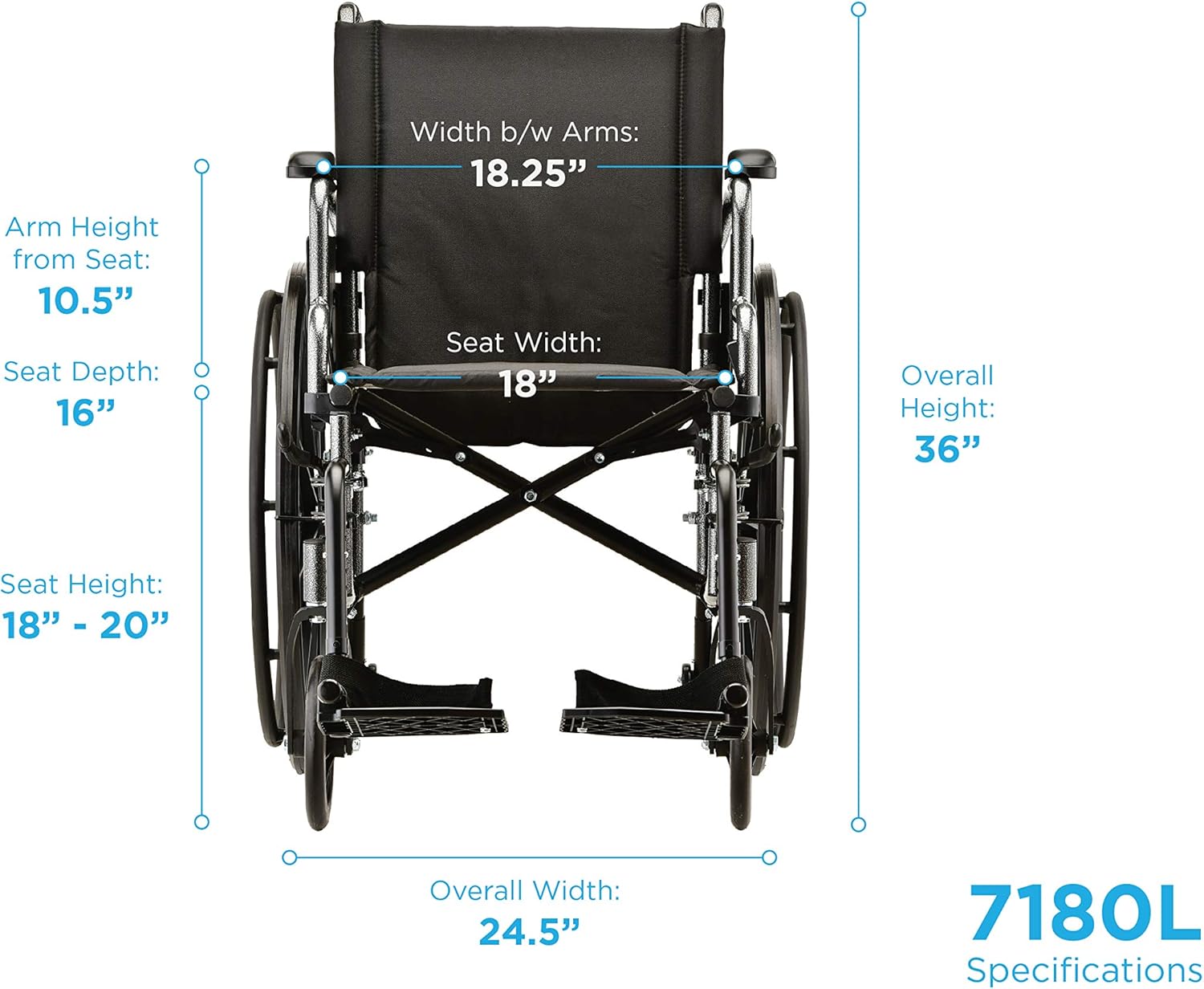
Zdjęcie: Szczegółowy przód view of the wheelchair with key dimensions labeled, including seat width, arm height, and overall height.
Gwarancja i wsparcie
For specific warranty information, please refer to the documentation included with your purchase or visit the official NOVA Medical Products webstrona.
If you have any questions, require assistance with assembly, operation, or need replacement parts, please contact NOVA Medical Products customer support. Contact details can typically be found on the product packaging or the manufacturer's webstrona.