
Wstęp
Thank you for choosing the Mitel Superset 4025 Digital Phone. This manual provides essential information for setting up, operating, and maintaining your new digital telephone. The Superset 4025 is designed for business environments, offering advanced features for efficient communication. Please read this manual thoroughly before using the device to ensure proper functionality and to maximize its capabilities.
Informacje dotyczące bezpieczeństwa
Please observe the following safety precautions to prevent damage to the phone and to ensure your safety:
- Nie wystawiaj telefonu na działanie wody ani nadmiernej wilgoci.
- Unikaj umieszczania telefonu w pobliżu źródeł ciepła lub w bezpośrednim świetle słonecznym.
- Use only the power supply and cables provided or specified by Mitel.
- Nie próbuj samodzielnie otwierać ani naprawiać telefonu. Wszelkie naprawy zlecaj wykwalifikowanemu personelowi.
- Trzymaj telefon z dala od silnych pól elektromagnetycznych.
Organizować coś
The Mitel Superset 4025 Digital Phone requires connection to a compatible digital extension line and a Mitel PBX system for operation. This phone is specifically designed to work with the Mitel SX 200 ML/EL or SX 2000 series phone systems.
Podłączanie telefonu
- Podłącz słuchawkę: Plug the coiled cord from the handset into the designated port on the side or back of the phone base.
- Podłącz przewód zasilający: Connect one end of the line cord to the digital extension line port on the phone and the other end to the wall jack or network interface. Ensure the digital extension line has been programmed for a Superset 4025.
- Podłącz zasilanie (jeśli dotyczy): The phone is corded electric. Ensure it is properly connected to a power source if external power is required for certain features or if it's not powered over Ethernet (PoE).
Once connected, the phone should power on and display initial setup information or be ready for use after system configuration.
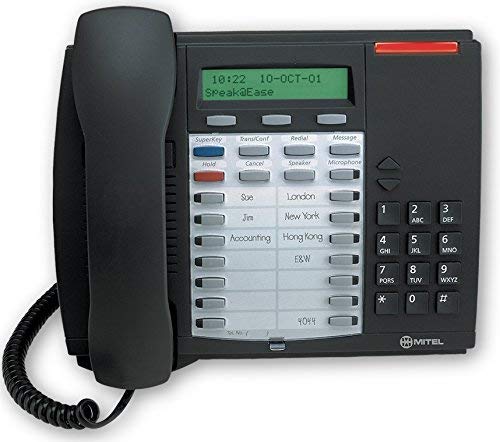
This image shows the Mitel Superset 4025 Digital Phone, highlighting its keypad, display, and programmable keys. The phone features a dark charcoal gray finish.
Instrukcja obsługi
The Superset 4025 offers a range of features for effective communication.
Główne cechy i funkcje
- Podświetlany wyświetlacz: Provides clear visibility of caller information, menu options, and system status.
- Zestaw głośnomówiący: Allows for hands-free communication. Activate by pressing the dedicated speakerphone button.
- Wyświetlacz dzwoniącego: Shows incoming caller ID information on the backlit display.
- Programowalne klawisze: Features 13 personal programmable keys and 14 personal keys with built-in status indicators. These can be customized for speed dialing, feature access, or line appearances.
- Fixed-Function Keys: Includes 10 dedicated keys for common functions such as Hold, Transfer, Conference, Redial, and Mute.
- Context-Sensitive Soft Keys: The keys below the display change their function based on the current phone state (e.g., during a call, idle).
- Super Key Programming: Use the Super Key to easily access and program PBX telephone system features. Consult your system administrator for specific feature codes and programming instructions.
- Off-Hook Call Announce: Allows for announcing a call to a busy extension without interrupting the ongoing conversation.
- ACD Functionality: Supports Automatic Call Distribution (ACD) agent and supervisor functions, making it suitable for call center environments.
- Basic Conference Call Capability: Allows for multi-party conversations. Refer to your system's specific conference setup procedures.
Wykonywanie i odbieranie połączeń
- Zadzwonić: Lift the handset or press the Speakerphone button. Dial the desired number using the single keypad.
- Aby odebrać połączenie: Podnieś słuchawkę lub naciśnij przycisk głośnika, gdy telefon zadzwoni.
- Aby zakończyć połączenie: Odłóż słuchawkę lub naciśnij ponownie przycisk głośnika.
Konserwacja
Proper care and maintenance will extend the life of your Mitel Superset 4025 Digital Phone.
- Czyszczenie: Użyj miękkiego, lekko damp cloth to clean the exterior of the phone. Do not use abrasive cleaners, solvents, or aerosol sprays, as these can damage the finish and internal components.
- Handset and Cord Care: Avoid stretching or twisting the handset cord excessively, as this can lead to damage.
- Warunki środowiskowe: Store and operate the phone in a clean, dry environment within recommended temperature ranges.
Rozwiązywanie problemów
If you encounter issues with your Mitel Superset 4025, try the following steps before contacting support:
- Brak sygnału wybierania:
- Check all cable connections, ensuring they are securely plugged in.
- Verify that the digital extension line is active and correctly programmed for a Superset 4025.
- If using an external power adapter, ensure it is connected and receiving power.
- Wyświetlacz nie działa:
- Ensure the phone is properly connected to its power source.
- Adjust the display contrast or brightness settings if available (refer to system administrator for specific instructions).
- Klawisze nie reagują:
- Gently clean around the keys to remove any debris.
- Restart the phone by disconnecting and reconnecting the line cord (and power, if separate).
- Słaba jakość dźwięku:
- Check handset and line cord connections.
- Upewnij się, że nie występują żadne zakłócenia ze strony innych urządzeń elektronicznych.
- Test with another phone on the same line if possible to rule out line issues.
For persistent issues, contact your system administrator or IT support.
Specyfikacje
| Marka | Mitel |
| Model | Superset 4025 |
| Wymiary produktu (dł. x szer. x wys.) | 12 x 6 x 12 cala |
| Waga przedmiotu | 2.9 funta |
| Kolor | Szary |
| Typ telefonu | Sznurowy |
| Tworzywo | Plastikowy |
| Źródło zasilania | Elektryczny przewodowy |
| Typ dialera | Pojedyncza klawiatura |
| Typ systemu odbierającego | Cyfrowy |
| Kompatybilne urządzenia | Mitel SX-200 series phone systems |
| Możliwość prowadzenia rozmów konferencyjnych | Podstawowy |
Return Policy Information
If you are not satisfied with your purchase for any reason, you may be eligible to return the product within 14 days of receipt. Please consult your reseller or point of purchase for specific return procedures and conditions.
Wsparcie
For technical assistance, advanced programming, or further inquiries regarding your Mitel Superset 4025 Digital Phone, please contact your system administrator or the reseller from whom the product was purchased. The manufacturer is Mitel Networks Corporation.