
1. Wprowadzenie
The Olympus LS-10 Linear PCM Recorder is a portable device designed for high-fidelity audio recording. It captures sound with exceptional clarity, making it suitable for various applications, including live music, nature sounds, and interviews. This manual provides detailed instructions for the proper use and maintenance of your LS-10 recorder.
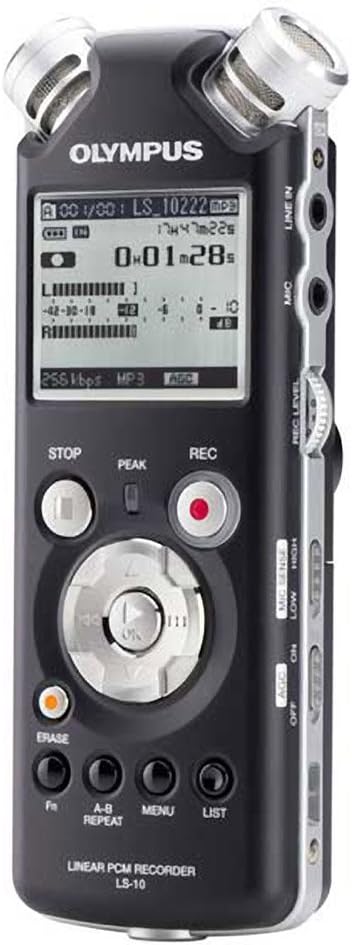
Rycina 1: Przód view of the Olympus LS-10 Linear PCM Recorder, showing the display, control buttons, and built-in microphones.
2. Konfiguracja
2.1 Instalacja baterii
The LS-10 operates on two AA batteries. For optimal performance, use alkaline, lithium, or NiMH rechargeable batteries.
- Znajdź pokrywę komory baterii z tyłu urządzenia.
- Aby otworzyć pokrywę, przesuń ją w kierunku wskazanym strzałką.
- Włóż dwie baterie AA, zwracając uwagę na prawidłową biegunowość (+/-), zgodnie z oznaczeniami wewnątrz komory.
- Dokładnie zamknij pokrywę komory baterii.

Rysunek 2: Tył view of the LS-10, illustrating the location of the battery compartment and built-in speakers.
2.2 Włączanie/wyłączanie
Aby włączyć urządzenie, naciśnij i przytrzymaj MOC Naciskaj przycisk, aż wyświetlacz się zaświeci. Aby wyłączyć, naciśnij i przytrzymaj MOC Naciśnij przycisk ponownie, aż wyświetlacz się wyłączy.
2.3 Inserting an SD/SDHC Card
The LS-10 features an SD/SDHC card slot for expanded storage capacity.
- Locate the SD card slot on the side of the recorder.
- Insert an SD or SDHC card into the slot until it clicks into place. Ensure the card is inserted in the correct orientation.
- To remove the card, gently push it inward until it clicks, then release to eject.
3. Działanie
3.1 Nagrywanie dźwięku
The LS-10 supports uncompressed 24-bit/96kHz Linear PCM recording, as well as WAV, MP3, and WMA formats.
- Wybierz tryb nagrywania: Użyj MENU button to navigate to the recording settings and select your desired format (WAV, MP3, or WMA) and quality.
- Adjust Microphone Sensitivity: Użyj WYCZUCIE MIKROF switch (LOW/HIGH) on the side of the device to match the recording environment. Use LOW for loud sounds and HIGH for quiet sounds.
- Set Recording Level: Użyj POZIOM NAGR dial to adjust the input level. Monitor the level meter on the display to prevent clipping (distortion).
- Rozpocznij nagrywanie: Naciśnij REK button (red circle) to begin recording. The REC indicator will illuminate.
- Zatrzymaj nagrywanie: Naciśnij ZATRZYMYWAĆ SIĘ przycisk, aby zakończyć nagrywanie.

Figure 3: Front panel of the LS-10, highlighting the REC, STOP, and navigation buttons essential for recording and playback.

Rysunek 4: Góra view of the LS-10, displaying the two high-quality built-in stereo microphones.
3.2 Odtwarzanie
Recordings can be played back through the built-in stereo speakers or via headphones.
- Wybierać File: Use the navigation buttons to browse through your recorded files i wybierz żądany utwór.
- Rozpocznij odtwarzanie: Naciśnij ODTWÓRZ/OK przycisk, aby rozpocząć odtwarzanie.
- Dostosuj głośność: Użyj TOM dial on the side of the unit to increase or decrease playback volume.
- Zatrzymaj odtwarzanie: Naciśnij ZATRZYMYWAĆ SIĘ przycisk.
- Powtórz AB: Użyj POWTARZANIE AB button to loop a specific section of a recording.

Rysunek 5: Strona view of the LS-10, showing the LINE IN, MIC, and EAR (headphone) jacks, along with the REC LEVEL and VOLUME controls.
3.3 Nawigacja i ustawienia menu
The LS-10 features a menu system for configuring various settings.
- Naciśnij MENU przycisk, aby uzyskać dostęp do menu głównego.
- Use the navigation buttons (up/down) to scroll through menu options.
- Naciskać ODTWÓRZ/OK aby wybrać opcję lub wejść do podmenu.
- Typowe ustawienia obejmują:
- Rec Mode: Adjust recording quality and format.
- Informacja o systemie: View Informacje o urządzeniu.
- Data i godzina: Ustaw aktualną godzinę i datę.
- Automatyczne wyłączanie: Configure automatic power-off duration.
- Naciśnij LISTA aby wyjść z menu.

Figure 6: The LS-10 display screen, illustrating the menu interface with various system settings.
3.4 File Kierownictwo
The recorder organizes files into folders and allows for easy transfer to a computer.
- Lornetka składana: The LS-10 supports 5 folders, each capable of holding up to 200 messages, plus a dedicated MUSIC folder.
- Erasing Files: Wybierz file chcesz usunąć i naciśnij USUWAĆ przycisk. Potwierdź usunięcie, gdy pojawi się monit.
- Podłączanie do komputera: Connect the LS-10 to your computer using a USB cable. The device will appear as a removable drive, allowing you to transfer files. Compatible with Windows 2000/XP/VISTA and Mac OS 10.2 or later.
4. Konserwacja
4.1 Czyszczenie
To maintain the recorder's performance and appearance:
- Wytrzyj urządzenie miękką, suchą ściereczką.
- W przypadku uporczywych zabrudzeń należy delikatnieampNamocz szmatkę w wodzie i wytrzyj do sucha.
- Do not use abrasive cleaners, solvents, or alcohol, as these can damage the surface.
4.2 Pielęgnacja baterii
- Aby zapobiec wyciekowi baterii, wyjmij je, jeśli urządzenie nie będzie używane przez dłuższy czas.
- Zużyte baterie należy utylizować zgodnie z lokalnymi przepisami.
4.3 Przechowywanie
Store the LS-10 in a cool, dry place away from direct sunlight, extreme temperatures, and high humidity.
5. Rozwiązywanie Problemów
If you encounter issues with your LS-10, refer to the following common problems and solutions:
- Brak zasilania:
- Sprawdź, czy baterie zostały włożone prawidłowo i czy bieguny są właściwe.
- Wymień na nowe baterie.
- Upewnij się, że przycisk zasilania jest wciśnięty i przytrzymany wystarczająco długo.
- Nie można nagrać:
- Check available memory on internal storage or SD card. Delete unnecessary files if storage is full.
- Ensure the device is not in playback mode.
- Verify microphone sensitivity and recording level settings.
- Słaba jakość dźwięku:
- Adjust microphone sensitivity (MIC SENSE) to match the environment.
- Ensure the recording level is not too high (causing distortion) or too low (causing noise).
- Record in a quiet environment if possible.
- Check if external microphones or line-in sources are properly connected.
- Komputer nie rozpoznaje urządzenia:
- Sprawdź, czy kabel USB jest prawidłowo podłączony zarówno do rejestratora, jak i do komputera.
- Wypróbuj inny port USB na swoim komputerze.
- Restart your computer and the LS-10.
6. Specyfikacje
| Funkcja | Szczegół |
|---|---|
| Formaty nagrywania | WAV (Linear PCM), MP3, WMA |
| Pamięć wewnętrzna | 2 GB |
| Pamięć zewnętrzna | Gniazdo kart SD/SDHC |
| Żywotność baterii | Około 14 godzin (nagranie) |
| Baterie | 2 x AA (Alkaline, Lithium, or NiMH) |
| Gniazdo mikrofonu | 3.5mm stereo mini-jack, impedance 2 kohms |
| Gniazdo wejścia liniowego | 3.5mm stereo mini-jack, impedance 2 kohms |
| Gniazdo słuchawkowe | 3.5mm stereo mini-jack, impedance 8 ohms |
| Wbudowany głośnik | 2 x 16mm round dynamic speakers, 8 ohms, 200 mW output |
| Kompatybilne urządzenia | Komputer osobisty |
| Interfejs sprzętowy | USB |
| Wymiary (szer. x wys. x gł.) | 3.4 x 6.3 x 6.5 cale (w przybliżeniu) |
| Waga | 1 funt (w przybliżeniu) |
7. Informacje o pomocy technicznej
For further assistance, technical support, or information regarding warranty, please refer to the official Olympus webOdwiedź witrynę lub skontaktuj się z działem obsługi klienta. Zachowaj paragon i numer seryjny produktu, gdy będziesz szukać pomocy.