
1. Wprowadzenie
Thank you for choosing the TFA Dostmann Digital Weather Station 35.1065. This device provides accurate indoor temperature, humidity, time, date, and a weather trend forecast. Please read this manual carefully before using the device to ensure proper operation and to prevent damage.
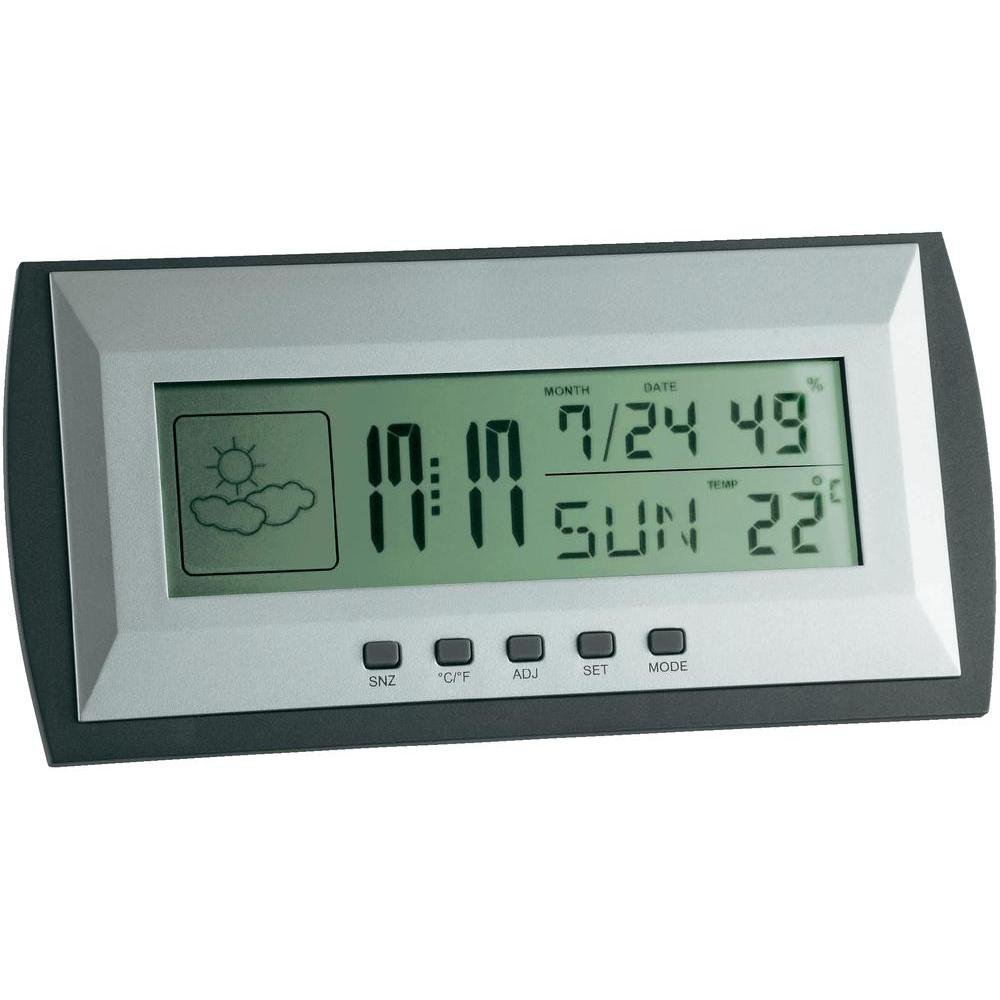
Figure 1: TFA Dostmann Digital Weather Station 35.1065 on a wooden desk. This image shows the weather station displaying time, date, and weather information in a typical home or office setting.
2. Informacje dotyczące bezpieczeństwa
- Zachowaj tę instrukcję do wykorzystania w przyszłości.
- Nie wystawiaj urządzenia na działanie ekstremalnych temperatur, wibracji ani wstrząsów.
- Unikaj bezpośredniego światła słonecznego i wilgoci.
- Nie zanurzaj urządzenia w wodzie.
- Nie próbuj samodzielnie naprawiać ani modyfikować urządzenia. W celu uzyskania pomocy skontaktuj się z wykwalifikowanym personelem.
- Zużyte baterie należy utylizować zgodnie z lokalnymi przepisami.
3. Konfiguracja
3.1 Zawartość opakowania
Upewnij się, że wszystkie elementy są obecne:
- TFA Dostmann Digital Weather Station 35.1065
- 2 baterie AA
- Instrukcja obsługi (ten dokument)
3.2 Instalacja baterii
- Locate the battery compartment cover on the back of the weather station.
- Otwórz pokrywę.
- Insert two (2) AA batteries, observing the correct polarity (+ and - markings).
- Dokładnie zamknij pokrywę komory baterii.
Urządzenie włączy się automatycznie i wyświetli wstępne odczyty.
3.3 Ustawienia początkowe (czas, data, jednostka temperatury)
Upon first power-on or after battery replacement, you may need to set the time, date, and preferred temperature unit.
- Naciśnij i przytrzymaj USTAWIĆ button for a few seconds to enter setting mode. The digit to be set will flash.
- Użyj PRZYMIOT przycisk umożliwiający dostosowanie migającej wartości (np. godziny, minut, roku, miesiąca, dnia).
- Naciśnij USTAWIĆ Naciśnij przycisk ponownie, aby potwierdzić ustawienie i przejść do następnego parametru.
- Repeat steps 2 and 3 until all desired settings (time, date) are configured.
- Aby przełączać się między stopniami Celsjusza (°C) i Fahrenheita (°F), naciśnij przycisk ° C / ° F przycisk.
4. Obsługa stacji pogodowej
4.1 Wyświetl ponadview
Na wyświetlaczu LCD wyświetlane są różne informacje:
- Czas: Aktualny czas w formacie 12-godzinnym lub 24-godzinnym.
- Data: Bieżący miesiąc, dzień i dzień tygodnia.
- Temperatura: Indoor temperature, displayed in °C or °F.
- Wilgotność: Indoor humidity percentage.
- Ikona prognozy pogody: Indicates a trend forecast (e.g., sunny, cloudy, rainy). This is a prediction based on atmospheric pressure changes and may not always reflect actual weather.
4.2 Funkcje przycisków
- SNZ (Snooze): Aktywuje funkcję drzemki dla alarmu.
- °C/°F: Przełącza między wyświetlaniem temperatury w stopniach Celsjusza i Fahrenheita.
- ADJ (Adjust): Used to adjust values during setting mode.
- ZESTAW: Wprowadza i potwierdza ustawienia.
- Sposób użycia: Switches between different display modes (e.g., time, alarm time).
4.3 Ustawianie alarmu
- Naciśnij TRYB Naciskaj przycisk wielokrotnie, aż wyświetli się godzina alarmu.
- Naciśnij i przytrzymaj USTAWIĆ button. The alarm hour will flash.
- Użyj PRZYMIOT przycisk, aby ustawić żądaną godzinę alarmu.
- Naciskać USTAWIĆ aby potwierdzić i przejść do protokołu.
- Używać PRZYMIOT aby ustawić żądaną liczbę minut alarmu.
- Naciskać USTAWIĆ aby potwierdzić i wyjść z ustawień alarmu.
- Aby aktywować/dezaktywować alarm, naciśnij przycisk PRZYMIOT Naciśnij przycisk, gdy wyświetlany jest czas alarmu. Ikona alarmu pojawi się/zniknie.
5. Konserwacja
5.1 Czyszczenie
Wyczyść urządzenie miękką,amp cloth. Do not use abrasive cleaners or solvents. Ensure no water enters the device.
5.2 Wymiana baterii
When the display becomes dim or the device stops functioning, replace the batteries. Follow the steps in Section 3.2. Always replace both batteries at the same time with new AA batteries.
5.3 Przechowywanie
If the device will not be used for an extended period, remove the batteries to prevent leakage and damage. Store in a cool, dry place.
6. Rozwiązywanie Problemów
| Problem | Możliwa przyczyna | Rozwiązanie |
|---|---|---|
| Brak obrazu lub obraz jest przyciemniony. | Baterie są słabe lub nieprawidłowo zainstalowane. | Wymień baterie na nowe, zwracając uwagę na prawidłową biegunowość. |
| Nieprawidłowa data/godzina. | Data/czas są ustawione nieprawidłowo. | Aby ustawić godzinę i datę, zapoznaj się z sekcją 3.3. |
| Niedokładne odczyty temperatury/wilgotności. | Urządzenie należy umieścić w pobliżu źródeł ciepła, otworów wentylacyjnych lub w miejscu narażonym na bezpośrednie działanie promieni słonecznych. | Relocate the weather station to a stable indoor environment away from extreme temperature fluctuations. Allow time for readings to stabilize. |
| Weather forecast icon seems incorrect. | Weather forecast is a trend prediction based on atmospheric pressure, not a real-time forecast. | Understand that the icon indicates a general trend over the next 12-24 hours, not current conditions. |
7. Specyfikacje

Figure 2: TFA Dostmann Digital Weather Station 35.1065 with dimensions. This image provides a detailed view of the device, including its width (18 cm), height (9 cm), and depth (3.81 cm).
- Marka: TFA Dostmann
- Model: 35.1065
- Źródło zasilania: Battery-powered (2 x AA batteries, included)
- Tworzywo: Plastikowy
- Cechy szczególne: Trend forecast
- Typ wyświetlacza: LCD
- Wymiary przedmiotu (gł. x szer. x wys.): Wymiary: 3.8 cm x 18 cm x 9 cm
- Waga przedmiotu: 164 gram
- Zawartość zestawu: Weather station, batteries, user manual
- Zalecane użycie: Domowe biuro
- Konkretne zastosowania: Date, Humidity, Temperature, Time
- Kraj pochodzenia: Chiny
8. Gwarancja i wsparcie
For warranty information, please refer to the documentation provided at the time of purchase or visit the official TFA Dostmann website. For technical support or further assistance, please contact TFA Dostmann customer service through their official channels.
Official TFA Dostmann Webstrona: www.tfa-dostmann.de


