
1. Wprowadzenie
Thank you for choosing the Calor Pressing Profil steam generator, model 288000. This manual provides essential information for the safe and efficient use, maintenance, and troubleshooting of your appliance. Please read it thoroughly before first use and keep it for future reference.
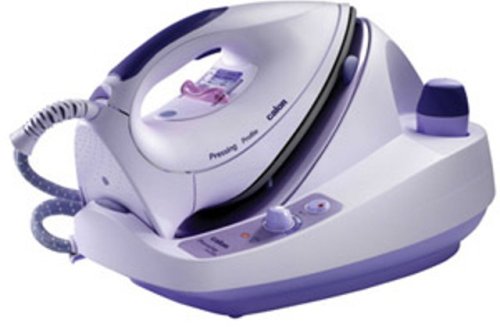
Image 1.1: Calor Pressing Profil Steam Generator. This image displays the overall design of the steam generator unit with its iron and water tank.
Ważne instrukcje bezpieczeństwa
- Always ensure the appliance is connected to a grounded electrical outlet.
- Do not leave the steam generator unattended while it is switched on.
- Przechowywać urządzenie w miejscu niedostępnym dla dzieci i zwierząt domowych.
- Never touch the hot soleplate of the iron or the steam jet. Risk of burns.
- Unplug the appliance from the power outlet before filling the water tank, cleaning, or performing any maintenance.
- Nie zanurzaj urządzenia w wodzie ani innym płynie.
- Jeśli przewód zasilający jest uszkodzony, musi zostać wymieniony przez producenta, jego przedstawiciela serwisowego lub podobnie wykwalifikowaną osobę, aby uniknąć niebezpieczeństwa.
- Use only tap water in the water tank. Do not add perfumes, vinegar, starch, descaling agents, or other chemicals, as these can damage the appliance.
2. Przewodnik konfiguracji
2.1 Rozpakowanie
Carefully remove all packaging materials from the steam generator. Retain the packaging for potential future transport or storage. Check that all components are present and undamaged.
2.2 Napełnianie zbiornika na wodę
- Ensure the steam generator is unplugged from the power outlet and has cooled down.
- Locate the ergonomic cap with a silicone ring on the water tank. Unscrew it.
- Napełnij zbiornik czystą wodą z kranu do linii maksymalnego napełnienia. Nie przepełniaj.
- Securely screw the cap back onto the water tank.
2.3 Pierwsze użycie
Before first use, it is recommended to iron an old piece of fabric to remove any manufacturing residues from the soleplate. This also helps to prime the steam system.
3. Operating Your Steam Generator
3.1 Włączanie
- Ustaw generator pary na stabilnej, odpornej na ciepło powierzchni.
- Plug the power cord into a grounded electrical outlet. The power-on indicator light will illuminate.
- Wait for the heating indicator light to turn off, indicating that the appliance has reached the desired temperature and is ready for use. This typically takes a few minutes.
3.2 Adjusting Steam Output
The Calor Pressing Profil features an adjustable steam output up to 90 g/min. Use the steam control dial or button on the iron or base unit to select the appropriate steam level for your fabric type. Higher steam settings are suitable for thicker fabrics like denim, while lower settings are for delicate materials.
3.3 Techniki prasowania
- Prasowanie na sucho: For dry ironing, ensure the steam function is turned off.
- Prasowanie parowe: For steam ironing, select the desired steam output. The Avantis iron with its inclined soleplate is designed for smooth gliding. Move the iron steadily over the fabric.
- Pionowe gotowanie na parze: The steam generator can also be used for vertical steaming of hanging garments or curtains. Hold the iron a few centimeters away from the fabric and press the steam button.
4. Pielęgnacja i konserwacja
4.1 Odkamienianie
The Calor Pressing Profil features an anti-scale system with a stainless steel tank and an anti-limescale filter. Regular descaling is crucial to maintain performance and extend the life of your appliance. Refer to the specific descaling instructions provided in the full manual for your model. Generally, this involves flushing the tank or using a recommended descaling solution.
4.2 Cleaning the Iron Soleplate
To clean the soleplate, ensure the iron is cool and unplugged. Wipe the soleplate with a damp cloth and a non-abrasive cleaner if necessary. Do not use abrasive pads or metallic objects, as these can scratch the soleplate.
4.3 Przechowywanie
After each use, unplug the appliance and allow it to cool completely. Empty any remaining water from the tank. Store the iron securely on its base or in the designated storage area, ensuring the cord is neatly wrapped.
5. Przewodnik rozwiązywania problemów
| Problem | Możliwa przyczyna | Rozwiązanie |
|---|---|---|
| Brak wytwarzania pary | Water tank empty; appliance not heated; steam button not pressed. | Fill water tank; wait for heating indicator to turn off; press steam button. |
| Wyciek wody z płyty fundamentowej | Temperature too low for steam; iron held horizontally for too long without steam. | Increase temperature setting; ensure iron is hot enough before using steam. |
| White flakes on fabric | Limescale buildup in the tank or iron. | Perform descaling procedure as per manual. |
| Urządzenie się nie włącza | Niepodłączony; usterka gniazdka elektrycznego. | Sprawdź podłączenie przewodu zasilającego; przetestuj gniazdko, podłączając inne urządzenie. |
6. Specyfikacje techniczne
- Model: Calor Pressing Profil 288000
- Marka: Kalor
- Regulowana wydajność pary: Do 90 g/min
- Water Tank Autonomy: Approximately 1 hour 30 minutes
- Anti-Scale System: Stainless steel tank with external heating element and anti-limescale filter
- Iron Type: Avantis iron with inclined soleplate
- Wymiary (opakowanie): Wymiary 44.9 x 34.3 x 27.6 cm
- Waga (przedmiotu): 5.12 kilograma
7. Gwarancja i obsługa klienta
This Calor appliance is designed and manufactured to the highest quality standards. In the unlikely event of a defect, please refer to your purchase documentation for specific warranty terms and conditions.
Dostępność części zamiennych: Części zamienne do tego produktu są dostępne przez 5 lat od daty zakupu.
For further assistance, technical support, or to inquire about spare parts, please contact Calor customer service through their official webSkontaktuj się z witryną lub sprzedawcą, u którego produkt został zakupiony. Przygotuj numer modelu (288000) i dowód zakupu.