
1. Wprowadzenie
The Sigma SD14 is a 14-megapixel Digital Single-Lens Reflex (DSLR) camera designed for advanced photographers. It features the Foveon X3 direct-image sensor, which captures full RGB color information at each pixel layer, aiming for high-definition images with rich gradation. This manual provides essential information for setting up, operating, and maintaining your SD14 camera.
Key features include a 2.5-inch LCD monitor, a durable shutter mechanism rated for over 100,000 cycles, a 5-point autofocus system, and continuous shooting capabilities. The camera supports both RAW and JPEG image recording formats and includes Sigma Photo Pro 3.0 software for RAW image processing.

Rycina 1.1: Przód view of the Sigma SD14 Digital SLR Camera, showing the lens mount and body design.
2. Co znajduje się w pudełku
Verify that all the following items are included in your Sigma SD14 package:
- Sigma SD14 Digital SLR Camera Body
- Lithium-ion Power Battery BP-21
- Battery Charger BC-21
- Kabel USB
- Kabel wideo
- Pasek na szyję
- Eye Cap
- Nakładka na korpus
- Pokrywka okularu
- SIGMA Photo Pro 3.0 CD-ROM
- SD14 Instruction Manual (this document)
3. Konfiguracja
3.1. Ładowanie i instalacja akumulatora
- Insert the Lithium-ion Battery BP-21 into the Battery Charger BC-21.
- Podłącz ładowarkę do gniazdka elektrycznego. Zaświeci się wskaźnik ładowania.
- Pełne naładowanie trwa zazwyczaj około 120 minut.
- Po całkowitym naładowaniu wyjmij akumulator z ładowarki.
- Open the battery compartment cover on the camera body.
- Włóż naładowany akumulator do komory, zwracając uwagę na jego prawidłowe ułożenie.
- Dokładnie zamknij pokrywę komory baterii.
A fully charged BP-21 battery can capture approximately 500 images.
3.2. Wkładanie karty pamięci
The SD14 uses CompactFlash (CF) Type I/II cards. Ensure the card is formatted in the camera before first use.
- Open the CF card slot cover on the side of the camera.
- Insert the CF card with the correct orientation until it clicks into place.
- Close the CF card slot cover securely.
3.3. Mocowanie soczewki
The Sigma SD14 uses the Sigma SA Bayonet mount. Only Sigma SA mount lenses are directly compatible.
- Zdejmij pokrywkę korpusu aparatu i tylną pokrywkę obiektywu.
- Align the red index mark on the lens with the red index mark on the camera body's lens mount.
- Attach the lens by rotating it clockwise until it locks into place with a click.
- Aby zdjąć obiektyw, naciśnij przycisk zwalniania obiektywu na obudowie aparatu i obróć obiektyw w kierunku przeciwnym do ruchu wskazówek zegara.
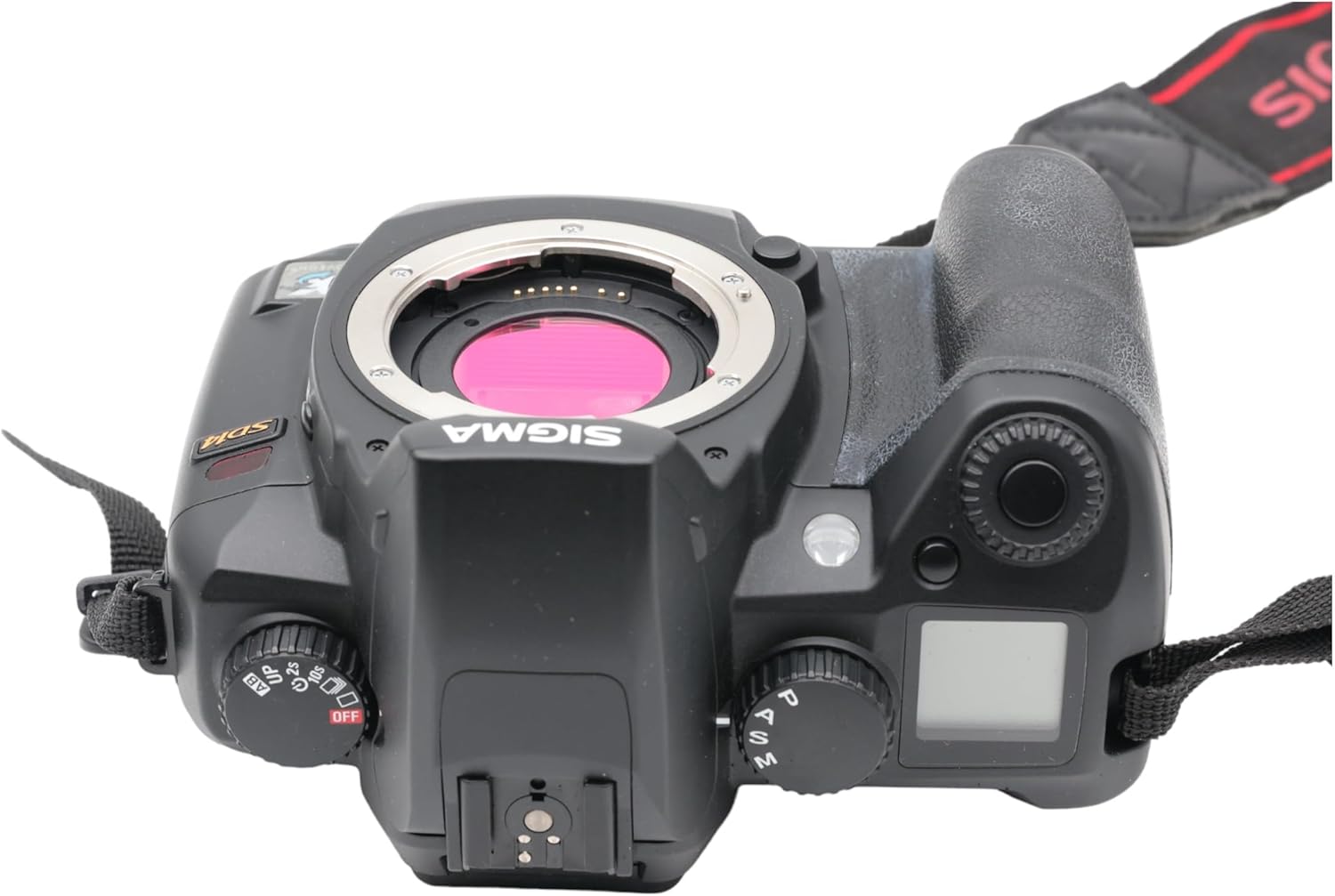
Rysunek 3.1: Góra view of the Sigma SD14, illustrating the lens mount and mode dials.
4. Działanie
4.1. Włączanie/wyłączanie zasilania
Rotate the power switch to the ON position to turn on the camera. Rotate it to OFF to power down.
4.2. Podstawowe sterowanie i wyświetlacz
The SD14 features a 2.5-inch LCD monitor for reviewing images and navigating menus, and a pentaprism viewfinder for composing shots. The top LCD panel displays key settings such as resolution, metering mode, battery status, and remaining shots.

Rysunek 4.1: Tył view of the Sigma SD14, showing the LCD monitor, viewFinder i przyciski sterujące.
Key buttons include MENU, ISO, WB (White Balance), and a 4-way controller with an OK button for navigation. The INFO button displays shutter speed, aperture, and other settings on the LCD.
4.3. Skupienie
The camera utilizes a 5-point autofocus (AF) system (center, left, right, up, and down). The center AF point features a cross-type sensor for enhanced precision. AF point selection can be automatic or manual.
4.4. Tryby pomiaru
The SD14 offers three metering modes:
- 8-segment Evaluative Metering: Analyzes the entire scene for balanced exposure.
- Center Area Metering: Prioritizes the central area of the frame.
- Center Weighted Average Metering: Measures the entire frame but gives more weight to the central area.
Exposure compensation and auto bracketing functions are available for fine-tuning exposure.
4.5. Rejestracja obrazu
The camera supports both RAW (X3F) and JPEG formats. JPEG recording offers four sizes (Super High, High, Medium, Low) and three quality settings (Fine, Normal, Basic).
- Super High (4608 x 3072 pixels): Suitable for A3 or larger prints.
- High (2640 x 1760 pixels): Suitable for A4 prints.
- Medium (1776 x 1184 pixels): Suitable for regular size prints.
- Low (1296 x 864 pixels): Nadaje się do web pages and email.
4.6. Ciągłe strzelanie
The SD14 can shoot continuously at 3 frames per second. The number of frames captured in a burst depends on the resolution setting:
- Wysoki: 6 klatka
- Średni: 12 klatka
- Niski: 24 klatka
These figures apply to both RAW and JPEG modes.
4.7. Wbudowana pamięć Flash
The built-in flash has a guide number of 11 (ISO 100) and covers a 17mm lens angle (28mm equivalent on 35mm format). It supports S-TTL automatic flash metering and can synchronize with shutter speeds up to 1/180 second.
4.8. Mirror Lock-up
Activate the mirror lock-up mechanism to prevent camera shake caused by mirror movement during exposure. This is particularly useful for macro photography, long telephoto shots, or scientific applications. For best results, use with a remote controller or cable release (sold separately).
4.9. Sigma Photo Pro 3.0 Software
The included Sigma Photo Pro 3.0 software is a RAW image developer. It allows for quick conversion of RAW data and offers three adjustment modes: X3F Mode (original settings), Auto Adjustment Mode, and Custom Mode for manual adjustments (exposure, contrast, shadow, highlight, saturation, sharpness, fill-light). The software supports 8-bit TIFF, 16-bit TIFF, and JPEG file formats, and sRGB, Apple RGB, Adobe RGB, and ColorMatch RGB color spaces.
5. Konserwacja
5.1. Image Sensor Dust Protector
The SD14 features a dust protector positioned in front of the image sensor. This design prevents dust from adhering directly to the sensor, minimizing its impact on image quality. If dust accumulates on the protector, it will be out of focus and generally not visible in images.
5.2. Czyszczenie korpusu aparatu i obiektywu
- Do czyszczenia korpusu aparatu użyj miękkiej, niepozostawiającej włókien ściereczki. W przypadku uporczywych zabrudzeń delikatnie przetrzyjamppl szmatkę wodą lub łagodnym środkiem czyszczącym.
- For lenses, use a lens brush to remove loose dust, then a lens cleaning solution and a microfiber cloth. Avoid touching the lens surface with your fingers.
- Never use organic solvents like paint thinner or benzene to clean the camera or lens.
5.3. Pielęgnacja baterii
- Baterie, które nie są używane, przechowuj w chłodnym i suchym miejscu.
- Aby przedłużyć żywotność akumulatora, należy unikać jego całkowitego rozładowywania.
- Jeżeli aparat nie będzie używany przez dłuższy czas, należy wyjąć baterię.
6. Rozwiązywanie Problemów
| Problem | Możliwa przyczyna | Rozwiązanie |
|---|---|---|
| Kamera się nie włącza. | Bateria jest rozładowana lub nieprawidłowo włożona. | Naładuj akumulator do pełna i upewnij się, że jest włożony prawidłowo. |
| Obrazy są niewyraźne. | Nieprawidłowa ostrość, drżenie aparatu lub brudny obiektyw. | Zadbaj o prawidłową ostrość. Użyj krótszego czasu otwarcia migawki lub statywu. Wyczyść obiektyw. |
| Obrazy są zbyt ciemne lub zbyt jasne. | Incorrect exposure settings or metering mode. | Adjust exposure compensation. Select an appropriate metering mode for the scene. |
| Color blotching in underexposed areas. | Characteristic of the Foveon sensor when severely underexposed. | Aim to slightly overexpose images (e.g., +.7 EV) to retain shadow detail and avoid this effect. |
| Cannot record images. | Memory card is full, locked, or not inserted correctly. | Insert an empty card, unlock the card, or reinsert it correctly. Format the card if necessary (this will erase all data). |
| Kamera zawiesza się lub przestaje reagować. | Tymczasowy błąd oprogramowania. | Wyjmij baterię i włóż ją ponownie, aby zresetować kamerę. |
For more detailed troubleshooting or error codes, please refer to the comprehensive instruction manual included with your camera or visit the Sigma support webstrona.
7. Specyfikacje
| Funkcja | Szczegół |
|---|---|
| Nazwa modelu | SD14 |
| Rozdzielczość czujnika fotograficznego | 14 MP (Foveon X3 direct-image sensor) |
| Rozmiar fotokomórki | APS-C |
| Kompatybilne mocowania | Sigma SA Bayonet |
| Utrzymany File Formaty | JPEG, RAW (X3F), TIFF |
| Rozmiar ekranu | 2.5 Inches (150,000 pixels) |
| Viewznalazca | Optical Pentaprism (98% coverage, 0.9x magnification) |
| Punkty autofokusa | 5-point (Phase Detection) |
| Prędkość ciągłego fotografowania | 3 klatek na sekundę |
| Maksymalna prędkość migawki | 1/4000 sekundy |
| Minimalna prędkość migawki | 30 sekund |
| Rozszerzony zakres ISO | 100-1600 |
| Tryby pomiaru | 8-segment Evaluative, Center Area, Center Weighted Average |
| Built-in Flash Guide Number | 11 (norma ISO 100) |
| Nośniki pamięci | Compact Flash (CF) Type I/II |
| Źródło zasilania | Lithium-ion Battery BP-21 |
| Łączność | USB, wyjście wideo |
| Waga przedmiotu | 1.65 funta (ok. 748 g) |
| Numer modelu | C23900 |
| UPC | 085126924416 |
7.1. Akcesoria opcjonalne (sprzedawane oddzielnie)
- Sigma Lenses (over 40 compatible models)
- Flashguns: EF-500 DG SUPER, EF-500 DG ST, EM-140 DG
- Power Grip PG-21
- Cable Release CR-21
- Remote Controller RS-31
- AC Adapter SAC-21
8. Gwarancja i pomoc techniczna
8.1. Informacje o gwarancji
For detailed warranty terms and conditions, please refer to the warranty card included with your product or visit the official Sigma webGwarancja zazwyczaj obejmuje wady materiałowe i wykonawcze przez określony czas od daty zakupu.
8.2. Obsługa klienta
If you encounter any issues or have questions not covered in this manual, please contact Sigma customer support. Contact information can usually be found on the official Sigma webmiejscu lub w dokumentacji gwarancyjnej.
Zasoby internetowe: Visit the official Sigma website for product registration, firmware updates, FAQs, and additional support resources.