
Wstęp
Dziękujemy za zakupasing the Jamo I300 2.1 Channel Speaker System. This manual provides essential information for the safe and efficient use of your new audio system. Please read these instructions carefully before installation and operation, and retain them for future reference.
The Jamo I300 is a high-performance 2.1 channel speaker system designed to deliver rich, dynamic audio. It features a powerful subwoofer for deep bass and two satellite speakers for clear mid-range and treble. With Bluetooth connectivity, you can easily stream audio wirelessly from compatible devices. A remote control is included for convenient system management.
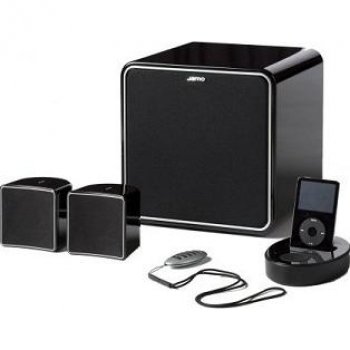
Image: The Jamo I300 2.1 Channel Speaker System, showcasing subwoofer i dwa głośniki satelitarne.
Zawartość opakowania
Sprawdź, czy w przesyłce znajdują się wszystkie elementy:
- 1 x Jamo I300 Subwoofer
- 2 x Jamo I300 Satellite Speakers
- 1 x Pilot zdalnego sterowania
- 1 x kabel zasilający
- Audio Connection Cables (e.g., RCA to 3.5mm, speaker wires)
- Niniejsza instrukcja obsługi
Organizować coś
1. Rozpakowywanie
Ostrożnie wyjmij wszystkie elementy z opakowania. Zachowaj materiały opakowaniowe do transportu lub przechowywania w przyszłości.
2. Umieszczenie
Optimal placement is crucial for sound quality. The Jamo I300 system can be placed on the floor or on a table, depending on your room layout and preference.
- Głośnik niskotonowy: Place the subwoofer on the floor, ideally in a corner or near a wall for enhanced bass response. Experiment with placement to find the best sound for your room.
- Głośniki satelitarne: Position the satellite speakers equidistant from your primary listening position. For stereo imaging, place them at ear level or slightly above, angled towards the listener.
3. Połączenia
- Podłącz głośniki satelitarne: Connect the satellite speakers to the corresponding outputs on the subwoofer using the provided speaker wires. Ensure correct polarity (positive to positive, negative to negative).
- Podłącz źródło dźwięku: Connect your audio source (e.g., TV, computer, smartphone) to the subwoofer's input using the appropriate audio cable (e.g., RCA or 3.5mm jack).
- Podłącz zasilanie: Plug the power cable into the subwoofer's power input, then connect the other end to a suitable wall outlet.
Instrukcja obsługi
1. Włączanie/wyłączanie zasilania
- To power on the system, press the power button on the subwoofer or the remote control. The power indicator will illuminate.
- Aby wyłączyć, naciśnij ponownie przycisk zasilania.
2. Regulacja głośności
- Adjust the master volume using the volume controls on the subwoofer or the remote control.
- Some models may feature separate bass/treble controls for fine-tuning the sound.
3. Wybór źródła
Use the 'Source' or 'Input' button on the subwoofer or remote control to switch between connected audio sources (e.g., Line In, Bluetooth).
4. Parowanie Bluetooth
- Ensure the speaker system is powered on and set to Bluetooth input mode. The Bluetooth indicator will typically flash, indicating it's in pairing mode.
- Na urządzeniu z włączoną funkcją Bluetooth (np. smartfonie, tablecie) przejdź do ustawień Bluetooth i wyszukaj dostępne urządzenia.
- Select "Jamo I300" from the list of devices.
- Once paired, the Bluetooth indicator on the speaker system will become solid, and you can now stream audio wirelessly.
Konserwacja
1. Czyszczenie
- Przed czyszczeniem należy zawsze odłączyć kabel zasilający.
- Use a soft, dry cloth to wipe the surfaces of the speakers and subwoofer.
- Do not use liquid cleaners, aerosols, or abrasive materials, as these can damage the finish or internal components.
2. Przechowywanie
If storing the system for an extended period, ensure it is powered off and disconnected from the mains. Store it in a cool, dry place, away from direct sunlight and extreme temperatures.
Rozwiązywanie problemów
Aby zapoznać się z najczęstszymi problemami i ich rozwiązaniami, zapoznaj się z poniższą tabelą.
| Problem | Możliwa przyczyna | Rozwiązanie |
|---|---|---|
| Brak zasilania | Kabel zasilający nie jest podłączony; gniazdko elektryczne jest uszkodzone | Sprawdź połączenie kabla zasilającego; spróbuj innego gniazdka elektrycznego |
| Brak dźwięku | Incorrect input source; Volume too low; Audio cables loose/faulty | Wybierz właściwe źródło sygnału wejściowego; Zwiększ głośność; Sprawdź wszystkie połączenia kabli audio |
| Bluetooth nie łączy się | Głośnik nie jest w trybie parowania; Urządzenie jest za daleko; Zakłócenia | Ensure speaker is in pairing mode; Move device closer; Restart both devices |
| Zniekształcony dźwięk | Zbyt wysoka głośność; Słaba jakość źródła dźwięku; Rozmieszczenie głośników | Reduce volume; Use a higher quality audio source; Adjust speaker placement |
Specyfikacje
The following are the technical specifications for the Jamo I300 2.1 Channel Speaker System:
| Funkcja | Specyfikacja |
|---|---|
| Numer modelu | I300B |
| Kanały audio | 2.1 kanały |
| Całkowita moc RMS | 300 W |
| Moc RMS subwoofera | 150 W |
| Moc głośnika satelitarnego | 75 W per speaker (estimated) |
| Zakres częstotliwości | 45 - 20000 Hz |
| Wrażliwość | 86dB |
| Impedancja | 6 omy |
| Kolor | Czarny |
| Wymiary (subwoofer) | 9.09 x 9.09 x 9.19 cm (w przybliżeniu, na podstawie wymiarów produktu) |
| Waga | 12 kg (łącznie) |
| Technologia bezprzewodowa | Bluetooth |
| Typ sterowania | Zdalne sterowanie |
| Typ montażu | Floor, Table Mount |
Gwarancja i wsparcie
Jamo products are manufactured to the highest quality standards. This product is covered by a limited warranty. For detailed warranty terms and conditions, please refer to the warranty card included with your product or visit the official Jamo webstrona.
For technical support, service, or further assistance, please contact your local Jamo dealer or authorized service center. Contact information can typically be found on the official Jamo webstronie lub w dokumentacji produktu.