
1. Wprowadzenie
This manual provides instructions for the safe and efficient use of your Ergotron Neo-Flex Single Monitor Stand (Model 33-310-060). This desktop stand is designed to support a single monitor up to 27 inches and 16 pounds, compatible with VESA patterns 75x75mm and 100x100mm. It offers ergonomic adjustments including height, pan, tilt, and rotation to enhance your computing experience.
2. Zawartość opakowania
Przed rozpoczęciem montażu należy sprawdzić, czy wszystkie elementy są obecne:
- Podstawa stojaka na monitor
- Adjustable Column with Pivot
- Płyta montażowa VESA
- Attachment Hardware (screws, washers, Allen wrench)

Image: All components included with the Neo-Flex Single Monitor Stand.
3. Informacje dotyczące bezpieczeństwa
- Ensure the monitor weight and size are within the specified limits (up to 27 inches, 16 lbs).
- Nie dokręcaj śrub zbyt mocno podczas montażu.
- Ustaw stojak na stabilnej, równej powierzchni.
- Trzymaj dzieci i zwierzęta domowe z dala od miejsca montażu.
4. Montaż i konfiguracja
4.1 Attaching the Column to the Base
- Place the monitor stand base on a flat, stable surface.
- Align the adjustable column with the designated holes on the base.
- Secure the column to the base using the provided screws and Allen wrench. Ensure it is tightened firmly but do not overtighten.
4.2 Attaching the VESA Plate to Your Monitor
- Carefully lay your monitor face down on a soft, clean surface to prevent scratches.
- Align the VESA mounting plate with the VESA holes on the back of your monitor (75x75mm or 100x100mm).
- Use the appropriate screws from the hardware kit to attach the VESA plate securely to the monitor.
4.3 Mounting the Monitor to the Stand
- With the VESA plate attached to your monitor, carefully lift the monitor.
- Slide the VESA plate (with monitor) onto the pivot on the adjustable column. Ensure it clicks securely into place.
- Tighten any hand screws or locking mechanisms on the pivot to secure the monitor.

Obraz: Tył view of the stand's VESA mounting plate, ready for monitor attachment.
5. Instrukcja obsługi
The Neo-Flex stand allows for easy, fingertip adjustments to optimize your viewkomfort.
5.1 Regulacja wysokości
- To raise or lower the monitor, gently lift or push down on the monitor. The stand allows for 5 inches (13 cm) of vertical travel without levers or knobs.
5.2 Tilt and Pan Adjustment
- Delikatnie przechyl monitor do przodu lub do tyłu, aby uzyskać pożądany efekt. viewing angle (up to 30 degrees tilt).
- Swivel the monitor left or right up to 270 degrees for easy screen sharing or collaboration.
5.3 Obrót
- Rotate the monitor 360 degrees to switch between landscape and portrait viewtryby.
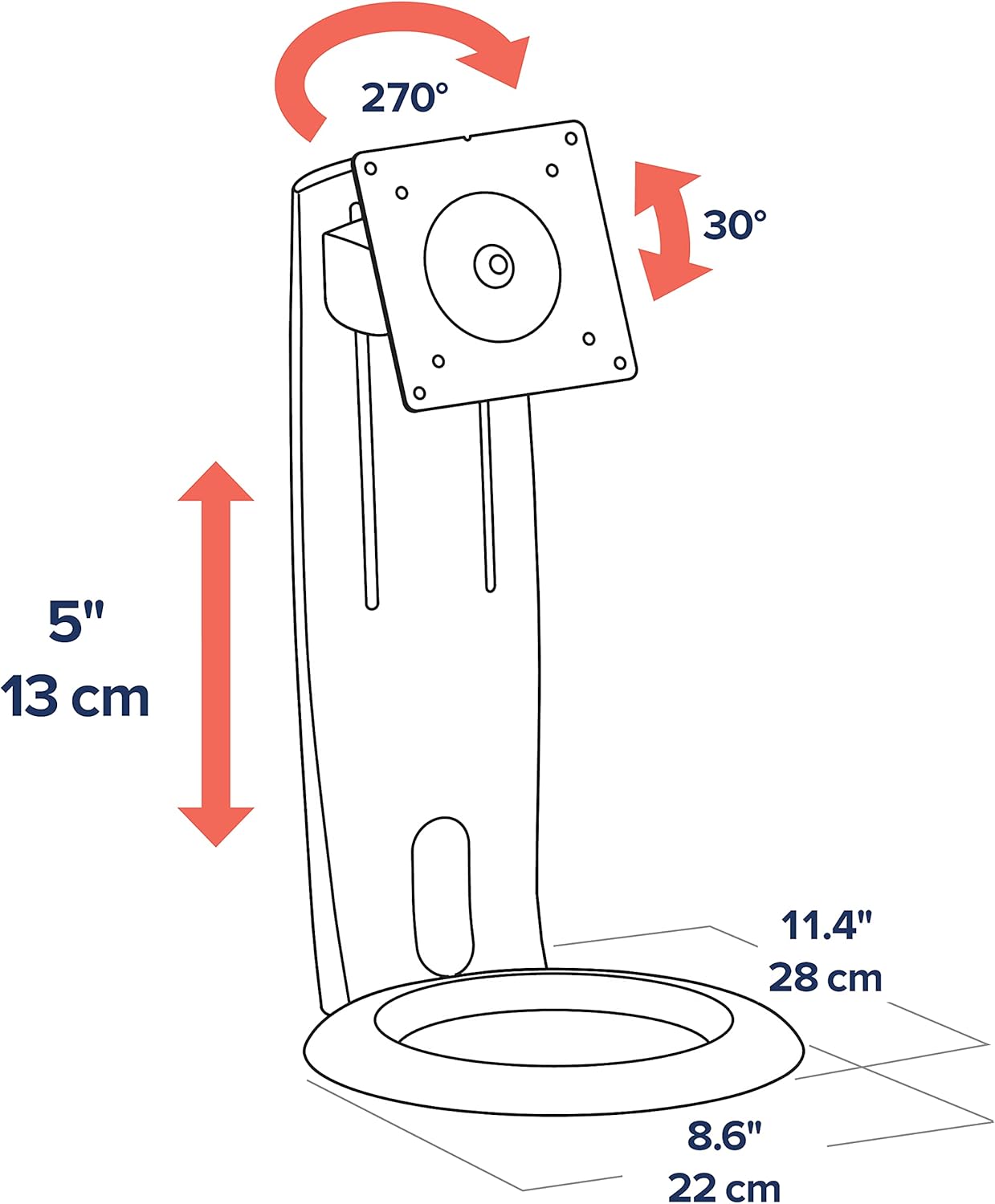
Image: Diagram showing the adjustable height (5 inches/13 cm), tilt (30 degrees), and pan (270 degrees) capabilities.

Obraz: Przód view of the Ergotron Neo-Flex stand with a monitor, demonstrating its compact design.
6. Zarządzanie kablami
The stand features integrated cable routing to keep your workspace tidy. Route monitor cables through the designated channels on the column to keep them out of sight and prevent clutter.
7. Konserwacja
- Regularnie sprawdzaj wszystkie śruby i połączenia, aby mieć pewność, że są dobrze dokręcone.
- Wyczyść stojak miękką,amp płótno. Unikaj ściernych środków czyszczących.
- Do not apply lubricants to the moving parts unless specifically instructed by Ergotron support.
8. Rozwiązywanie Problemów
8.1 Monitor is not stable or wobbles
- Ensure all assembly screws, especially those connecting the column to the base and the VESA plate to the monitor, are securely tightened.
- Verify that the monitor's weight is within the specified load capacity (6 to 16 lbs).
- Ensure the stand is placed on a flat, stable, and sturdy surface.
8.2 Adjustments are too stiff or too loose
- The stand is designed for fingertip adjustments. If movements are too stiff, check for any overtightened screws. If too loose, ensure all connections are firm.
- Refer to the original product documentation or contact Ergotron support for specific adjustment mechanisms if needed.
9. Specyfikacje
| Funkcja | Szczegół |
|---|---|
| Numer modelu | 33-310-060 |
| Obsługiwany rozmiar ekranu | Do 27 cali |
| Nośność | 6 do 16 funtów |
| Zgodność ze standardem VESA | 75x75mm, 100x100mm |
| Regulacja wysokości | 5 cali (13 cm) |
| Nachylenie | Forward/Back (approx. 30 degrees) |
| Patelnia | 270 degrees (left/right) |
| Obrót | 360 degrees (portrait/landscape) |
| Tworzywo | Plastic (with metal components) |
| Kolor | Czarny |
| Wymiary produktu | 18.25 x 9.13 x 5.88 cala |
| Waga przedmiotu | 4.4 funta |
10. Gwarancja i wsparcie
Ergotron products are built to last and come with a 3-year warranty. For technical support, troubleshooting assistance, or warranty claims, please visit the official Ergotron webOdwiedź stronę internetową lub skontaktuj się bezpośrednio z działem obsługi klienta. Zachowaj paragon zakupu, aby skorzystać z gwarancji.