
ECS Elitegroup P4M800-M7
ECS P4M800-M7 Motherboard User Manual
Model: P4M800-M7
Wstęp
This manual provides detailed instructions for the installation, operation, and maintenance of the ECS P4M800-M7 motherboard. The P4M800-M7 is designed to support Socket LGA775 Intel Pentium 4 / Pentium D / Celeron D Processors with FSB 800/533 MHz and Hyper-Threading Technology.
Key features include 64-bit support, FSB 800MHz, RAID0, RAID1, and Serial ATA capabilities.
Produkt ponadview

Figure 1: ECS P4M800-M7 Motherboard Layout. This image displays the main components of the motherboard, including the CPU socket (LGA 775), two DDR RAM slots, PCI and AGP expansion slots, and various I/O ports.
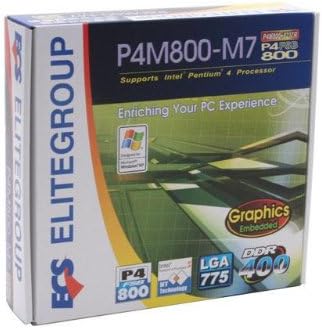
Figure 2: ECS P4M800-M7 Retail Box. The product packaging indicates support for Intel Pentium 4 processors, embedded graphics, and DDR400 memory, along with the LGA 775 socket type.
Konfiguracja i instalacja
Follow these steps for proper installation of the ECS P4M800-M7 motherboard into your computer system.
1. Przygotuj swój system
- Upewnij się, że zasilacz jest odłączony od gniazdka ściennego.
- Rozładuj ładunki elektrostatyczne poprzez dotknięcie uziemionego przedmiotu metalowego.
2. Zainstaluj procesor
- Otwórz dźwignię gniazda procesora.
- Carefully align the CPU (Intel Pentium 4 / Pentium D / Celeron D) with the socket, ensuring the notches match.
- Delikatnie włóż procesor do gniazda. Nie używaj siły.
- Zamknij dźwignię gniazda, aby zabezpieczyć procesor.
- Apply a thin layer of thermal paste to the CPU surface.
- Zainstaluj chłodzenie procesora zgodnie z instrukcją producenta.
3. Install Memory Modules
The motherboard supports DDR memory. Insert DDR modules into the available memory slots (2 slots).
- Otwórz zaciski na obu końcach gniazda DIMM.
- Dopasuj moduł pamięci do gniazda, upewniając się, że wycięcie na module pokrywa się z wypustką w gnieździe.
- Naciśnij mocno oba końce modułu, aż klipsy wskoczą na swoje miejsce.
4. Mount the Motherboard
- Install standoffs in your PC case that align with the motherboard's mounting holes.
- Carefully place the motherboard onto the standoffs, aligning the I/O shield with the case opening.
- Przymocuj płytę główną za pomocą śrub.
5. Connect Power and Peripherals
Connect the 20-pin ATX main power connector and the 4-pin ATX 12V power connector from your power supply to the motherboard. Connect SATA and IDE devices, front panel connectors, and expansion cards as needed.
Instrukcja obsługi
Once the motherboard is installed and all components are connected, you can proceed with system operation.
1. Pierwsze uruchomienie
After connecting the power supply and monitor, power on your system. The system should display the BIOS POST screen. Press the designated key (usually USUNĄĆ or F2) aby wejść do narzędzia konfiguracji BIOS-u.
2. Konfiguracja BIOS-u
In the BIOS, you can configure various system settings, including boot order, date/time, and hardware parameters. Refer to the BIOS section of the full manual for detailed settings. Save changes and exit the BIOS to continue.
3. Instalacja systemu operacyjnego
Insert your operating system installation media (e.g., Windows CD/DVD) and follow the on-screen prompts to install the OS. Ensure all necessary drivers (chipset, audio, network, graphics) are installed after the OS installation for optimal performance. Drivers are typically provided on a CD with the motherboard or can be downloaded from the ECS Elitegroup webstrona.
Konserwacja
Właściwa konserwacja zapewnia długowieczność i stabilną pracę płyty głównej.
- Usuwanie kurzu: Regularnie czyść sprężonym powietrzem wnętrze obudowy komputera, zwłaszcza radiatory i wentylatory, z kurzu. Przed czyszczeniem upewnij się, że komputer jest wyłączony i odłączony od zasilania.
- Zarządzanie kablami: Ensure internal cables are neatly routed to allow for proper airflow.
- Aktualizacje BIOS-u: Periodically check the ECS Elitegroup website for BIOS updates. Only update the BIOS if necessary and follow the instructions precisely to avoid system instability.
- Aktualizacje sterowników: Keep your device drivers updated to ensure compatibility and performance.
Rozwiązywanie problemów
This section addresses common issues you might encounter with the ECS P4M800-M7 motherboard.
| Problem | Możliwa przyczyna | Rozwiązanie |
|---|---|---|
| System nie włącza się. | Power cables not connected, faulty power supply, or short circuit. | Check all power connections (20-pin ATX, 4-pin 12V). Test power supply. Ensure no metal objects are touching the motherboard. |
| Brak obrazu na monitorze. | Monitor cable loose, faulty graphics card (if external), or RAM not seated correctly. | Verify monitor cable connection. Reseat RAM modules. If using an external graphics card, ensure it is properly seated and powered. |
| System zawiesza się lub ulega awarii. | Overheating, unstable drivers, or faulty RAM. | Check CPU and chipset temperatures. Update drivers. Test RAM modules individually. |
| Nie znaleziono systemu operacyjnego. | Incorrect boot order in BIOS, or hard drive not detected. | Enter BIOS and set the correct boot order. Check SATA/IDE cable connections to the hard drive. |
Specyfikacje
| Funkcja | Szczegół |
|---|---|
| Producent | ECS |
| Numer modelu | P4M800-M7 |
| Gniazdo procesora | LGA 775 |
| Kompatybilne procesory | Intel Celeron D, Intel Pentium 4, Intel Pentium |
| Typ chipsetu | Intel |
| Dostępne gniazda pamięci | 2 |
| Obsługiwany standard magistrali systemowej | SATA 3 |
| FSB Support | 800/533MHz |
| Technologia Hyper-Threading | Utrzymany |
| Obsługa RAID | RAID0, RAID1 |
| UPC | 881038001678 |
| Data pierwszej dostępności | 5 kwietnia 2006 r. |
Gwarancja i wsparcie
For warranty information and technical support, please refer to the documentation included with your purchase or visit the official ECS Elitegroup webWarunki gwarancji mogą się różnić w zależności od regionu i sprzedawcy.
Official ECS Elitegroup Webstrona: ECS Elitegroup Store on Amazon (Note: This link directs to the brand's store page on Amazon, where further support information might be available.)
Ask a question about this manual
Ask about setup, troubleshooting, compatibility, parts, safety, or missing instructions. Manuals+ will review the question and use this page’s manual context to help answer it.