
1. Wprowadzenie
This manual provides comprehensive instructions for the safe and efficient use of your Logisys PS480D 480W ATX Power Supply. Please read this manual thoroughly before installation and operation to ensure proper functionality and to prevent damage to the unit or other components.

Figure 1: Logisys PS480D 480W ATX Power Supply, front view with cables bundled.
2. Informacje dotyczące bezpieczeństwa
OSTRZEŻENIE: Power supplies contain high voltage komponenty. Nie otwierać zasilacza casing. Wewnątrz nie ma żadnych części nadających się do samodzielnej naprawy przez użytkownika.
- Przed instalacją lub konserwacją należy upewnić się, że zasilanie jest odłączone od gniazdka prądu zmiennego.
- Always ground yourself to prevent electrostatic discharge (ESD) when handling internal computer components.
- Nie należy używać zasilacza w wilgotnych lub zawilgoconych miejscach.amp warunki.
- Aby zapobiec przegrzaniu, należy zapewnić odpowiednią wentylację wokół zasilacza.
- Use only the provided power cables and connectors.
3. Funkcje produktu
The Logisys PS480D is a 480W ATX power supply designed for personal computers. Key features include:
- Wysoka wydajność
- Low Noise & Ripple
- Ponad tomtage Ochrona
- Zabezpieczenie przed zwarciem
- Built-in EMI Filter
- Insulation Resistance 100MΩ min.
- Complies with FCC part 15J class B 115VAC operation and CISPR 22 230 VAC operation.
- Meets UL 1950, CSA 22.2 LEVEL 3 Requirement.
- 100% Burn-in test / Vibration test / Hi-pot test / Leakage current test.
- MTBF above 100,000 hours at 25 °C.

Figure 2: Rear panel of the power supply with fan, AC inlet, and power switch.
4. Konfiguracja i instalacja
Follow these steps to install the Logisys PS480D power supply into your computer system.
- Przygotowanie: Ensure your computer is completely powered off and unplugged from the wall outlet. Open your computer case according to its manufacturer's instructions.
- Wyjmij stary zasilacz (jeśli dotyczy): Disconnect all cables from the old power supply to the motherboard, drives, and other components. Unscrew and remove the old power supply from the case.
- Zainstaluj nowy zasilacz: Carefully place the Logisys PS480D into the power supply bay of your computer case. Secure it with screws.
- Podłącz główne zasilanie: Connect the 20+4 pin ATX mainboard connector to your motherboard. If your motherboard uses a 20-pin connector, detach the 4-pin section. If it uses a 24-pin connector, connect both sections.
- Podłącz zasilanie procesora: Connect the 4-pin +12V power connector to the corresponding port on your motherboard.
- Podłącz zasilanie peryferyjne:
- Use the 4-pin standard drive connectors for HDDs and CD/DVD-ROM drives.
- Use the 4-pin 3.5" FDD or ZIP connectors for floppy disk drives or similar devices.
- Use the Serial ATA (SATA) connectors for SATA hard drives and SSDs.
- Zarządzanie kablami: Ułóż kable w sposób zapewniający właściwy przepływ powietrza wewnątrz obudowy.
- Zamknij sprawę: Gdy wszystkie połączenia będą już bezpieczne, zamknij obudowę komputera.
- Podłącz zasilanie sieciowe: Plug the AC power cord into the power supply's AC inlet and then into a wall outlet.
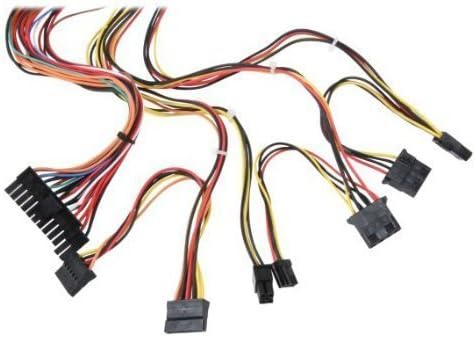
Rysunek 3: Koniecview of power supply connectors.

Figure 4: Power supply dimensions and included AC power cord.
5. Instrukcja obsługi
After successful installation, you can power on your computer.
- Ensure the power switch on the rear of the power supply (Figure 2) is in the "ON" (I) position.
- Naciśnij przycisk zasilania na obudowie komputera.
- The power supply will provide stable power to your system components.
- To power off, shut down your operating system normally. For complete power disconnection, switch the power supply to the "OFF" (O) position and unplug the AC cord.
6. Konserwacja
Regularna konserwacja pomaga zapewnić długowieczność i optymalną wydajność zasilacza.
- Czyszczenie: Periodically clean dust from the power supply's fan and vents using compressed air. Ensure the power supply is unplugged before cleaning.
- Przepływ powietrza: Ensure that the computer case has adequate airflow and that the power supply's fan is not obstructed.
- Integralność kabla: Periodically check all power cables for secure connections and signs of wear or damage.
7. Rozwiązywanie Problemów
Jeśli masz problemy z zasilaniem, zapoznaj się z poniższymi typowymi procedurami rozwiązywania problemów:
- Brak zasilania:
- Sprawdź, czy przewód zasilający jest prawidłowo podłączony do zasilacza i gniazdka ściennego.
- Ensure the power switch on the rear of the power supply is in the "ON" (I) position.
- Sprawdź, czy gniazdko ścienne działa prawidłowo, podłączając do niego inne urządzenie.
- Check all internal power connections (20/24-pin ATX, 4-pin +12V, peripheral connectors) are firmly seated.
- Niestabilność systemu/losowe wyłączanie się systemu:
- This could indicate an overloaded or failing power supply. Ensure your system's power requirements do not exceed the PS480D's 480W capacity.
- Check for proper ventilation and ensure the power supply fan is spinning. Overheating can cause instability.
- Nietypowy hałas:
- A loud fan noise might indicate dust buildup or a failing fan bearing. Clean the fan as described in the Maintenance section.
If problems persist after attempting these steps, contact Logisys customer support or a qualified technician.
8. Specyfikacje
| Funkcja | Specyfikacja |
|---|---|
| Marka | Logisys |
| Numer modelu | PS480D |
| Moc wyjściowatage | 480 watów |
| Współczynnik kształtu | ATX |
| Wymiary (dł. x szer. x wys.) | 6" dł. x 5.5" szer. x 3.25" wys. (15.24 x 13.97 x 8.25 cm) |
| Waga przedmiotu | 2.06 funtów (0.93 kg) |
| Złącze płyty głównej | 1x 20+4 Pin ATX |
| Złącze zasilania procesora | 1x 4 Pin +12V |
| Standard Drive Connectors | 4x 4 Pin (Molex) |
| FDD/ZIP Connectors | 1x 4 Pin 3.5" |
| Złącza szeregowe ATA | 1x SATA |
| Metoda chłodzenia | Powietrze |
| Ochrona | Ponad tomtage Ochrona, ochrona przed zwarciem |
| Certyfikaty | FCC part 15J class B, CISPR 22, UL 1950, CSA 22.2 LEVEL 3 |
9. Gwarancja i wsparcie
For warranty information, technical support, or service inquiries, please refer to the official Logisys webOdwiedź stronę internetową lub skontaktuj się z działem obsługi klienta. Zachowaj paragon jako dowód zakupu.