
1. Wprowadzenie
This manual provides essential instructions for the safe and efficient operation, setup, and maintenance of your Ohaus ES50R ES Industrial Bench Scale. The Ohaus ES50R is designed for industrial weighing applications, offering a capacity of 50 kg (110 lb) with a readability of 20 g (0.05 lb). Please read this manual thoroughly before using the scale to ensure proper functionality and to prevent damage.
2. Informacje dotyczące bezpieczeństwa
Zawsze przestrzegaj następujących środków ostrożności:
- Nie przeciążaj wagi ponad jej maksymalny udźwig 50 kg (110 funtów).
- Aby uzyskać dokładne odczyty, należy ustawić wagę na stabilnej i równej powierzchni.
- Operate the scale only with the specified 120 V power supply.
- Unikaj wystawiania wagi na działanie ekstremalnych temperatur, wilgoci lub bezpośredniego światła słonecznego.
- Nie zanurzaj wagi w wodzie ani innych płynach.
- Utrzymuj wagę w czystości, bez kurzu i zanieczyszczeń.
- Naprawy i prace konserwacyjne wykraczające poza rutynowe czyszczenie powinny być wykonywane wyłącznie przez wykwalifikowany personel.
3. Zawartość opakowania
Sprawdź, czy po rozpakowaniu znajdują się wszystkie elementy:
- Ohaus ES50R ES Industrial Bench Scale unit
- Power Adapter (for 120 V operation)
- Instrukcja obsługi (ten dokument)
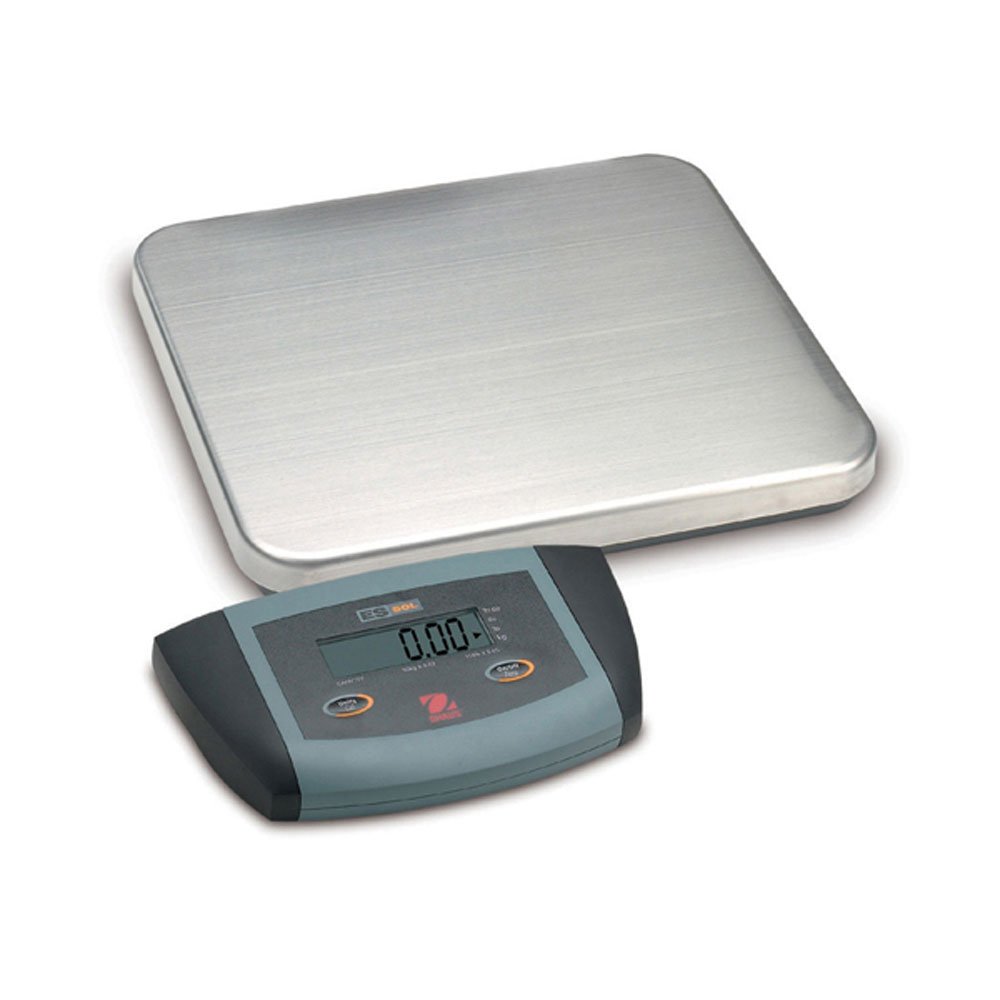
Rysunek 1: Ohaus ES50R ES Industrial Bench Scale. This image shows the complete bench scale unit, including the weighing platform and the display unit.
4. Konfiguracja
- Rozpakowywanie: Ostrożnie wyjmij wszystkie elementy z opakowania. Zachowaj opakowanie do transportu lub przechowywania w przyszłości.
- Umieszczenie: Place the scale on a firm, level, and stable surface, free from vibrations, drafts, and rapid temperature changes. Ensure adequate space around the scale for safe operation.
- Podłączenie zasilania: Connect the power adapter to the scale's power input port. Plug the adapter into a standard 120 V AC power outlet.
- Pierwsze włączenie: Naciśnij WŁ./WYŁ. button to power on the scale. The display will perform a self-test and then show "0.00" or "0.0".
- Niwelacja: If your scale includes adjustable feet, rotate them until the bubble in the spirit level (if present) is centered.
5. Instrukcja obsługi
5.1 Podstawowe ważenie
- Ensure the scale is powered on and the display shows "0.00" or "0.0".
- Place the item to be weighed gently in the center of the weighing platform.
- Wait for the display to stabilize. The stable weight reading will be shown on the large LCD display.
- Zdejmij przedmiot z platformy. Wyświetlacz powinien wrócić do zera.
5.2 Funkcja tary
Funkcja tarowania pozwala na odjęcie ciężaru pojemnika, dzięki czemu wyświetlana jest tylko waga netto zawartości.
- Umieść pusty pojemnik na platformie ważącej.
- Naciśnij TARA button. The display will reset to "0.00" or "0.0", indicating the container's weight has been tared.
- Wsyp materiał do ważenia do pojemnika. Na wyświetlaczu pojawi się waga netto materiału.
- Aby wyczyścić tarę, należy zdjąć pojemnik z platformy i nacisnąć TARA naciśnij przycisk ponownie.
5.3 Funkcje specjalne
- Automatyczne wyłączanie: The scale is equipped with an auto shut-off feature to conserve power. If no activity is detected for a set period, the scale will automatically turn off.
- Duży wyświetlacz: The LCD display provides clear and easy-to-read weight indications.
- Ręczne wyłączanie: To manually turn off the scale, press and hold the WŁ./WYŁ. przycisk, aż wyświetlacz się wyłączy.
6. Konserwacja
6.1 Czyszczenie
To maintain accuracy and prolong the life of your scale:
- Przed czyszczeniem należy odłączyć wagę od zasilania.
- Wytrzyj powierzchnie skali za pomocąamp szmatką i łagodnym detergentem.
- Nie należy używać środków czyszczących o działaniu ściernym, rozpuszczalników ani silnych środków chemicznych.
- Ensure no liquid enters the scale's internal components.
- Po wyczyszczeniu dokładnie osusz wagę.
6.2 Kalibracja
Regular calibration ensures the accuracy of your scale. Refer to the full technical manual or contact Ohaus customer support for detailed calibration procedures. Calibration typically requires certified weights.
7. Rozwiązywanie Problemów
| Problem | Możliwa przyczyna | Rozwiązanie |
|---|---|---|
| Waga nie włącza się. | Brak zasilania; uszkodzony zasilacz. | Check power connection and outlet. Ensure power adapter is functioning correctly. |
| Niedokładne odczyty. | Scale not level; unstable surface; overload; calibration required. | Ensure scale is level and on a stable surface. Do not exceed capacity. Perform calibration if necessary. |
| Na wyświetlaczu pojawia się komunikat „Err” lub kod błędu. | Overload; internal malfunction. | Remove weight from platform. If error persists, power cycle the scale. If still present, contact customer support. |
| Auto shut-off too soon/not at all. | Auto shut-off settings. | Refer to the full technical manual for adjusting auto shut-off settings, if available. |
8. Specyfikacje
| Funkcja | Szczegół |
|---|---|
| Model | ES50R |
| Marka | Ohaus |
| Pojemność | 50 kg / 110 funtów |
| Czytelność | 20 g / 0.05 funta |
| Typ wyświetlacza | LCD (Large Display) |
| Cechy specjalne | Auto Shut Off, Manual Shutdown |
| Współczynnik kształtu | Skala stołowa |
| Zasilacz | 120 V AC (via adapter) |
| Wymiary produktu | 15 x 13 x 5.5 cala |
| Waga przedmiotu | 9.64 funta |
| Producent | COLE-PARMER |
9. Gwarancja
The Ohaus ES50R ES Industrial Bench Scale comes with a 1-letnia gwarancja from the date of purchase. This warranty covers defects in materials and workmanship under normal use. It does not cover damage resulting from misuse, accident, unauthorized modification, or operation outside the specified environmental and electrical limits. For warranty claims, please retain your proof of purchase and contact Ohaus customer support.
10. Obsługa klienta
For technical assistance, service, or to inquire about replacement parts, please contact Ohaus customer support. Visit the official Ohaus webstrona zawierająca najnowsze dane kontaktowe i dodatkowe zasoby.
Notatka: Always provide your product model number (ES50R) and serial number (if applicable) when contacting support.