
Wstęp
The Altec Lansing VS4221 is a 2.1 speaker system designed to provide enhanced audio for computers, gaming systems, and other compatible devices. This system includes two satellite speakers and one subwoofer, offering a balanced audio experience with clear highs, rich mids, and deep bass. It features a wireless remote for convenient control and multiple input options for versatile connectivity.
Zawartość opakowania
Przed rozpoczęciem instalacji należy sprawdzić, czy w opakowaniu znajdują się wszystkie elementy:
- One (1) Altec Lansing VS4221 Subwoofer
- Two (2) Altec Lansing VS4221 Satellite Speakers
- Jeden (1) bezprzewodowy pilot zdalnego sterowania
- One (1) Remote Control Caddy
- Audio Input Cables (color-coded)
- Kabel zasilający
Instrukcje konfiguracji
- Pozycjonowanie głośników: Place the subwoofer on the floor, ideally near a wall or in a corner for optimal bass response. Position the two satellite speakers on either side of your listening area, such as on a desk or shelf. The satellite speakers feature pivoting stands, allowing you to adjust their angle to direct sound towards your ears.
- Podłączanie głośników satelitarnych do subwoofera: Connect the cables from the satellite speakers to the corresponding output jacks on the back of the subwoofer. Ensure a secure connection.
- Podłączanie do źródła dźwięku:
- For computers, MP3 players, or devices with a 3.5mm headphone jack: Use the provided 3.5mm audio cable to connect the audio output of your device to the 3.5mm input jack on the subwoofer.
- For televisions or video gaming systems with RCA outputs: Use RCA cables (not necessarily included, but the system supports them) to connect the audio output of your TV or gaming system to the RCA input jacks on the subwoofer. The cables are color-coded for easy installation (typically red for right, white for left).
- Podłączanie do zasilania: Plug the power cable into the subwoofer's power input, then plug the other end into a standard electrical outlet.
- Pierwsze włączenie: Turn on the speaker system using the power button, which may be located on the subwoofer or controlled via the wireless remote.
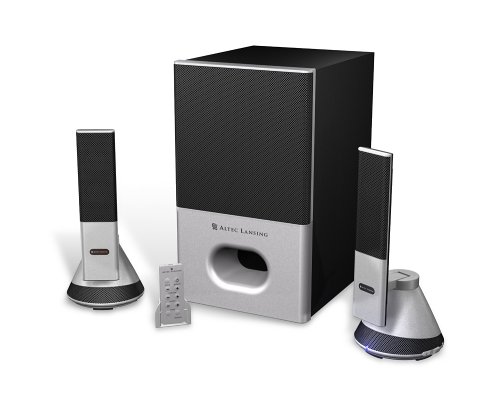
Image: The Altec Lansing VS4221 2.1 Speaker System, showing the subwoofer and two satellite speakers. The satellite speakers are designed with pivoting stands for directional sound.
Instrukcja obsługi
Using the Wireless Remote Control
The VS4221 system includes a wireless remote control for convenient adjustment of audio settings. Place the remote in its caddy when not in use to prevent misplacement.
- Zasilanie/Czuwanie: Press the power button on the remote to turn the system on or put it into standby mode.
- Głośność: Use the volume up (+) and volume down (-) buttons to adjust the overall sound level.
- Kontrola basu: Adjust the bass level to your preference using the dedicated bass control buttons.
- Kontrola tonów wysokich: Adjust the treble level for crisp high frequencies using the dedicated treble control buttons.
- Głośność: Activate or deactivate the loudness feature to enhance bass and treble at lower volumes.
Korzystanie z gniazda słuchawkowego
A headphone jack is integrated into the system, typically on one of the satellite speakers or the remote caddy. Plugging in headphones will mute the speakers, allowing for private listening. Unplugging headphones will restore audio through the speakers.
Konserwacja
- Czyszczenie: Do czyszczenia powierzchni głośników i subwoofera używaj miękkiej, suchej ściereczki. Unikaj stosowania płynnych środków czyszczących lub materiałów ściernych, ponieważ mogą one uszkodzić wykończenie lub elementy wewnętrzne.
- Umieszczenie: Ensure the speakers are placed on stable surfaces to prevent accidental falls. Avoid placing them in direct sunlight, near heat sources, or in areas with high humidity.
- Zarządzanie kablami: Keep cables organized and untangled to prevent damage and ensure proper connectivity.
Rozwiązywanie problemów
| Problem | Możliwa przyczyna | Rozwiązanie |
|---|---|---|
| Brak dźwięku z głośników. |
|
|
| Zniekształcony lub niewyraźny dźwięk. |
|
|
| Pilot bezprzewodowy nie odpowiada. |
|
|
Specyfikacje
| Funkcja | Szczegół |
|---|---|
| Numer modelu | VS4221 |
| Typ głośnika | 2.1 Speaker System (Two Satellite Speakers, One Subwoofer) |
| Tryb wyjścia audio | Stereofoniczny |
| Maksymalna moc wyjściowa głośnika | 35 watów |
| Stosunek sygnału do szumu | 80dB |
| Sterownik subwoofera | 3-inch down-firing |
| Przetworniki głośników satelitarnych | Micro Drivers (for highs), 3-inch Midrange Driver (concealed) |
| Technologia łączności | Wired (3.5mm, RCA inputs) |
| Metoda kontroli | Wireless Remote Control, Built-in Controls |
| Kompatybilne urządzenia | Smartphone, Tablet, Laptop, MP3 Player, Desktop, Television, Projector |
| Źródło zasilania | AC |
| Waga przedmiotu | 12.3 funtów |
| Kolor | Czarny |
| UPC | 021986941538 |
Gwarancja i wsparcie
The Altec Lansing VS4221 speaker system comes with a Ograniczona gwarancja. For specific details regarding warranty coverage, duration, and terms, please refer to the warranty card included with your product or visit the official Altec Lansing webstrona.
For technical support, troubleshooting assistance beyond this manual, or service inquiries, please contact Altec Lansing customer support through their official channels. Keep your purchase receipt and product model number (VS4221) readily available when seeking support.


