
1. Wprowadzenie
Dziękujemy za zakupasing the GPX BCD2004 Boombox. This portable audio system features a top-loading CD player and an AM/FM tuner, designed for versatile audio playback. This manual provides essential information for setting up, operating, and maintaining your device to ensure optimal performance and longevity.
2. Informacje dotyczące bezpieczeństwa
- Przeczytaj instrukcję: Carefully read all operating instructions before using the unit.
- Zachowaj instrukcje: Zachowaj tę instrukcję do wykorzystania w przyszłości.
- Woda i wilgoć: Nie narażaj urządzenia na działanie kapiącą lub rozpryskującą się wodę. Nie stawiaj na urządzeniu przedmiotów wypełnionych płynami, takich jak wazony.
- Wentylacja: Zapewnij odpowiednią wentylację. Nie blokuj żadnych otworów wentylacyjnych.
- Ciepło: Nie umieszczać w pobliżu źródeł ciepła, takich jak grzejniki, kratki wentylacyjne, piece lub inne urządzenia (w tym amp(lifiers) wytwarzające ciepło.
- Źródła zasilania: Use only the power source indicated on the appliance.
- Baterie: Follow battery safety guidelines. Do not mix old and new batteries, or different types of batteries. Remove batteries if the unit is not used for extended periods.
- Serwisowanie: Wszelkie prace serwisowe należy powierzać wykwalifikowanemu personelowi.
3. Zawartość opakowania
Sprawdź, czy w przesyłce znajdują się następujące elementy:
- GPX BCD2004 Boombox Unit
- Przewód zasilający AC
- Instrukcja obsługi
4. Sterowanie i funkcjeview
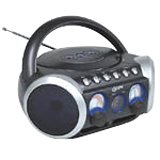
Rysunek 1: Przód view of the GPX BCD2004 Boombox. This image shows the overall design of the boombox, including the speaker grilles and the general layout of the front panel.
Familiarize yourself with the main controls and features of your boombox:
- Komora na płyty CD: Top-loading bay for inserting CDs.
- Przełącznik funkcji: Selects between CD, AM, FM, and OFF modes.
- Regulacja głośności: Rotary dial to adjust the audio output level.
- Pokrętło strojenia: Rotary dial for selecting AM or FM radio frequencies.
- Przycisk Odtwórz/Pauza: Starts or temporarily stops CD playback.
- Przycisk stopu: Zatrzymuje odtwarzanie płyty CD.
- Przyciski Pomiń/Szukaj (◀◀ / ▶▶): Przechodzi do poprzedniego/następnego utworu lub przeszukuje utwór w obrębie utworu.
- Przycisk programu: Used to program a sequence of tracks for CD playback.
- Przycisk powtarzania: Powtarza bieżący utwór lub całą płytę CD.
- Antena AM/FM: Telescopic antenna for FM reception, internal antenna for AM.
- Wejście zasilania prądem zmiennym: Jack for connecting the AC power cord.
- Komora baterii: Located on the bottom or rear for 'C' batteries.
- Fold-down Carrying Handle: Dla łatwego przenoszenia.
5. Konfiguracja
5.1 Zasilanie jednostki
Your GPX BCD2004 Boombox can be powered by either AC power or batteries.
Zasilanie prądem zmiennym
- Ensure the Function Switch is in the OFF position.
- Insert the small end of the AC power cord into the AC power input jack on the back of the unit.
- Podłącz drugi koniec przewodu zasilającego do standardowego gniazdka ściennego prądu zmiennego (120 V ~ 60 Hz).
Zasilanie bateryjne
For portable use, the boombox requires 8 'C' size batteries (not included).
- Ensure the Function Switch is in the OFF position.
- Otwórz pokrywę komory baterii, która znajduje się na spodzie lub z tyłu urządzenia.
- Insert 8 'C' size batteries, observing the correct polarity (+ and -) as indicated inside the compartment.
- Dokładnie zamknij pokrywę komory baterii.
- Notatka: When operating on battery power, disconnect the AC power cord from the unit.
6. Obsługa odtwarzacza CD
The GPX BCD2004 is compatible with standard audio CDs, CD-R, and CD-RW discs.
6.1 Ładowanie płyty CD
- Lift the CD compartment door located on the top of the unit.
- Umieść płytę CD na środkowym wrzecionie etykietą do góry.
- Gently close the CD compartment door until it clicks shut.
6.2 Podstawowe odtwarzanie płyt CD
- Ustaw przełącznik funkcji w pozycji CD.
- The CD player will begin to read the disc. The track number will typically display.
- Press the PLAY/PAUSE (▶/██) button to start playback.
- Adjust the Volume Control to your desired listening level.
- To pause playback, press the PLAY/PAUSE (▶/██) button. Press it again to resume.
- Aby zatrzymać odtwarzanie, naciśnij przycisk STOP (■).
6.3 Skipping and Searching Tracks
- Pomiń ścieżkę: During playback, press the SKIP/SEARCH FORWARD (▶▶) button to go to the next track. Press the SKIP/SEARCH BACKWARD (◀◀) button to go to the beginning of the current track, or press it twice to go to the previous track.
- Search Within Track: During playback, press and hold the SKIP/SEARCH FORWARD (▶▶) or SKIP/SEARCH BACKWARD (◀◀) button to fast forward or rewind through the current track. Release the button to resume normal playback.
6.4 Program Play
Można zaprogramować odtwarzanie maksymalnie 16 utworów w określonej kolejności.
- In STOP mode, press the PROGRAM button. The program indicator will flash.
- Use the SKIP/SEARCH buttons (◀◀ / ▶▶) to select your desired first track.
- Press the PROGRAM button again to confirm the selection.
- Repeat steps 2 and 3 to add up to 16 tracks to your program list.
- After programming all desired tracks, press the PLAY/PAUSE (▶/██) button to start programmed playback.
- To clear the program, press the STOP (■) button twice.
6.5 Repeat Play
During CD playback, press the REPEAT button:
- Naciśnij raz, aby Powtórz 1 (repeats the current track).
- Naciśnij dwa razy, aby Powtórz wszystko (repeats the entire CD or programmed tracks).
- Press a third time to cancel repeat function.
7. Operating the AM/FM Radio
7.1 Tuning to Radio Stations
- Set the Function Switch to either the AM or FM position.
- Adjust the Tuning Dial to select your desired radio station.
- Adjust the Volume Control to your desired listening level.
7.2 Improving Radio Reception
- Odbiór FM: Extend the telescopic antenna fully and adjust its position for the best reception.
- Recepcja poranna: The unit has a built-in AM antenna. Rotate the entire boombox for optimal AM reception.
8. Konserwacja
8.1 Czyszczenie urządzenia
- Wytrzyj obudowę urządzenia miękką, damp ściereczka. Nie należy używać środków czyszczących o właściwościach ściernych ani rozpuszczalników.
- For the CD lens, use a specialized CD lens cleaner disc or a soft, lint-free cloth specifically designed for optical lenses.
8.2 Pielęgnacja baterii
- Aby zapobiec wyciekowi baterii, wyjmij je, jeśli urządzenie nie będzie używane przez dłuższy czas.
- Zużytych baterii należy pozbywać się w sposób odpowiedzialny, zgodnie z lokalnymi przepisami.
9. Rozwiązywanie Problemów
If you experience issues with your boombox, please refer to the following common problems and solutions:
| Problem | Możliwa przyczyna | Rozwiązanie |
|---|---|---|
| Brak zasilania | AC cord not connected; Batteries dead or incorrectly inserted; Function switch OFF. | Check AC cord connection; Replace batteries or check polarity; Set Function switch to CD, AM, or FM. |
| Płyta CD nie odtwarza się | CD inserted incorrectly; CD dirty or scratched; CD compartment door open; Function switch not on CD. | Insert CD with label side up; Clean or replace CD; Close CD door securely; Set Function switch to CD. |
| Słaby odbiór radia | Antena nie jest rozciągnięta/wyregulowana; słaby sygnał. | Extend and adjust FM antenna; Rotate unit for AM reception; Try a different location. |
| Brak dźwięku lub niska głośność | Volume too low; Unit in pause mode. | Increase volume; Press Play/Pause button to resume playback. |
10. Specyfikacje
- Model: BCD2004
- Marka: GPX
- Kompatybilność z płytami CD: Płyta CD, płyta CD-R, płyta CD-RW
- Tuner radiowy: AM/FM
- Źródło zasilania: Prąd zmienny 120 V ~ 60 Hz lub 8 baterii typu „C” (brak w zestawie)
- Prelegenci: 2 Full-range speakers
- Wymiary (w przybliżeniu): 33.02 x 27.94 x 17.02 cm (dł. x szer. x wys.)
- Waga (w przybliżeniu): 2.18 kilogramów
- Cechy: 16-track programming, Repeat play, Song skip/search, Fold-down carrying handle
11. Gwarancja i wsparcie
This GPX BCD2004 Boombox comes with a 90-dniowa gwarancja od daty pierwotnego zakupu. Niniejsza gwarancja obejmuje wady materiałowe i wykonawcze wynikające z normalnego użytkowania.
For warranty service or technical support, please refer to the contact information provided with your purchase documentation or visit the official GPX website. Please have your model number (BCD2004) and proof of purchase ready when contacting support.