
Wstęp
This manual provides detailed instructions for the safe and effective use of your Pentax Optio S4i 4MP Digital Camera. Please read this manual thoroughly before using the camera and keep it in a safe place for future reference. The Pentax Optio S4i is a compact digital camera featuring a 4-megapixel sensor, 3x optical zoom, and a 1.8-inch LCD monitor, designed for capturing high-quality still images and video.
Organizować coś
1. Montaż i ładowanie akumulatora
The Pentax Optio S4i uses a rechargeable Lithium-Ion battery. Ensure the battery is fully charged before first use.
- Otwórz pokrywę komory baterii znajdującą się na spodzie aparatu.
- Insert the Lithium-Ion battery with the correct orientation, matching the polarity indicators.
- Dokładnie zamknij pokrywę komory baterii.
- Connect the camera to the provided charger or use the external charger to recharge the battery. The charging indicator will show the charging status.

Rysunek 1: Spód view of the camera, illustrating the battery and SD card compartment. This is where the Lithium-Ion battery is inserted and secured.
2. Instalacja karty pamięci
The camera has 10 MB of built-in memory. For extended storage, an optional Secure Digital (SD) memory card is recommended.
- Otwórz pokrywę komory baterii/karty pamięci znajdującą się na spodzie aparatu.
- Insert the SD card into the designated slot until it clicks into place. Ensure the card is inserted in the correct direction.
- Zamknij dokładnie pokrywę komory.
3. Pierwsze włączenie zasilania
To power on the camera, press the ON/OFF button located on the top panel.

Rysunek 2: Szczyt view of the camera, highlighting the ON/OFF button. Press this button to power the camera on or off.
Instrukcja obsługi
1. Taking Still Pictures
The camera features a 4-megapixel sensor and a 3x optical zoom lens for capturing detailed images.
- Turn on the camera. The lens will extend.
- Select your desired shooting mode using the MODE button on the rear panel. The camera offers 21 shooting modes, including automatic exposure control.
- Skadruj ujęcie korzystając z 1.8-calowego monitora LCD.
- Use the zoom lever to adjust the 3x optical zoom. The 4x digital zoom can further extend the magnification up to 12x combined.
- Naciśnij przycisk migawki do połowy, aby ustawić ostrość, a następnie naciśnij go do końca, aby uchwycić obraz.

Rysunek 3: Przód view of the Pentax Optio S4i with its 3x optical zoom lens extended, ready for capturing images.
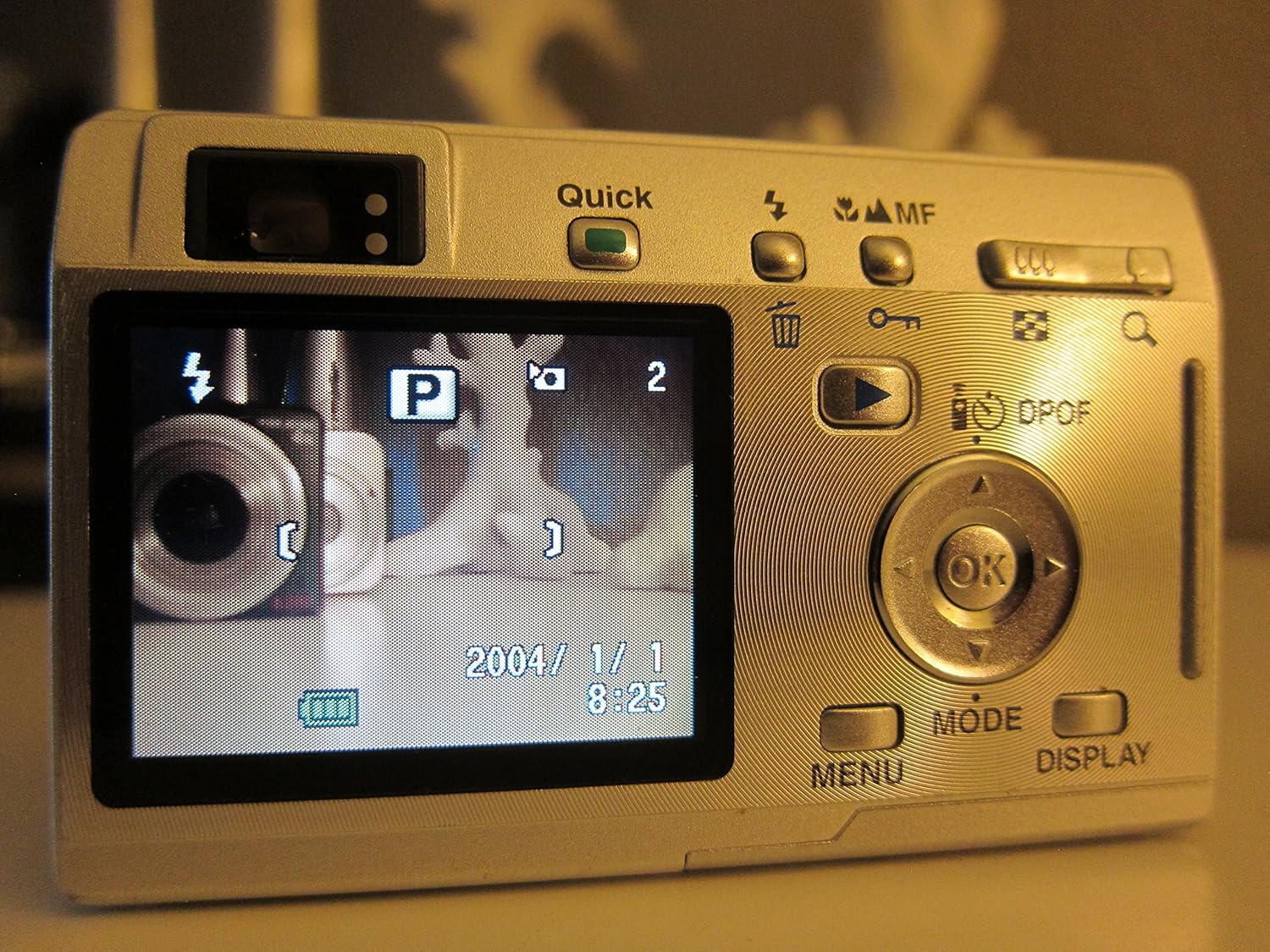
Rysunek 4: Tył view of the camera displaying the LCD screen in shooting mode, with various controls visible for mode selection and navigation.
2. Nagrywanie filmów
The camera supports movie mode with sound, capturing video at 320 x 240 resolution at 15 frames per second.
- Switch to movie mode using the MODE button.
- Naciśnij spust migawki, aby rozpocząć nagrywanie.
- Naciśnij ponownie przycisk migawki, aby zatrzymać nagrywanie.
3. Tryb odtwarzania
View your captured photos and videos on the 1.8-inch LCD screen.
- Press the Playback button (often indicated by a triangle icon) to enter playback mode.
- Użyj klawiatury kierunkowej, aby poruszać się po zdjęciach i filmach.
- Naciśnij przycisk OK, aby view szczegóły lub odtwórz filmy.

Rysunek 5: Tył view of the camera with the LCD screen displaying an image in playback mode, showing navigation controls.
4. Podłączanie do komputera
Transfer your images and videos to a computer using the USB connection.
- Sprawdź, czy kamera jest wyłączona.
- Connect the camera to your computer using a compatible USB cable.
- Power on the camera. It should be recognized as a removable storage device.
- Przenosić files as you would from any other external drive.
Konserwacja
1. Czyszczenie aparatu
- Do czyszczenia korpusu aparatu należy używać miękkiej, suchej ściereczki.
- Do czyszczenia soczewek i ekranu LCD należy używać specjalnej ściereczki i płynu do czyszczenia soczewek. Unikać materiałów ściernych.
- Do not use organic solvents such as alcohol or paint thinner.
2. Pielęgnacja baterii
- Wyjmij baterię, jeśli aparat nie będzie używany przez dłuższy czas.
- Przechowuj baterie w chłodnym, suchym miejscu.
- Unikaj wystawiania baterii na działanie ekstremalnych temperatur.
3. Przechowywanie
- Store the camera in a dry, dust-free environment.
- Use a protective case to prevent scratches and damage.
Rozwiązywanie problemów
- Kamera się nie włącza: Sprawdź, czy akumulator jest całkowicie naładowany i prawidłowo włożony.
- Obrazy są niewyraźne: Check that the lens is clean. Ensure the camera has focused correctly before taking the shot. Use appropriate shooting modes for different lighting conditions.
- Błąd karty pamięci: Reinsert the memory card. If the issue persists, try a different compatible SD card. Ensure the card is not locked.
- Slow shot-to-shot performance: This camera may exhibit slower performance between shots, especially in certain modes or with larger image sizes. This is normal operation.
- Nie można połączyć się z komputerem: Verify the USB cable connection. Ensure the camera is powered on after connecting. Try a different USB port or cable.
Specyfikacje
| Funkcja | Specyfikacja |
|---|---|
| Nazwa modelu | Optio S4i |
| Rozdzielczość czujnika fotograficznego | 4 MP |
| Zoom optyczny | 3x |
| Zoom cyfrowy | 4x (12x combined) |
| Rozmiar ekranu | 1.8 cali |
| Typ czujnika | CCD (1/2.5 cala) |
| Stabilizacja obrazu | Cyfrowy, optyczny |
| Utrzymany File Format | JPG, RAW |
| Rozdzielczość wideo | 320 x 240, 15 fps, audio |
| Minimalna prędkość migawki | 4 sekund |
| Maksymalna prędkość migawki | 1/2000 sekundy |
| Rozszerzony zakres ISO | 50-400 |
| Nośniki pamięci | SD/MMC card, 10 MB Internal |
| Typ baterii | Litowo-jonowy (ładowalny) |
| Łączność | USB |
| Waga przedmiotu | 0.26 funtów |
Gwarancja i wsparcie
For information regarding warranty coverage, technical support, or service, please refer to the official Pentax website or contact your local Pentax dealer. Specific warranty terms may vary by region and purchase date.
You can visit the official Pentax store for more information: Pentax Store