
Wstęp
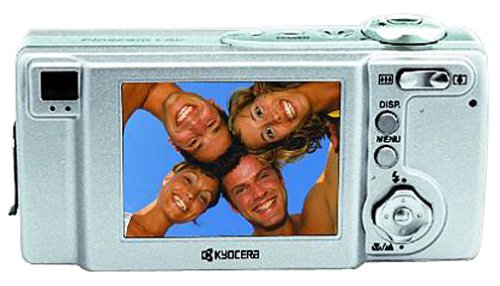
The Kyocera Finecam L4V is a compact 4-megapixel digital camera designed for capturing high-quality images and video. It features a 3x optical zoom lens, a large 2.5-inch LCD screen, and various shooting modes to suit different photographic situations. This manual provides essential information for setting up, operating, maintaining, and troubleshooting your Finecam L4V camera.
Rysunek 1: A silver Kyocera Finecam L4V digital camera, viewed from a slight angle, showing the lens, flash, and the 'Finecam L4v' branding on the front, and the battery/card compartment on the side.
Organizować coś
1. Instalacja baterii
The Finecam L4V operates using a CR-V3 lithium battery (included). For extended use and cost-effectiveness, two AA-sized rechargeable NiMH batteries are recommended as an alternative.
- Znajdź pokrywę komory baterii z boku aparatu.
- Przesuń zatrzask, aby otworzyć komorę.
- Insert the CR-V3 battery or two AA NiMH batteries, ensuring correct polarity (+/-) as indicated inside the compartment.
- Close the compartment door securely until it clicks into place.
2. Instalacja karty pamięci
The camera uses Secure Digital (SD) or MultiMedia (MMC) memory cards for image and video storage. A 16 MB SD card is included with your camera.
- Open the battery/card compartment door.
- Insert the SD or MMC card into the designated slot with the metal contacts facing the correct direction (usually towards the front of the camera).
- Push the card gently until it locks into place. To remove, push the card in again, and it will spring out.
- Zamknij dokładnie drzwi przedziału.
3. Podłączanie do komputera
To transfer images and videos, connect your Finecam L4V to a computer using the supplied USB cable.
- Sprawdź, czy kamera jest wyłączona.
- Podłącz jeden koniec kabla USB do portu USB aparatu.
- Connect the other end to an available USB 1.1 port on your Windows or Mac computer.
- Install the imaging software and USB drivers from the included CD-ROM if prompted by your operating system.
Obsługa aparatu
1. Włączanie/wyłączanie zasilania
Press the power button (usually located on the top of the camera) to turn the camera on or off. The 2.5-inch LCD screen will activate upon power-on.
2. Robienie zdjęć
- Ramy: Użyj 2.5-calowego ekranu LCD lub optycznego viewfinder, aby skomponować ujęcie.
- Brzęczenie: Use the zoom controls (typically a rocker switch near the shutter button) to adjust the 3x optical zoom and 4x digital zoom (for a total 12x zoom).
- Centrum: The camera features autofocus. Half-press the shutter button to focus, then fully press to capture the image.
- Tryby fotografowania: Select from various modes such as macro for close-ups, landscape for wide scenes, and color modes (color, sepia, black & white) via the camera's menu.
- Tryby Flash: Adjust flash settings for different lighting conditions: auto flash, red-eye reduction auto flash, fill-in flash, flash-off, or night-time portrait.
3. Nagrywanie filmów
The Finecam L4V supports AVI movie recording with sound for up to 120 seconds.
- Switch the camera to movie mode (refer to your camera's specific button or menu option).
- Naciśnij spust migawki, aby rozpocząć nagrywanie.
- Naciśnij ponownie przycisk migawki, aby zatrzymać nagrywanie.
4. Nagrywanie głosu
You can attach up to a 30-second voice message to each image. Consult the camera's on-screen menu for options to record and attach voice memos.
Konserwacja
- Czyszczenie obiektywu: Używaj miękkiej, niepozostawiającej włókien ściereczki przeznaczonej specjalnie do obiektywów aparatów. Unikaj agresywnych środków chemicznych.
- Czyszczenie ekranu LCD: Gently wipe the screen with a microfiber cloth.
- Składowanie: When not in use, store the camera in a dry, dust-free environment, away from extreme temperatures. Remove batteries if storing for extended periods.
- Pielęgnacja baterii: If using rechargeable NiMH batteries, follow the manufacturer's charging instructions. Avoid overcharging.
Rozwiązywanie problemów
Typowe problemy i rozwiązania:
- Kamera się nie włącza:
- Sprawdź, czy baterie zostały prawidłowo włożone, z zachowaniem właściwej polaryzacji.
- Check if batteries are fully charged or replace with fresh ones.
- If using a CR-V3 battery, note that it is not rechargeable and will need replacement when depleted. Consider using rechargeable AA NiMH batteries for long-term use.
- Obrazy są niewyraźne:
- Upewnij się, że obiektyw jest czysty.
- Make sure the camera has focused correctly before fully pressing the shutter button.
- Sprawdź warunki oświetleniowe, w razie konieczności użyj lampy błyskowej.
- Błąd karty pamięci:
- Sprawdź, czy karta pamięci jest włożona prawidłowo.
- Try reformatting the card (this will erase all data, so back up first).
- Try a different compatible SD or MMC card.
- Nie można przesłać zdjęć do komputera:
- Sprawdź, czy kabel USB jest prawidłowo podłączony do aparatu i komputera.
- Ensure the camera is powered on when connected.
- Install the necessary drivers from the included CD-ROM.
- Wypróbuj inny port USB na swoim komputerze.
Specyfikacje
| Funkcja | Szczegół |
|---|---|
| Nazwa modelu | Finecam L4V |
| Efektywna rozdzielczość obrazu nieruchomego | 4 MP |
| Zoom optyczny | 3x |
| Zoom cyfrowy | 4x |
| Rozmiar ekranu | 2.5 cali |
| Typ czujnika | CCD |
| Utrzymany File Format | Plik JPEG |
| Rozdzielczość wideo | 320 x 240 up to 120 sec |
| Typ pamięci flash | Karta SD/MMC |
| Typ baterii | CR-V3 Lithium (included), AA NiMH (recommended) |
| Technologia łączności | USB 1.1 |
| Waga przedmiotu | 0.49 funta (ok. 222 g) |
| Wymiary (w przybliżeniu) | 4.4 x 2.1 x 1.4 cala (11.2 x 5.3 x 3.6 cm) |
| Zakres ISO | Auto, 100, 200, 400 |
| Minimalna prędkość migawki | 8 sekund |
| Maksymalna prędkość migawki | 1/2000 sekundy |
| Tryby przysłony | F2.8-F4.7 |
| Posiada samowyzwalacz | Tak |
Gwarancja i wsparcie
For information regarding warranty coverage, technical support, or service for your Kyocera Finecam L4V camera, please refer to the documentation included with your purchase or visit the official Kyocera support webstrona.
You can also visit the Kyocera brand store for additional product information: Sklep Kyocera na Amazon.