
1. Wprowadzenie
Welcome to the Hot Wheels Velocity X PC game. This manual provides essential information to help you install, play, and troubleshoot the game. Prepare to navigate Monument City, engage in high-speed races, and complete challenging missions.

Image 1: The official cover art for Hot Wheels Velocity X, featuring a green racing car against a backdrop of a futuristic city skyline.
2. Wymagania systemowe
Before installing, ensure your computer meets the minimum system requirements for optimal performance.
- System operacyjny: Windows 95, Windows 98, Windows Me (Later Windows versions may require compatibility mode).
- Edytor: Pentium II 300 MHz or equivalent.
- BARAN: 64 MB.
- Miejsce na dysku twardym: 500 MB free.
- Karta graficzna: 8 MB DirectX compatible 3D accelerator card.
- Karta dźwiękowa: DirectX compatible sound card.
- Napęd CD-ROM: 8x speed.
- Wejście: Keyboard, Mouse.
3. Instalacja
Follow these steps to install Hot Wheels Velocity X on your PC:
- Insert the Hot Wheels Velocity X game CD into your computer's CD-ROM drive.
- If the installer does not launch automatically, navigate to "My Computer," right-click on your CD-ROM drive icon, and select "Open." Then, locate and double-click "Setup.exe" or "Install.exe."
- Follow the on-screen prompts to complete the installation process. This typically involves accepting the license agreement, choosing an installation directory, and selecting components.
- Once installation is complete, you may be prompted to restart your computer. It is recommended to do so.
- A shortcut to the game will be placed on your desktop or in your Start Menu.
4. Obsługa gry
4.1 Rozpoczęcie gry
Double-click the Hot Wheels Velocity X shortcut on your desktop or select it from the Start Menu to launch the game.
4.2 Menu główne
From the main menu, you can access various game options:
- New Game: Start a new campzrównaj.
- Load Game: Continue a previously saved game.
- Opcje: Adjust graphics, sound, and control settings.
- Wieloosobowa: Engage in local multiplayer modes.
- Wyjście: Wyjdź z gry.
4.3 tryby gry
Hot Wheels Velocity X offers several modes of play:
- Tryb fabularny: Embark on 30 missions across six distinct levels in Monument City to defeat a criminal gang.
- Tryb wyścigu: Compete in various races against AI opponents.
- Tryb bitwy: Engage in vehicular combat using power-ups.
- Stunt Challenge: Perform daring stunts and earn points.
- Wieloosobowa: Challenge a friend in head-to-head racing, battle mode, or stunt challenges.

Image 2: A dynamic in-game screenshot showing a yellow Hot Wheels car defying gravity on a looped track, highlighting the game's stunt capabilities.
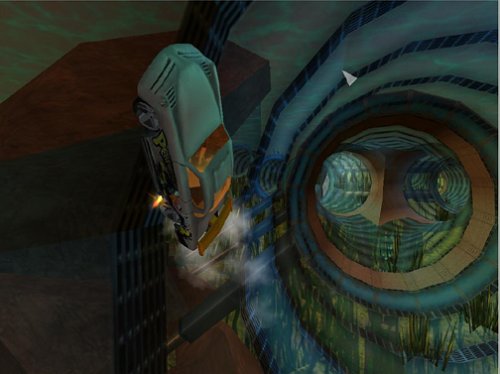
Image 3: An in-game view of a white Hot Wheels car navigating a vibrant, patterned tunnel, showcasing the diverse track designs.
4.4 Sterowanie
Default keyboard controls are as follows. These can be customized in the Options menu.
- Przyśpieszyć: Klawisz strzałki w górę
- Hamulec/Wsteczny: Klawisz strzałki w dół
- Steer Left: Lewy klawisz strzałki
- Steer Right: Klawisz strzałki w prawo
- Use Power-up: Spacja
- Hamulec ręczny: Lewy klawisz Shift
- Look Back: Klawisz C.
- Pause Game: Klawisz Esc

Image 4: An action shot from the game featuring a white Hot Wheels car with custom decals, racing on an elevated track against a vibrant sunset.

Image 5: A high-resolution gameplay image showing a Hot Wheels car executing a wall ride on a complex track structure, with the city visible below.
4.5 Zapisywanie i ładowanie
The game typically features an auto-save function at key points. You can also manually save your progress through the in-game pause menu. To load a game, select "Load Game" from the main menu and choose your desired save file.
5. Konserwacja
To ensure the longevity and optimal performance of your game, consider the following maintenance tips:
- Pielęgnacja dysków: Keep the game CD clean and free of scratches. Store it in its original case when not in use.
- Aktualizacje systemu: Ensure your operating system and graphics drivers are up to date. This can improve game compatibility and performance.
- Miejsce na dysku: Periodically check that you have sufficient free hard drive space for game saves and temporary files.
- Oprogramowanie antywirusowe: Keep your antivirus software updated and perform regular scans to prevent malware interference.
6. Rozwiązywanie Problemów
If you encounter issues while playing Hot Wheels Velocity X, refer to the following common solutions:
- Gra się nie uruchamia:
- Verify your system meets the minimum requirements.
- Ensure the game CD is clean and properly inserted.
- Try running the game in compatibility mode for Windows 95/98/Me. Right-click the game shortcut, select "Properties," then "Compatibility."
- Zaktualizuj sterowniki karty graficznej.
- Performance Issues (Lag, Low FPS):
- Zamknij inne aplikacje działające w tle.
- Lower the game's graphical settings in the Options menu.
- Ensure your graphics drivers are updated.
- Problemy z dźwiękiem:
- Check your computer's volume settings and in-game sound options.
- Ensure your sound card drivers are up to date.
- Verify your sound card is DirectX compatible.
- Elementy sterujące nie odpowiadają:
- Ensure your keyboard and mouse are properly connected.
- Check the in-game control settings for any reconfigurations.
- Restart the game and your computer.
Aby uzyskać dalszą pomoc, zapoznaj się z sekcją Pomoc.
7. Specyfikacje
| Funkcja | Szczegół |
|---|---|
| Tytuł | Hot Wheels Velocity X - PC |
| Marka | THQ |
| Model | Prędkość X |
| Platforma | PC (Windows 95, Windows 98, Windows Me) |
| Data wydania | 21 października 2002 r. |
| Producent | THQ |
| Waga przedmiotu | 4.8 uncji |
| Wymiary produktu | 7.76 x 5.24 x 1.26 cala |
| UPC | 752919490976 |
| ASIN | B00006C7EP |
| Ocena ESRB | Wszyscy |
8. Informacje o gwarancji
This product is subject to the standard warranty terms provided by the manufacturer, THQ, at the time of purchase. Please refer to the documentation included with your game disc or visit the official THQ website (if available) for detailed warranty information, including coverage period and conditions. Keep your proof of purchase for any warranty claims.
9. Wsparcie
For technical support or further inquiries regarding Hot Wheels Velocity X, please consider the following resources:
- Producent Webstrona: Visit the official THQ website for potential FAQs, patches, or contact information. (Note: THQ has undergone significant changes since the game's release; current support may be limited).
- Fora internetowe: Community forums dedicated to classic PC games or Hot Wheels games may offer solutions from other players.
- Wsparcie dla sprzedawców detalicznych: If purchased recently, your retailer may offer limited support or return options.
