
1. Wprowadzenie
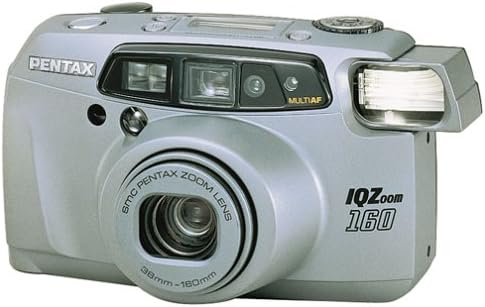
The Pentax IQ Zoom 160 is a compact 35mm film camera designed for ease of use and versatility. It features a powerful 38-160mm zoom lens, an advanced autofocus system, and various shooting modes to capture a wide range of photographic situations. This manual provides detailed instructions for the proper operation and care of your camera.

Rycina 1: Przód view of the Pentax IQ Zoom 160 camera, showing the lens, flash, and viewznalazca.
Główne cechy:
- 38-160mm power zoom lens for versatile framing.
- Five-point passive autofocus system for precise focusing.
- Six-segment multipattern metering system for optimal exposure.
- Automatic backlight compensation.
- Actual-image zoom viewfinder with diopter adjustment.
- Panorama mode for wide-angle shots.
- Multiexposure mode for creative effects.
- Self-timer function.
- Easy-to-read LCD instruction panel with automatic illumination.
2. Konfiguracja
2.1. Instalacja baterii
The Pentax IQ Zoom 160 requires one 3V Lithium battery, type CR123A or SF123A. Ensure the battery is inserted with the correct polarity as indicated inside the battery compartment.
- Znajdź pokrywę komory baterii znajdującą się na spodzie aparatu.
- Slide or twist the cover latch to open the compartment.
- Insert one CR123A/SF123A battery, matching the (+) and (-) terminals with the indicators.
- Zamknij pokrywę komory baterii, aż zatrzaśnie się na swoim miejscu.
Rysunek 2: Dół view of the camera, showing the battery compartment and tripod mount.
2.2. Ładowanie filmu
The camera uses standard 35mm film rolls. Always load film in subdued light to prevent accidental exposure.
- Open the camera back by sliding the film door release latch (usually on the side or top of the camera).
- Umieść nową kasetę z filmem 35 mm w komorze filmu po lewej stronie.
- Pull the film leader across to the film take-up spool on the right side, ensuring it catches on the spool's teeth.
- Close the camera back firmly until it latches. The camera will automatically advance the film to the first frame. The exposure counter on the LCD panel will display "1".

Rysunek 3: Tył view kamery, pokazujący viewfinder and film door release.
3. Obsługa aparatu
3.1. Włączanie/wyłączanie i wybór trybu
The user-friendly mode dial allows you to turn the camera on and off, and select various shooting modes.

Rysunek 4: Góra view of the camera, highlighting the mode dial and LCD instruction panel.
- Włączanie: Rotate the mode dial from "OFF" to any desired shooting mode (e.g., Auto). The lens will extend.
- Wyłączone: Rotate the mode dial to "OFF". The lens will retract.
- Mode Dial Settings: The dial typically includes modes such as Auto, Red-eye Reduction, Flash Off, Self-timer, and Multiexposure. Refer to the icons on the dial for specific functions.
3.2. Robienie zdjęć
- Aim the Camera: Przejrzyj viewznajdź i wykadruj obiekt.
- Brzęczenie: Use the zoom buttons (usually marked 'W' for Wide and 'T' for Telephoto) to adjust the focal length of the 38-160mm lens.
- Centrum: Lightly press the shutter button halfway down. The camera's five-point passive autofocus system will focus on the subject. A focus indicator in the viewfinder will confirm focus.
- Strzelać: Aby zrobić zdjęcie, naciśnij przycisk migawki do końca.
3.3. Tryby lampy błyskowej
The built-in flash provides illumination in low-light conditions. The camera features automatic backlight compensation, firing the flash when necessary to properly expose the subject.
- Automatyczna lampa błyskowa: Aparat automatycznie określa, czy potrzebna jest lampa błyskowa.
- Redukcja czerwonego oka: Fires a pre-flash before the main flash to reduce red-eye effect.
- Wyłączenie lampy błyskowej: Prevents the flash from firing, useful in situations where flash is prohibited or undesirable.
3.4. Special Shooting Functions
- Tryb panoramy: Switch to panorama mode via the mode dial or a dedicated button. The viewfinder will adjust to show the panorama framing area. This mode allows for wider aspect ratio images.
- Samowyzwalacz: Activate the self-timer (typically 10 seconds) using the mode dial or a dedicated button. The camera will delay taking the picture, allowing the photographer to be included in the shot.
- Multiexposure Mode: This creative mode allows you to combine two or more exposures onto a single frame of film. Consult the LCD instruction panel for guidance on activating and using this feature.
3.5. Viewfinder and LCD Panel
The actual-image zoom viewFinder zapewnia jasne view of your subject and includes a diopter adjustment for users with varying eyesight. The large LCD instruction panel displays essential camera settings and indicators, such as exposure counter, battery exhaustion warning, flash status, and selected mode. It automatically lights up for visibility in any lighting condition.
4. Konserwacja
4.1. Czyszczenie aparatu
- Obiektyw: Użyj miękkiej, niepozostawiającej włókien ściereczki lub szczoteczki do soczewek, aby delikatnie usunąć kurz. W przypadku smug użyj specjalnego płynu do czyszczenia soczewek i ściereczki. Unikaj dotykania powierzchni soczewki palcami.
- Korpus aparatu: Przetrzyj korpus aparatu miękką, suchą ściereczką. W przypadku uporczywych zabrudzeń delikatnie przetrzyj.ampWyczyść szmatkę wodą. Nie używaj rozpuszczalników ani środków czyszczących o właściwościach ściernych.
- Viewznalazca: Użyj miękkiej szczotki lub dmuchawy, aby usunąć kurz z viewokular szukacza.
4.2. Przechowywanie
- Jeśli nie używasz urządzenia przez dłuższy czas, wyjmij baterię, aby zapobiec wyciekowi.
- Store the camera in a cool, dry place, away from direct sunlight, high humidity, and extreme temperatures.
- Use a camera bag or case to protect the camera from dust and physical damage.
5. Rozwiązywanie Problemów
| Problem | Rozwiązanie | |
|---|---|---|
| Kamera się nie włącza. | Rozładowana lub nieprawidłowo włożona bateria. | Replace battery with a fresh CR123A/SF123A, ensuring correct polarity. |
| Film się nie przesuwa. | Film not properly loaded or end of roll. | Re-load film, ensuring the leader catches the take-up spool. Check if the film counter shows 'S' or 'E'. |
| Zdjęcia są rozmazane. | Camera shake, subject too close, or focus error. | Hold camera steady, ensure subject is within focusing range, or use a tripod. Ensure focus confirmation appears before shooting. |
| Lampa błyskowa się nie uruchamia. | Flash is set to "Flash Off" mode or battery is low. | Check flash mode setting. Replace battery if low. |
| Czerwone oczy na zdjęciach. | Flash fired directly at subject's eyes. | Use Red-eye Reduction flash mode. Increase ambient lighting if possible. |
6. Specyfikacje
| Ogólny | |
|---|---|
| Marka | Pentax |
| Nazwa modelu | IQ Zoom 160 |
| Numer modelu | 10124 |
| Współczynnik kształtu | Kompaktowy |
| Waga przedmiotu | 16 uncji |
| Materiał obudowy | Plastikowy |
| Obiektyw | |
| Typ soczewki | Brzęczenie |
| Minimalna ogniskowa | 38 milimetrów |
| Maksymalna ogniskowa | 160 milimetrów |
| minimalna przysłona | 4.5 |
| Tryby przysłony | 4.5-12 |
| Exposure & Focus | |
| Kontrola ekspozycji | Automatyczny |
| Metody pomiaru | Spot, Multi-pattern |
| Minimalna prędkość migawki | 1/400 sekundy |
| Maksymalna prędkość migawki | 2 sekund |
| Technologia automatycznego ustawiania ostrości | Contrast Detection, Multi area, sensor |
| Punkty autofokusa | 5 |
| Tryb skupienia | Single-Servo AF (AF-S) |
| Ustawienia balansu bieli | Automatyczny |
| Rozszerzone minimum ISO | 100 |
| Błysk | |
| Lampa błyskowa aparatu | Wbudowany |
| Tryby Flash | Automatic, Red Eye Reduction |
| Prędkość synchronizacji błysku | 1/400 sekundy |
| Inne funkcje | |
| Viewznalazca | Optyczny |
| Typ wyświetlacza | LCD |
| Samowyzwalacz | 10 sekund |
| Tryby fotografowania | Automatic, Panorama, Multiexposure, Self-timer |
| Funkcja specjalna | Panorama |
| Typ baterii | 3V Lithium CR123A/SF123A |
| Poziom wodoodporności | Nie jest wodoodporny |
| Posiada stabilizację obrazu | NIE |
7. Gwarancja i wsparcie
For specific warranty information, please refer to the documentation included with your purchase or visit the official Pentax website. For technical support or service inquiries, please contact Pentax customer service directly.
You can often find additional support resources, FAQs, and contact information on the manufacturer's official webstrona.


