
1. Wprowadzenie i koniecview
The Brother CTS-410-ES is a versatile 4-line executive phone system designed for efficient communication in office or home environments. It can function as a stand-alone unit or integrate into a larger system. Key features include a built-in caller ID, a 99-number call log, and a desktop data port for convenient access to line 4. This manual provides detailed instructions for setup, operation, maintenance, and troubleshooting to ensure optimal performance of your device.
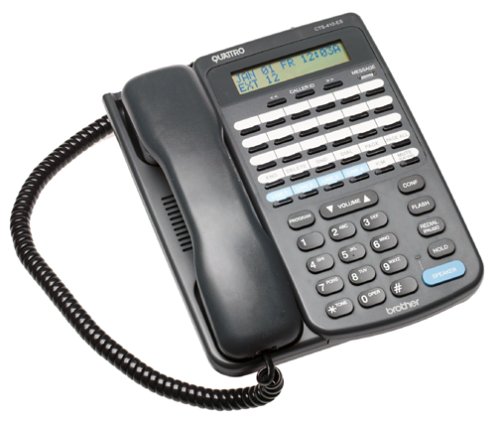
Przód view of the Brother CTS-410-ES 4-line executive phone system, showing the keypad, display, and line buttons.
2. Informacje dotyczące bezpieczeństwa
Please read and follow these safety precautions to prevent damage to the unit and ensure your safety:
- Nie narażaj urządzenia na działanie wody i wilgoci.
- Unikaj umieszczania urządzenia w pobliżu źródeł ciepła lub bezpośredniego światła słonecznego.
- Używaj wyłącznie zasilacza dostarczonego wraz z urządzeniem.
- Nie próbuj samodzielnie otwierać ani naprawiać urządzenia. Wszelkie prace serwisowe zleć wykwalifikowanemu personelowi.
- Keep the unit away from strong electromagnetic fields.
3. Zawartość opakowania
Sprawdź, czy w przesyłce znajdują się następujące elementy:
- Brother CTS-410-ES 4-Line Executive Phone System Unit
- Zasilacz sieciowy
- Telephone Line Cords (typically 4)
- Noise-Canceling Headset
- Instrukcja obsługi (ten dokument)
4. Konfiguracja
Follow these steps to set up your Brother CTS-410-ES phone system:
- Podłącz zasilanie: Plug the AC power adapter into the power jack on the back of the phone unit, then plug the adapter into a standard electrical outlet.
- Podłącz linie telefoniczne: Connect each telephone line cord from your wall jacks to the corresponding line jacks (Line 1, Line 2, Line 3, Line 4) on the back of the phone unit.
- Podłącz zestaw słuchawkowy: If using the included noise-canceling headset, plug it into the dedicated headset jack on the side or front of the phone unit.
- Pierwsze włączenie: The unit should power on automatically. The display will illuminate, and you may hear a brief self-test sequence.
5. Instrukcja obsługi
This section details the various functions and operations of your phone system.
5.1 Podstawowe funkcje wywołań
- Nawiązywanie połączenia: Lift the handset or press the SPEAKER button. Select an available line button (Line 1-4). Dial the desired number.
- Odbieranie połączenia: When the phone rings, lift the handset or press the SPEAKER button. The corresponding line button will flash.
- Zakończenie połączenia: Place the handset back in the cradle or press the SPEAKER button again if using the speakerphone.
- Trzymać: During a call, press the HOLD button to place the call on hold. Press the flashing line button to resume the call.
5.2 Caller ID and Call Log
- Identyfikator dzwoniącego: When a call comes in, the caller's name and number will appear on the display (if available from your service provider).
- Rejestr połączeń: The system stores up to 99 incoming calls. Use the navigation buttons (e.g., UP/DOWN arrows) to scroll through the call log.
- Wybieranie numeru z rejestru połączeń: Select an entry from the call log and press the DIAL or SPEAKER button to call back.
5.3 Głośnik i zestaw słuchawkowy
- Zestaw głośnomówiący: Press the SPEAKER button to activate hands-free communication. Adjust volume using the volume controls.
- Obsługa zestawu słuchawkowego: With the headset connected, press the HEADSET button (if available) or simply lift the handset to activate the headset for calls.
5.4 Intercom and Paging
- Awiofon: If multiple CTS-410-ES units are connected, use the INTERCOM function to communicate between units. Refer to your system's specific intercom setup.
- Stronicowanie: Use the PAGING function to broadcast an announcement to other connected units.
5.5 Message Waiting Light and Data Port
- Kontrolka oczekującej wiadomości: A dedicated light will illuminate to indicate new messages (requires compatible voicemail service from your provider).
- Desktop Data Port: The data port provides quick access to Line 4, allowing you to connect a modem or other data device.
6. Konserwacja
Proper maintenance ensures the longevity and performance of your phone system.
- Czyszczenie: Wipe the unit with a soft, dry cloth. Do not use liquid or aerosol cleaners.
- Składowanie: If storing the unit for an extended period, disconnect it from power and telephone lines. Store in a cool, dry place.
- Zarządzanie przewodami: Ensure all cords are free from kinks or damage. Replace damaged cords immediately.
7. Rozwiązywanie Problemów
If you encounter issues with your phone system, try these common solutions:
| Problem | Możliwe rozwiązanie |
|---|---|
| Brak sygnału wybierania | Check all telephone line connections. Ensure the power adapter is securely plugged in. Test with a different phone line if possible. |
| Identyfikator dzwoniącego nie jest wyświetlany | Verify that Caller ID service is activated with your telephone service provider. Ensure the phone is connected to a compatible line. |
| Dźwięk w głośniku jest słaby lub zniekształcony | Adjust the speaker volume. Ensure the microphone is not obstructed. Move closer to the unit. |
| Message waiting light not working | Confirm that you have voicemail service with your provider and that it is properly configured. |
8. Specyfikacje
Technical specifications for the Brother CTS-410-ES phone system:
| Funkcja | Szczegół |
|---|---|
| Marka | Brat |
| Numer modelu | CTS-410-ES |
| Typ telefonu | Sznurowy |
| Liczba linii | 4 |
| Źródło zasilania | Elektryczny przewodowy |
| Typ dialera | Pojedyncza klawiatura |
| Pozycja Wymiary (dł. x szer. x wys.) | Wymiary 17.8 x 22.9 x 10.8 cm |
| Typ systemu odbierającego | Cyfrowy |
| Możliwość prowadzenia rozmów konferencyjnych | 4 droga |
| Operacja wieloliniowa | Tak |
| Identyfikacja dzwoniącego | Tak |
| Pojemność nagrywania | 20 Minutes (for answering system, if applicable) |
| Rozszerzalny | Yes, with other optional CTS410ES units |
| Call Log Memory | 99 liczby |
| Gniazdo słuchawkowe | Tak |
| Desktop Data Port | Yes (for Line 4) |
9. Gwarancja i wsparcie
This Brother CTS-410-ES product comes with a 90-dniowa ograniczona gwarancja. For warranty claims or technical assistance, please contact Brother customer support. Keep your purchase receipt as proof of purchase.
For further support, visit the official Brother support webodwiedź witrynę lub skonsultuj się z lokalnym dealerem.