
Wstęp
The Vivitar 450PZ is a compact 35mm camera designed for ease of use, featuring fully automatic operation. This manual provides essential information for setting up, operating, maintaining, and troubleshooting your camera to ensure optimal performance.
The camera incorporates automatic focusing and exposure, a 38 to 70mm zoom lens, an automatic flash with red-eye reduction, and motorized film handling. An electronic self-timer is also included for convenience.
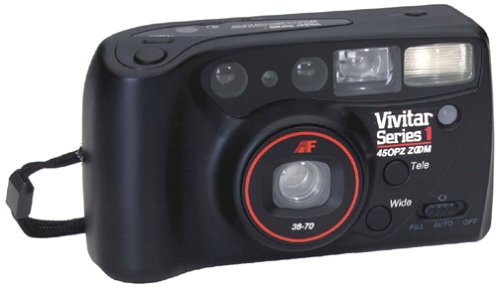
Obraz: Przód view of the Vivitar 450PZ 35mm Camera, showcasinze względu na kompaktową konstrukcję i obiektyw.
Organizować coś
1. Instalacja baterii
- Locate the battery compartment cover on the camera body.
- Open the cover by sliding or lifting it according to the indicator.
- Insert the required CR123A type batteries, ensuring correct polarity (+/-) as indicated inside the compartment.
- Dokładnie zamknij pokrywę komory baterii.
2. Ładowanie filmu
- Open the camera back by sliding the latch.
- Umieść kasetę z filmem 35 mm w komorze filmu.
- Pull the film leader across to the film take-up spool, aligning it with the start mark.
- Close the camera back. The camera will automatically advance the film to the first frame.
3. Wrist Strap Attachment
Attach the provided wrist strap to the designated loop on the camera body. This helps prevent accidental drops and provides a secure grip during use.
Obsługa aparatu
1. Włączanie/wyłączanie zasilania
Locate the power button or switch, typically near the shutter button. Press or slide it to turn the camera on or off.
2. Robienie zdjęć
- Przejrzyj viewfinder, aby skomponować ujęcie.
- Press the shutter button halfway down to activate the autofocus and exposure systems. The camera will automatically set the focus and exposure.
- Naciśnij spust migawki do końca, aby zrobić zdjęcie. Film automatycznie przejdzie do następnej klatki.
3. Funkcja powiększania
Use the zoom control (usually a lever or buttons near the shutter) to adjust the focal length between 38mm (wide-angle) and 70mm (telephoto). This allows you to bring subjects closer or capture a wider scene.
4. Operacja flash
- Automatyczna lampa błyskowa: The flash will automatically fire in dimly lit conditions to ensure proper exposure.
- Redukcja efektu czerwonych oczu: When activated, the camera emits a series of pre-flashes before the main flash to reduce the red-eye effect in portraits.
- Flash Off Mode: For situations where flash is not desired (e.g., museums, theater), locate the flash mode button and select the 'flash off' setting.
5. Samowyzwalacz
To use the self-timer, press the self-timer button. A flashing LED indicator will typically signal the countdown. After a set delay (e.g., 10 seconds), the camera will automatically take the picture, allowing the photographer to be included in the shot.
6. Przewijanie filmu
When the film roll is complete, the camera will automatically rewind the film back into the cartridge. A mid-roll rewind function may also be available, allowing you to rewind the film before the roll is finished by pressing a specific button (refer to camera markings if available).
Konserwacja
Czyszczenie aparatu
- Do delikatnego przecierania korpusu aparatu należy używać miękkiej, niepozostawiającej włókien ściereczki.
- Do czyszczenia soczewek należy używać specjalnej ściereczki i płynu do czyszczenia soczewek. Unikaj dotykania powierzchni soczewki palcami.
- Do not use abrasive cleaners or solvents, as these can damage the camera's finish and optical components.
Składowanie
- Gdy nie używasz aparatu, przechowuj go w chłodnym, suchym miejscu, z dala od bezpośredniego światła słonecznego i ekstremalnych temperatur.
- Jeśli aparat nie będzie używany przez dłuższy czas, wyjmij baterie, aby zapobiec wyciekowi.
Rozwiązywanie problemów
Kamera nie włącza się
- Sprawdź, czy baterie zostały prawidłowo włożone, z zachowaniem właściwej polaryzacji.
- Wymień stare lub rozładowane baterie na nowe.
- Upewnij się, że wyłącznik zasilania jest w pozycji „Włączony”.
Film Not Advancing
- Verify that the film is correctly loaded and the leader is engaged with the take-up spool.
- Check if the film door is securely closed.
- Ensure there is enough power from the batteries for the motor to operate.
Lampa błyskowa nie działa
- Confirm that the flash is not set to 'Flash Off' mode.
- Allow sufficient time for the flash to charge (indicated by a flash ready lamp).
- Ensure ambient light conditions are dark enough for the automatic flash to activate.
Specyfikacje
| Funkcja | Szczegół |
|---|---|
| Marka | Vivitar |
| Nazwa modelu | 450PZ |
| Typ formatu filmu | 35mm |
| Obiektyw | Zoom 38-70 mm |
| Kontrola ekspozycji | Automatyczny |
| System ostrości | 14-zone Autofocus |
| Błysk | Automatic with Red-Eye Reduction |
| Obsługa filmu | Motorized Loading, Advance, and Rewind |
| Cechy specjalne | Built-In Flash, Compact Design, Electronic Self-Timer |
| Waga przedmiotu | 15.2 uncji |
| Zawarte komponenty | Korpus aparatu i obiektyw |
Gwarancja i wsparcie
Informacje o gwarancji
The Vivitar 450PZ camera comes with a warranty covering one year on parts and 90 days on labor from the date of purchase. Please retain your proof of purchase for warranty claims.
Obsługa klienta
For technical assistance, service, or further inquiries regarding your Vivitar 450PZ camera, please refer to the contact information provided with your product packaging or visit the official Vivitar webwitryna zawierająca zasoby pomocy.